-
 lawandamcdowell656
Hello Customer Support,
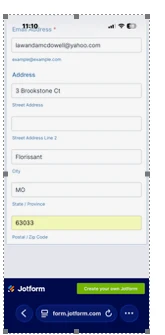
I’m reaching out because we are having an issue with one of our Jotform forms. When I log in on my desktop, the submit button is visible and appears to be working correctly. However, when constituents access the form by scanning the QR code, they are unable to see or use the submit button to complete their registration.
This is extremely urgent because more than 5,000 mailers have already been distributed with this QR code, and we need to make sure people can successfully submit the form.
Can you please look into this issue as soon as possible and let us know what is causing the problem and how it can be fixed right away?
Thank you for your prompt assistance.

-
 Podo: Support Specialist
I’m Podo from Jotform Support — we can definitely help you narrow this down quickly.
Because the form works on desktop but not when opened via QR code, it usually means the QR is pointing to a different URL or an embedded version that’s affected by device, zoom, or page layout.
To move fast, could you please share:
- The form URL you see in your browser when it works on desktop
- The exact URL encoded in the QR code (you can scan it yourself and copy the address)
- Whether users are opening it mostly on iPhone, Android, or both
- Whether the form is embedded on your website or opened directly on a Jotform URL
In the meantime, here are the main checks and quick fixes you can do right away:
-
1. Confirm the QR code points to the correct live form URL
- Log in to Jotform.
- Open your form in Form Builder.
- Click Publish at the top.
- Under Quick Share, copy the direct form link.
- Scan your mailer’s QR code with your phone and compare the URL it opens with the direct form link you just copied.
- If they’re different, you’ll want to generate a new QR code using the correct link (see QR options below).
-
2. Check if the form is embedded in a page that hides the bottom (submit) area on mobile
- If your QR code opens a page on your own website (not a jotform.com URL), the issue may be the page’s layout or CSS.
- On your phone, scroll all the way down and see if the form is cut off or if you need to scroll inside the form frame.
- If the form is cut off:
- Try embedding the form using the iFrame embed code from the Publish → Embed section.
- Make sure the iframe height is large enough (e.g., at least 1200–1500px) so the submit button is visible.
-
3. Check if any conditions are hiding the Submit button on mobile
- In Form Builder, go to Settings → Conditions.
- Look for any conditions that Show/Hide fields, especially ones that reference the Submit button or the last fields before it.
- Temporarily disable those conditions and test again via the QR code on your phone.
-
4. Test the form directly on mobile without the QR code
- Copy the direct form link from Publish → Quick Share.
- Send it to your phone (email, message, etc.) and open it directly.
- If the submit button works here but not via the QR code, the problem is definitely the URL or page behind the QR code, not the form itself.
If you need to quickly regenerate or manage QR codes for your form and other assets, you can use:
- Our guide on how to create QR codes for your forms and assets: Generate QR Code to Share Your Forms/Assets.
- Our standalone QR generator for any URL, website, or file (like a PDF of your form instructions): Generate QR Code for URLs, Websites or Files (Doc, PDF etc).
If you’re also using QR codes inside your form (for example, to show a scannable code or let users scan something), these might help:
- To display a QR code on the form itself (e.g., for event check-in or info): Add Scannable QR Code on Your Form.
- To let users scan a QR code from within the form (using their camera): Add QR Code Reader Widget to Your Form.
If you can send the form link and the QR destination URL, I can help you pinpoint exactly what’s causing the submit button to disappear and suggest the fastest fix so your 5,000+ mailers still work.
-
lawandamcdowell656
-
Podo: Support Specialist
Hi LaWanda,
Thanks for sharing the form link. To assist you further with the issue where the submit button is visible on desktop but not when accessed via the QR code, could you please provide the exact URL encoded in the QR code? Additionally, please let me know whether users are mostly opening the form on iPhone, Android, or both, and if the form is embedded on your website or opened directly via the Jotform URL.
Meanwhile, please ensure the following:
- Confirm the QR code points to the correct live form URL: Scan the QR code and compare the URL it opens with the direct form link you provided. If they differ, generate a new QR code with the correct link.
- Check if the form is embedded in a page that hides the submit button on mobile: If the QR code opens a page on your website, check the page layout and iframe height to ensure the submit button is visible.
- Check for any conditions hiding the submit button: In Form Builder, under Settings > Conditions, look for any show/hide conditions affecting the submit button and temporarily disable them to test.
- Test the form directly on mobile without the QR code: Open the direct form link on a mobile device to verify if the submit button appears and works.
Once you provide the QR code URL and device details, I can help pinpoint the cause and suggest a quick fix.
Give it a try and let us know how it goes.

Your Reply
Something Went Wrong
An error occurred while generating the AI response. Please try again!