-
 Megan_Molloy
When I try and send I keep getting failed. Everything seems to be set correct

-
 Podo: Support Specialist
Hi Megan,
Thanks for reaching out to Jotform Support. I'm an AI assistant here to assist you.
It looks like you are experiencing a "Failed" status when trying to send emails from Jotform Tables, even though everything seems set correctly.
You can easily send submission details by adding an Email Button to your Jotform Table. Let me show you how:
- In Jotform Tables, click on the Add button at the end of the rows, and click on the Buttons tab.
- Select Send Email, click on Next, and enter a column name, then click on Next again.
- Select the email you want, or click on the Create an Email button to set up a new one as needed.
- Click on the Create Column button, and you're done.
Now, when you click on the Send Email button, the email you configured will be sent, similar to the example below:
You can also check out How to Send Email With Form Data in Jotform Tables guide for more information.
Give it a try and let us know if you need any other help.
-
Megan_Molloy
It keeps failing. That is the issue. Everything is set up correctly as I have done many of these forms usually with no problem.
-
Podo: Support Specialist
Thanks for the clarification, and I get how frustrating that is, especially if your other forms work fine. To check this specific issue for you, could you please share the email address you use for your Jotform account?
-
Megan_Molloy
-
Podo: Support Specialist
Hi Megan,
Thank you for providing your email address. Since your email sending keeps failing despite correct setup, here are some important points and troubleshooting steps to consider:
- Ensure you have added a Send Email Action Button column in your Jotform Table and configured it properly with the desired email template.
- Check that the email templates you want to send are correctly set up, including recipients and content.
- Verify that your email address (teetimeconfirmations@morgancreekgolf.com) is not on Jotform's bounce list, which would block emails from being sent to it.
- Check your spam or junk folder to ensure emails are not being filtered there, and whitelist Jotform domains and IP addresses to improve deliverability.
- You can view detailed email logs in your Jotform Account History page to see the status and any errors related to email sending.
For detailed instructions on these steps, you can refer to the How to Send Email With Form Data in Jotform Tables and Troubleshooting Email Notifications guides.
If after these checks the issue persists, please let us know, and we can explore further troubleshooting options.
Give it a try and let us know how it goes.
-
Megan_Molloy
Nothing is showing up in the history for this specific email
-
Podo: Support Specialist
Hi Megan,
Since nothing is showing up in the email history for this specific email, here are some steps to help you troubleshoot the issue:
- Go to your Account History page by visiting https://www.jotform.com/myaccount/history.
- Use the date filter in the upper-right corner to select the period when you attempted to send the email.
- Set the action filter to "Emails" to view only email-related logs.
- Check if your email address is on the bounce list in your Account Settings, as emails to bounced addresses will not be sent.
- Verify your spam or junk folder to ensure emails are not being filtered there.
- Whitelist Jotform domains and IP addresses in your email settings to improve deliverability. You can find the list of Jotform IPs and domains in the Jotform help guide on whitelisting.
For more detailed information, you can refer to the How to View Your Form Email Logs and Troubleshooting Email Notifications guides.
If after these steps the issue persists, please let us know so we can explore further options.
Give it a try and let us know how it goes.
-
Megan_Molloy
This does not help.
-
Podo: Support Specialist
Hi Megan,
One of our Support Team members will take it from here to follow up shortly.
-
Megan_Molloy
I should update that this seems to be happening on all my tables. I have a table where it was working in March and now not working and nothing has changed
-
 Keenly JotForm Support
Hi Megan,
I’ll take it from here, as I’ve gone ahead and checked your account. Could you confirm if you’re currently working on your Ladies Social Golf Nights at Morgan Creek Golf Course form? If so, when I cloned and tested it, I wasn’t able to replicate the issue, as I was able to successfully send the refund email using the Send Email button in my test form table. Check out the screenshots below:
Could you try it one more time and see if it’s now working as expected? If the issue still persists, could you allow us to test the Send Email button in your form table? If so, we suggest keeping a test submission on your end that we can use for the test, and share us the details. Also, we’ll need your permission to access your account. Don’t worry, you can turn it off again once we’re done. Let me show you how to do it:1. In the top-right corner of your Workspace page, click on your Avatar/Profile Image icon.
2. Then, in the Dropdown menu that opens, click on Settings.
3. Next, in the panel on the left, click on the Security tab.
4. If you haven’t opened your Security page in a while, it’ll ask you to verify. To do that, click on Send Verification Code.
5. Then, enter the Verification Code you receive in your email.
6. Finally, at the bottom of the page, toggle on Jotform Support Access.
After we hear back from you, we’ll have a better idea of what’s going on and how to help. -
Megan_Molloy
Hi Keenly,
The ladies form is just one of the tables that it is not working on. I just tried again and am getting the failed message on my tableThe only tables it seems to work on is our Players Club Renewal form. All the others are not working.
I have granted you access -
Keenly JotForm Support
Hi Megan,
I tested it and had the same issue, so I created a ticket and escalated this to our Developers. We’ll follow up as soon as we have any news.
-
MMegan
Thank you


 Could you try it one more time and see if it’s now working as expected? If the issue still persists, could you allow us to test the Send Email button in your form table? If so, we suggest keeping a test submission on your end that we can use for the test, and share us the details. Also, we’ll need your permission to access your account. Don’t worry, you can turn it off again once we’re done. Let me show you how to do it: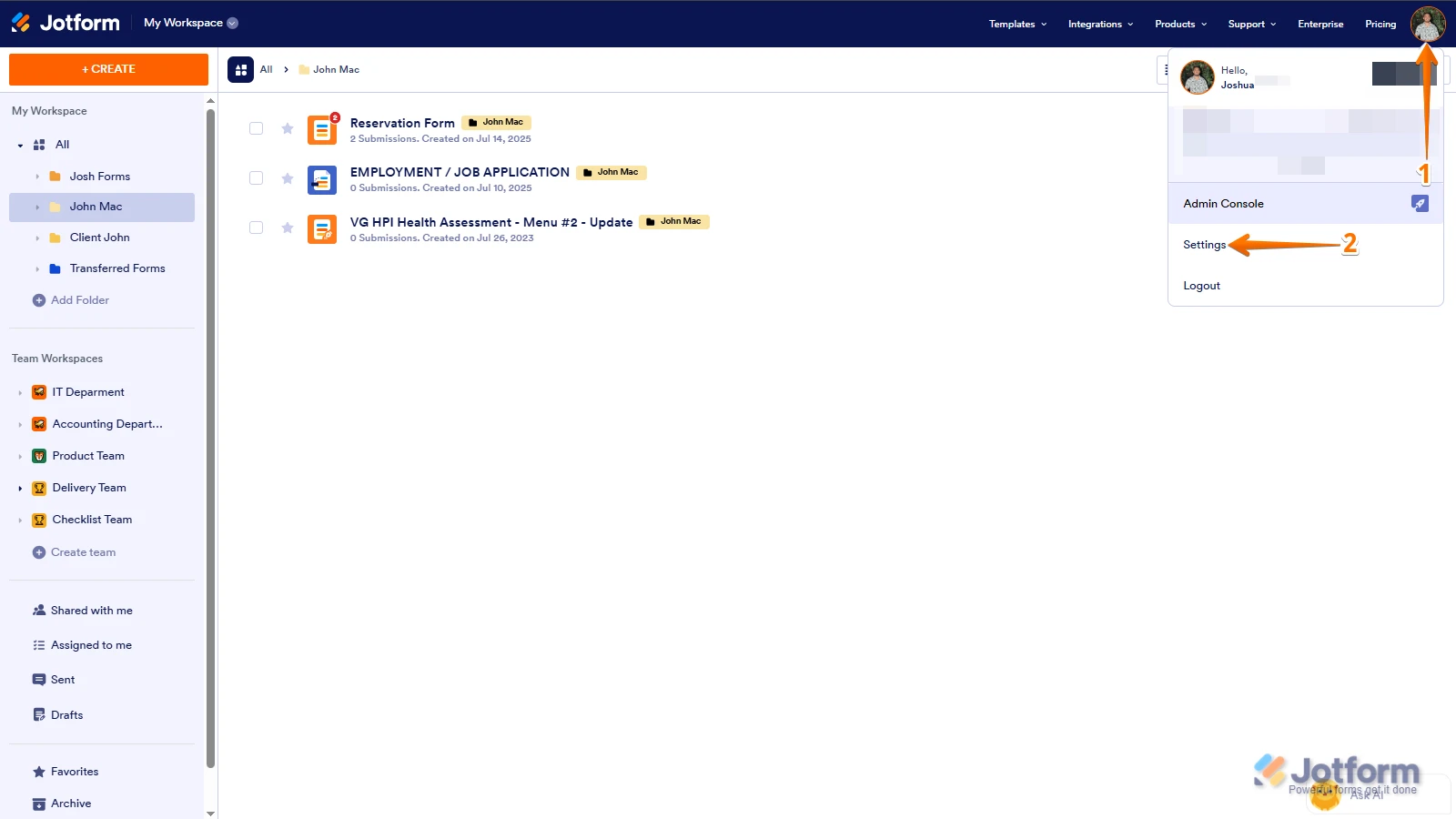
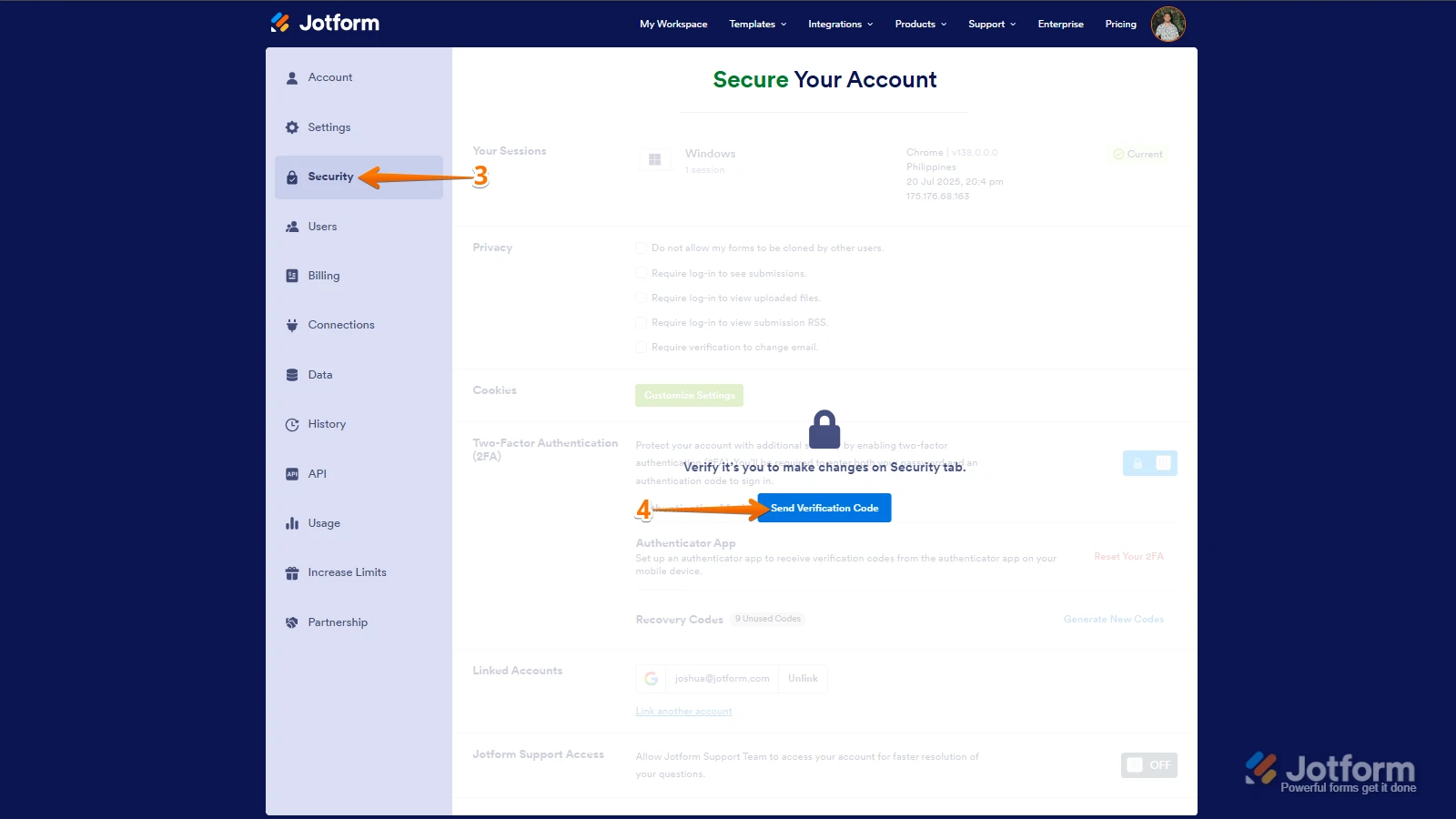
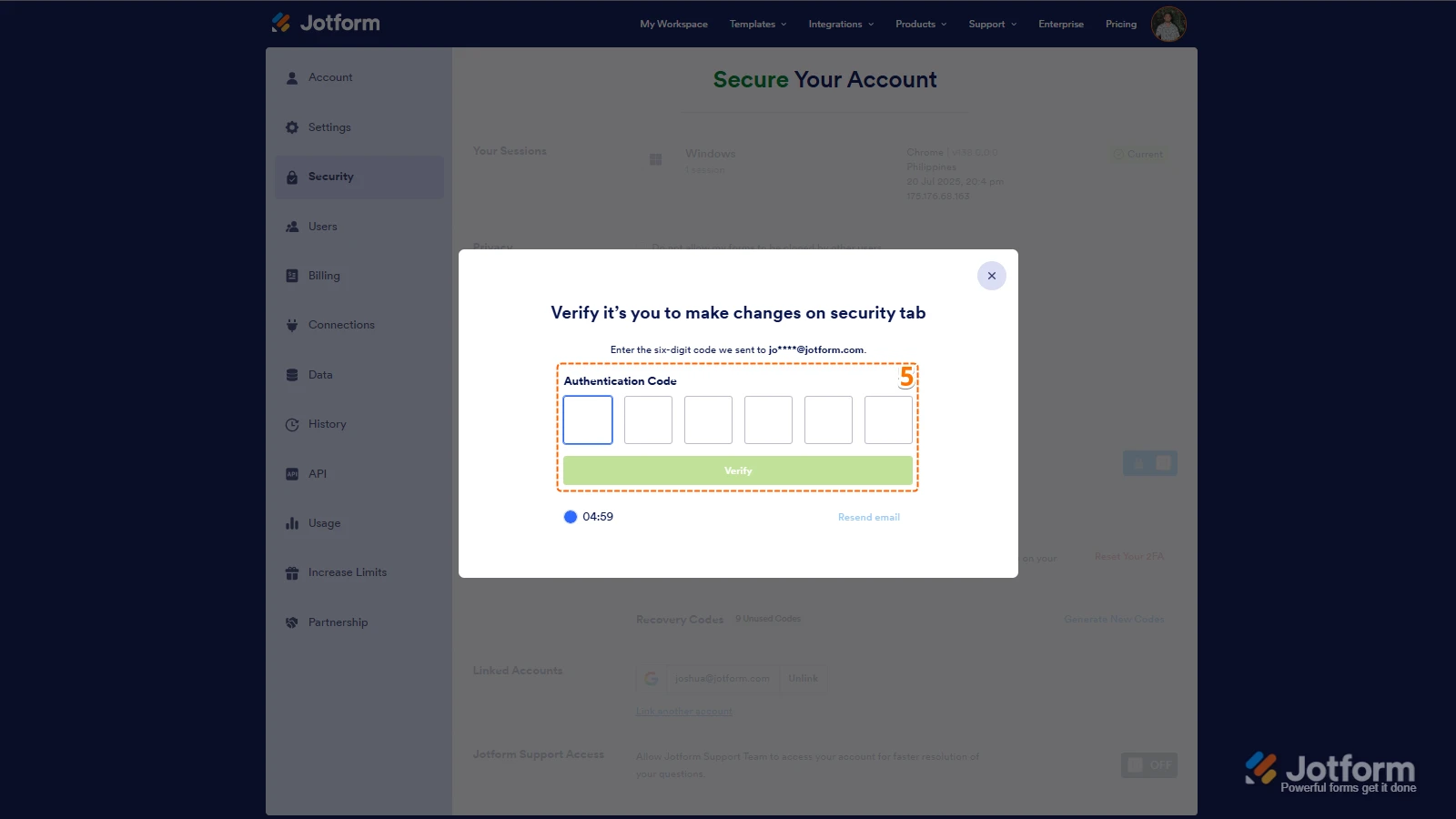
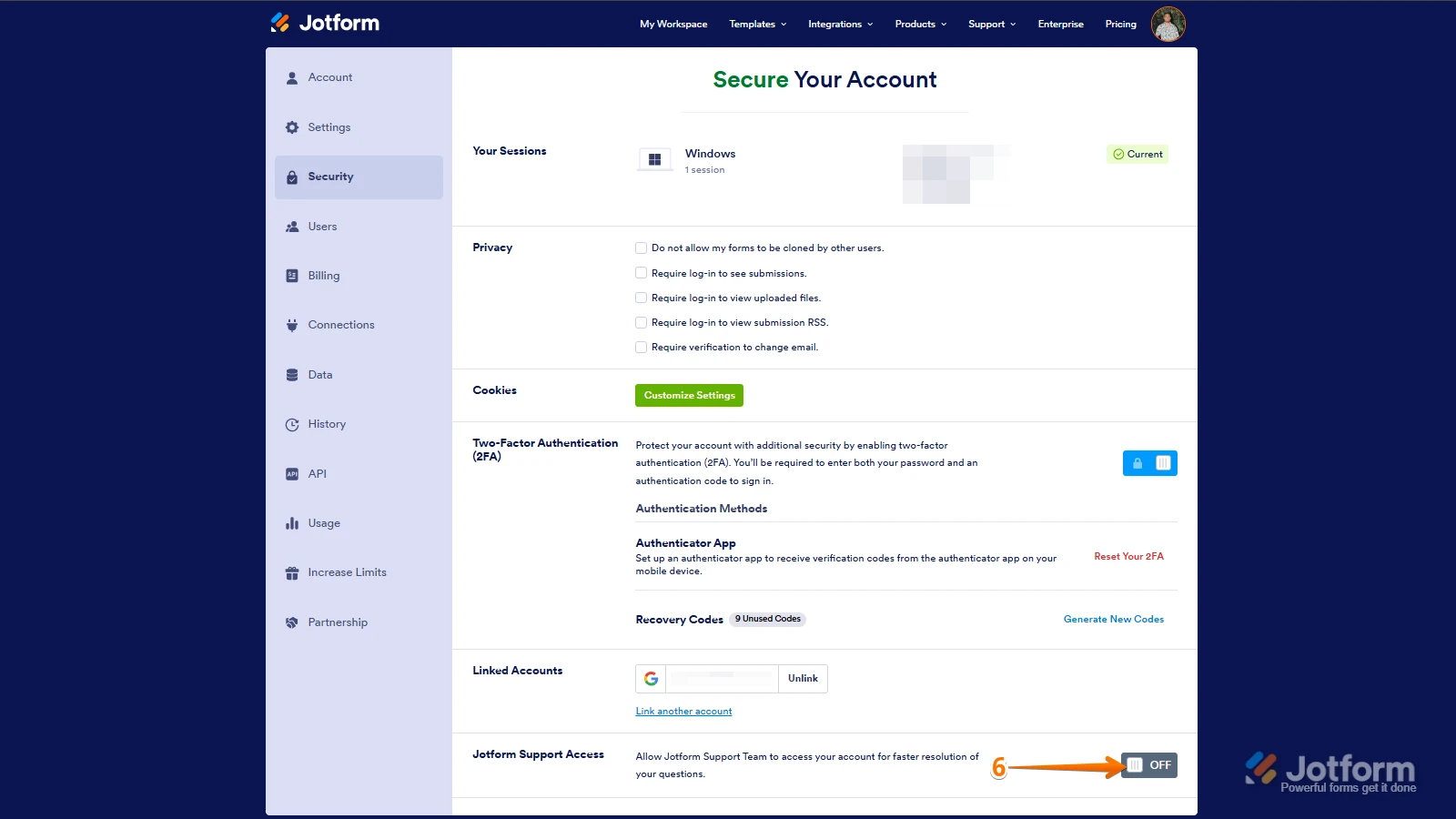 After we hear back from you, we’ll have a better idea of what’s going on and how to help.
 The only tables it seems to work on is our Players Club Renewal form. All the others are not working.
 Your Reply
Something Went Wrong
An error occurred while generating the AI response. Please try again!