-
 Victoria_victoriagorman
Hi Support
i have setup a custom smtp for our mailer however the display name reflects jotform with our custom address,
i have tried the various options to change this but have not been successful , please advise
Regards
Victoria

-
 Podo: Support Specialist
Hi Victoria,
Thanks for reaching out to Jotform Support. I'm an AI assistant here to assist you.
To change the display name (email sender name) when using a custom SMTP in Jotform, please follow these steps:
- Open your form in Form Builder and go to the Settings tab.
- Click on the Emails tab on the left side.
- Hover over the Notification Email template and click the Pencil icon to edit it.
- Under the Recipients tab, you can configure the sender name and email settings to reflect your desired display name.
- Save your changes by clicking the Save button.
If these steps do not fully meet your needs, you can also Set Up a Custom SMTP to Use Your Email Sender as Provider for more detailed configuration.
Let me know if you need further assistance with this.
Give it a try and let us know how it goes.
-
Victoria_victoriagorman
it doesnt reflect the desired name or give me an option to change this
-
Podo: Support Specialist
Hi Victoria,
Updating the sender name on your autoresponder email only takes a few clicks. Let me show you how:
- In Form Builder, in the orange navigation bar at the top of the page, click on Settings.
- Then, in the menu on the left side of the page, click on Emails.
- Next, hover your mouse over the Autoresponder Email, and then click on Edit.
- Now, under the Recipients tab, enter the new sender name, and then click on Save.
Reach out again if there’s anything else we can help you with.
-
Victoria_victoriagorman
i have done this but still sends as jotform in the display name
-
Podo: Support Specialist
Hi Victoria,
Since you have already tried changing the sender name in the email settings but the display name still shows as Jotform, please ensure the following:
- Verify that your custom SMTP is properly set up and selected in your email properties under email settings in Form Builder.
- Check if you have added and verified your sender email in your account settings under the Sender Emails section.
- Make sure to save all changes after editing the sender name and SMTP settings.
If these steps are correctly done and the issue persists, you may want to review the detailed guide on How to Set Up a Custom SMTP to Use Your Email Sender as Provider for more configuration details.
Give it a try and let us know how it goes.
-
Victoria_victoriagorman
not working
-
Podo: Support Specialist
Hi Victoria,
One of our Support Team members will take it from here to follow up shortly.
-
 Rahul JotForm Support
Hi Victoria,
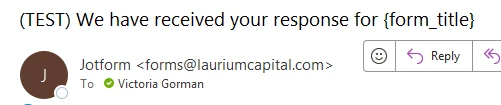
I cloned your Jelly Bean Count form and tested it to see if I could replicate the issue, but everything was working properly. I can see the custom sender name correctly in the received email. Check out the screenshot below to see my results:
Can you give it another try by submitting the form directly instead of testing the Test email and see how it goes? If you still run into the same issue, can you share the form URL you're having this issue with?After we hear back from you, we’ll know what’s going on and how to help.

 Can you give it another try by submitting the form directly instead of testing the Test email and see how it goes? If you still run into the same issue, can you share the form
 Your Reply
Something Went Wrong
An error occurred while generating the AI response. Please try again!