-
 Liza272
Action Needed: Reconnect Your Instagram Agent
Hi Liza,
Your Instagram connection has expired, so your Jotform AI Agent is not replying to new DMs. We're sorry for the interruption.
You can reconnect directly using the following button
Or you can also follow the steps below manually:
- Go to My Workspace
- Select your agent and click Edit
- Go to the Publish tab of AI Agent Builder
- Select Instagram Agent
- Click Connect
Once reconnected, your agent will start responding again. With auto-refresh enabled, you should not need to reconnect again in normal use.
If you have any questions or concerns, simply reply to this email or contact us at instagram-agent-support@jotform.com.
Best,
Jotform Instagram Agent Team
---
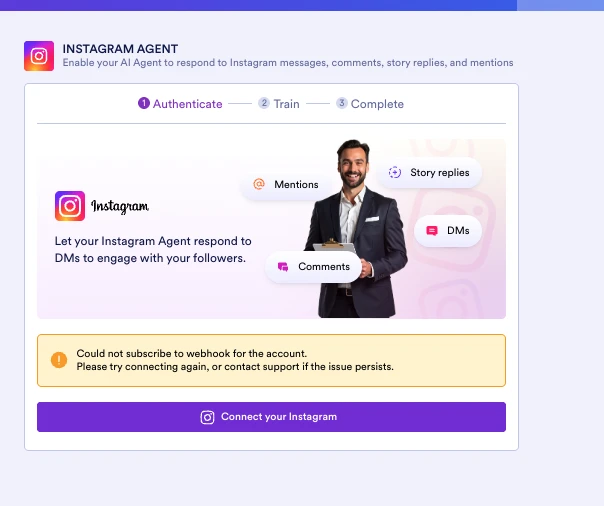
I received this email and then tried to follow the directions and got this error message

-
 Podo: Support Specialist
Hi Liza,
Thanks for reaching out to Jotform Support. I'm an AI assistant here to assist you.
It seems you received an email about reconnecting your Instagram Agent because your Instagram connection expired. When you tried to follow the directions, you encountered an error message.
Here’s how to fix common issues when reconnecting your Instagram Agent:
- Clear your browser cache and cookies or try using an incognito/private browsing window before reconnecting.
- Make sure your Instagram account is a Professional account (Business or Creator). Personal accounts cannot connect properly.
- Check your Instagram login activity for any unusual sessions and remove them if found.
- Update your Instagram password if prompted, then reconnect your account to the agent.
- Remove the Jotform Agents Messenger-IG app from your Instagram account's active apps and then try reconnecting again.
- Try switching your network or device/browser to rule out connection issues.
For detailed steps on reconnecting your Instagram account to your agent and troubleshooting the 400 Session Invalid Instagram error, you can follow the official Jotform guides.
If you continue to get the error message, please provide the exact error text or a screenshot so I can assist you further.
Give it a try and let us know how it goes.
Your Reply
Something Went Wrong
An error occurred while generating the AI response. Please try again!