-
RRicardo Contreras
Hello,
I'm looking for a solution that allows us to build dynamic forms for our team to fill out in Pipedrive. They'd ideally select the service type and from there it would give them the questions based on their selection.
Is this something JotForm can do? If so, would the form popup within Pipedrive or would they have to leave Pipedrive to complete the form?
-
 Raymond JotForm Support
Hi Ricardo,
Thanks for reaching out to Jotform Support. You can integrate Jotform with Pipedrive. While it's not possible to take fields based on your Pipedrive configuration, you can create the same fields using the same option and send them to Pipedrive.
Jotform also supports conditional logic so depending on the option selected, the form can show more relevant questions as needed. You can display questions based on selected answers in a few simple steps. Let me show first show you how to add the questions:
- In Form Builder, click on Add Element and drag-drop the fields you want to use as follow-up questions (I used Short Text fields in this example)
- Next, click on the Type a Question text and change it to the question you want to use.

Now, let's set up the conditions:
1. In Form Builder, in the orange navigation bar at the top of the page, click on Settings.
2. Next, click on Conditions on the left of the page.
3. Now, click on Show/Hide Field to create your condition (if you already have a condition, first click on Add Condition and then click on Show/Hide Field).
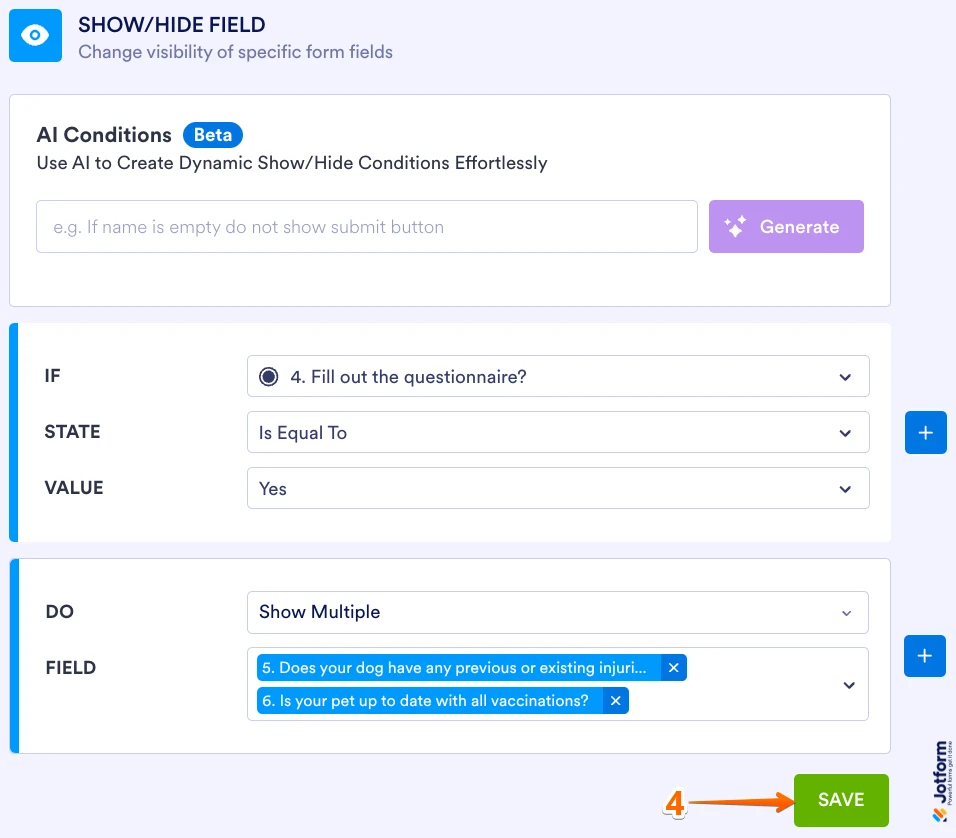
4. Set the conditions like you see below and click on Save:
The condition is set to show the follow up questions when the user selects Yes. Check out the screencast below to see what happens when the condition is met or not met:
Your Reply
Something Went Wrong
An error occurred while generating the AI response. Please try again!