-
 Melise_Gerber
I am creating an informational form, and it requires a number of multiple choice questions. But many of the individual choices within the multiple choice list could benefit from additional explanations. For example, the question might be:
What color palettes do you like the most?
- Pastels
- Jewel tones
- Monochromatic
- Black and white
I would like to be able to include a definition for each of the answers, so the test taker knows what I mean by each turn, but when I add the definition into the actual answer, the form becomes really unwieldy and difficult to reach.
Is there any way to add these definitions--maybe if they hover over the item some text is shown, or subheadings in a smaller text under each item that defines them, or some other option that I can’t imagine?
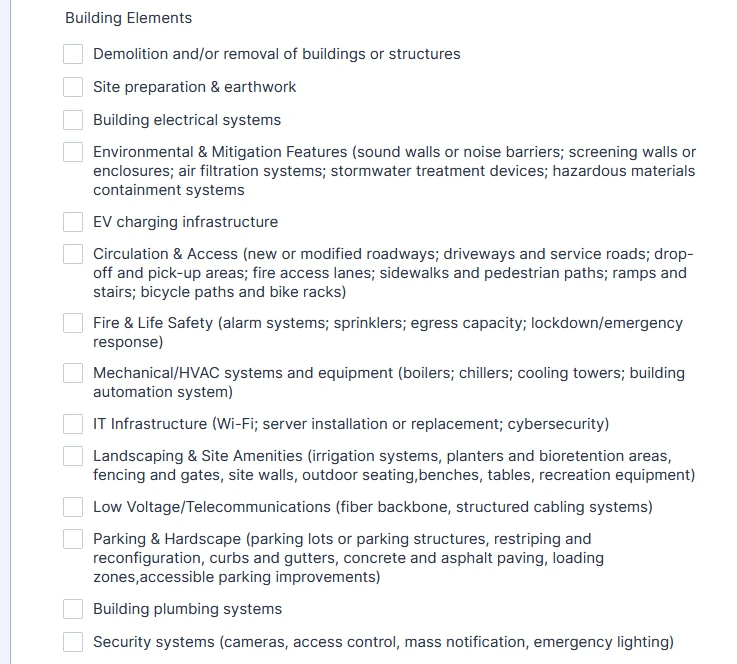
*The screenshot shows an example of one of the multiple choice questions on my actual document. I would like to remove the information in parenthesis, and allow the person filling the form to see it in some other fashion.

-
 Podo: Support Specialist
Hi Melise,
Thanks for reaching out to Jotform Support. I'm an AI assistant here to assist you.
Currently, Jotform does not have a direct feature to add sublabels or hover text specifically to individual multiple choice options. However, you can add additional explanations or definitions related to your multiple choice question by using a separate Paragraph element placed above or below the multiple choice field. This allows you to provide detailed descriptions or definitions without cluttering the answer options themselves.
Here’s how to do it:
- Open your form in the Jotform Form Builder.
- Drag and drop a Paragraph element from the Basic Elements tab onto your form.
- Position the Paragraph element either above or below your Multiple Choice field.
- Click on the Paragraph element to open the text editor.
- Enter your explanatory text or definitions for each choice, using formatting options to make it clear and readable.
- Save your form.
This way, your respondents can read the definitions separately without making the multiple choice options unwieldy.
Unfortunately, there is no built-in hover text or tooltip feature for individual multiple choice options in Jotform at this time.
Give it a try and let us know how it goes.
-
 Raymond JotForm Support
Hi Melise,
We can do that by Injecting CSS Codes into your form. Let me show you how:
1. First, copy this code:
/* Adding Hover text on the Multiple Choice fields for CID 89 */

#cid_89 .form-checkbox-item {

    position: relative;

}


#cid_89 .form-checkbox-item:hover:after {

    white-space: pre-wrap;

    top: 25px;

    background: #555555;

    color: #fff;

    padding: 6px 10px;

    opacity: 1;

    position: absolute;

    z-index: 9999;

    left: 20px;

    border-radius: 4px;

    font-size: 12px;

    min-width: 150px;

    pointer-events: none;

}


/* 2. Specific Content for each item */

#cid_89 .form-checkbox-item:nth-child(1):hover:after {

    content: "This is a text for demolition";

}

#cid_89 .form-checkbox-item:nth-child(2):hover:after {

    content: "This is a text for site prep";

}

#cid_89 .form-checkbox-item:nth-child(3):hover:after {

    content: "This is a text for electrical";

}

#cid_89 .form-checkbox-item:nth-child(4):hover:after {

    content: "This is a text for environment";

}

#cid_89 .form-checkbox-item:nth-child(5):hover:after {

    content: "This is a text for ev";

}

#cid_89 .form-checkbox-item:nth-child(6):hover:after {

    content: "This is a text for access";

}

#cid_89 .form-checkbox-item:nth-child(7):hover:after {

    content: "This is a text for fire";

}


/* Ends Here */
2. In Form Builder, click on the Paint Roller icon on the upper-right side of the page.
3. Then, in the Form Designer menu on the right, go to the Styles tab.
4. Finally, paste the CSS code into the Inject Custom CSS code field.
Here's how it would work:
You can edit the content text in the CSS code provided above, and if you need more codes to be generated, let us know the field you need the description hover texts to appear over, and we'll help you with codes you can use. Let us know if you have any other questions.

 You can edit the content text in the CSS code provided above, and if you need more codes to be generated, let us know the field you need the description hover texts to appear over, and we'll help you with codes you can use.
 Your Reply
Something Went Wrong
An error occurred while generating the AI response. Please try again!