-
 MMM_Creations
 -
 Kyle JotForm Support
Hello MMM_Creations,
Thanks for using Jotform. I cloned your form to test the setup and noticed that the issue comes from the way the 0 value is formatted. It currently has parentheses around it (0), which prevents the condition logic from working properly. Check out my screenshot below to see the result:

To fix this, simply remove the parentheses and leave the value as 0. Once updated, your coupon/promo code condition should work as expected. Let me show you how:
1. In Form Builder, in the orange navigation bar at the top of the page, click on the Settings.
2. In the menu on the left side of the page, click on Conditions, then hover your mouse over the Update/Calculate Field condition and select the Pencil icon.
3. Set the condition like you see below, and click on Save.
Check out the screencast below to see my results:
-
MMM_Creations
i removed the parantheses around the 0 but the problem is not solved
Try this, on my form
- select the Quantity
- Click on Promo Code Field, dont type anything
- Now click on anywhere in the form
You will see the Ticket Amount field becomes 0, this is a bug
-
 Raymond JotForm Support
Hi MMM_Creations,
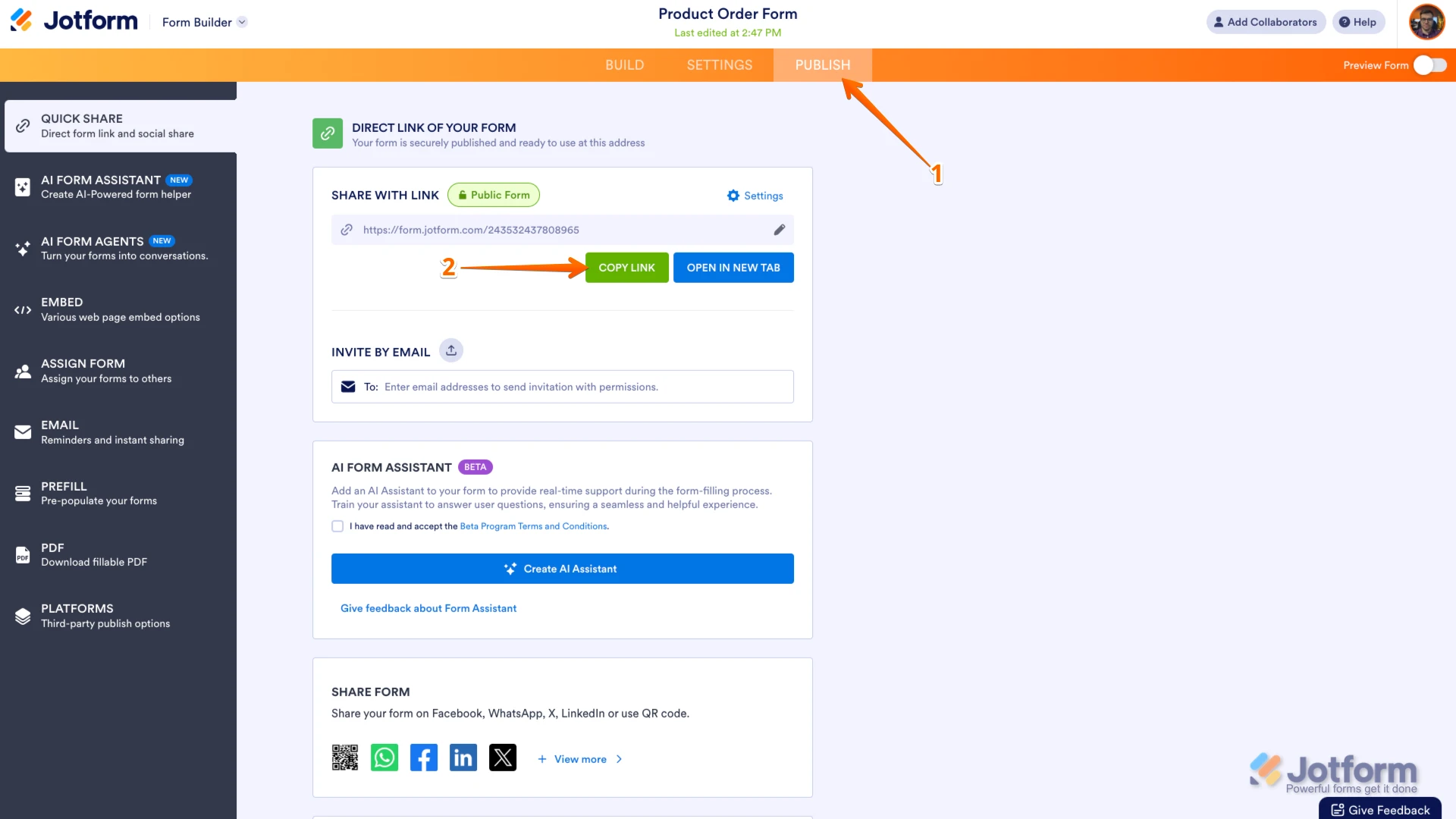
I checked your account, and it looks like you're working on multiple clones of your form. So we can check and accurately provide you with a solution, can you share with us the correct form you're working on? You can easily find your form's URL in Form Builder. Let me show you how:
- In Form Builder, in the orange navigation bar at the top of the page, click on Publish.
- In the Quick Share tab, click on Copy Link in the Share With Link section.
In the meantime, I cloned and tested the Clone of 2 Aala - Suspense Thriller Tamil Stage Drama form. I see that you already have calculation set up for the Ticket, Donation, and Total amount. Since you need a voucher and discount system, we'll have to create another price placeholder and subtract the total amount with the voucher amount.
I created a demo form you can test here. In the promo code, you can use test1 or test2. You can also clone the form to inspect it further. If this is what you're trying to do and need help further help, let us know together with a few examples of promo codes and the amount of discount you're trying to use so we can help you further.
Reach out again if you need any help.
-
MMM_Creations
This is my form where the problem is happening, use this form to reproduce the steps
- select the Quantity
- Click on Promo Code Field, dont type anything
- Now click on anywhere in the form
The solution that you gave me doesnt work for my need. the user can enter only the code, not the discount amount
I have setup everything correctly in the condition/update field rule, but it still doesnt work
-
 Sheena JotForm Support
Hi MMM_Creations,
We did not received the link you provided. Can you send it again? You can easily find your form's URL in Form Builder. Let me show you how:
- In Form Builder, in the orange navigation bar at the top of the page, click on Publish.
- In the Quick Share tab, click on Copy Link in the Share With Link section.
Once you share the form URL with us, we’ll be able to help you better with this. -
MMM_Creations
Pls use this form to recreate the issue i mentioned above
-
Kyle JotForm Support
Hello MMM_Creations,
I cloned the form you recently provided and tested the exact steps you described. I was able to reproduce the issue where the Ticket Amount field resets to 0 when the Promo Code field is clicked but left empty. Check out my fix and workaround here. You can also check out my cloned form here.
Give it a try and reach out again if you have any other questions.
-
MMM_Creations
i dont think the problem is solved, the bug still exists even in your cloned form, as i mentioned try these steps even on your form
- select the Quantity
- Click on Promo Code Field, dont type anything
- Now click on anywhere in the form
- you can see the ticket amount field becoming 0
-
 Jerlan JotForm Support
Hi MMM_Creations,
I tested your form and had the same issue, so I created a ticket and escalated this to our Developers. Although we don't know exactly when it'll be fixed, we’ll circle back to this thread when we have an update.
-
MMM_Creations
I need help asap, i want to use this form for my event and this bug is preventing me
-
 Mary JotForm Support
Hi MMM_Creations,
I'm afraid we do not have any update from our Developers yet. As soon as we hear from them, we will let you know.
Thanks for your patience and understanding. We really appreciate it.
-
MMM_Creations
any updates?
-
 Gemmhel Enterprise Support
Hi MMM_Creations,
It’s taking a little longer than expected to get a reply from the team, but rest assured, we’re on it. I’ll update you as soon as I have news.


 Once you share the form URL with us, we’ll be able to help you better with this.
Your Reply
Something Went Wrong
An error occurred while generating the AI response. Please try again!