-
 lyndalalleyn
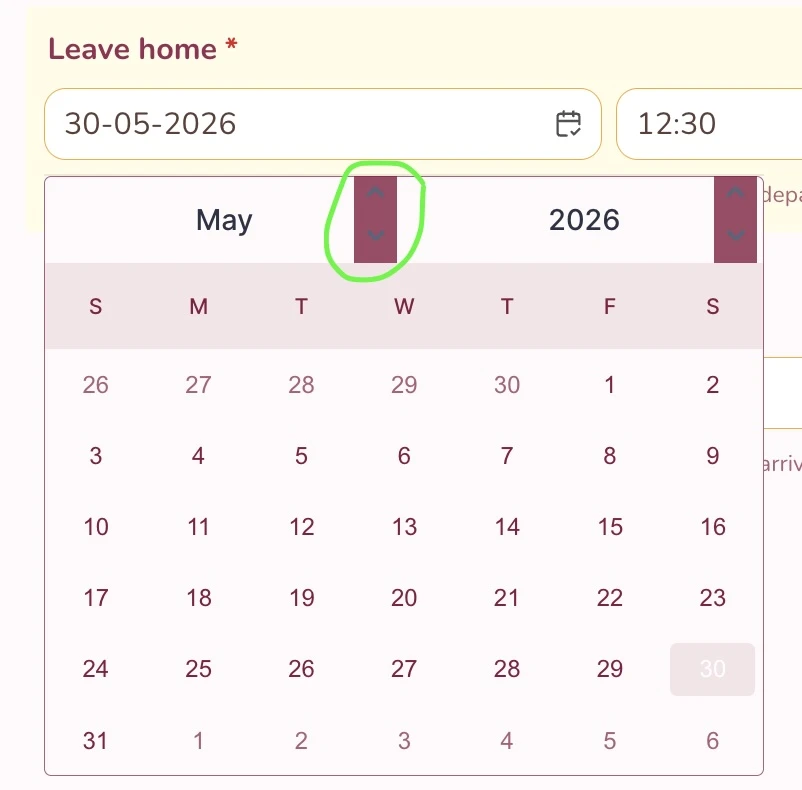
Hi there, I'm wondering if I could get some direction in how to change the colour scheme of the arrows in the calendar toggle. Clients are finding it hard to see, and I wanted to make them white instead of the blue/grey as seen below.
Thank you!
Lyndal
 Page URL: https://form.jotform.com/260877618574068
 -
 Rahul JotForm Support
Hi Lyndal,
Thanks for reaching out to Jotform Support. I undertsand that you would like to change the colour scheme of the arrows in the calendar toggle. I'll need a bit of time to look into this and will get back to you as soon as I can.
-
Rahul JotForm Support
Hi Lyndal,
Thanks for patiently waiting while I looked into this. You can easily change the arrow background color in the calender for the Date Picker field on your form by Injecting CSS Codes into your form. Let me walk you through it:
1. First, copy this code:
/*Change calendar arrow color from grey to transparent*/

.button.previousMonth,.button.nextMonth,.button.nextYear,.button.previousYear

{

  background-color: transparent !important;

}
2. In Form Builder, click on the Paint Roller icon on the right side of the page to open Form Designer.
3. Now, in the Form Designer menu, click on the Styles tab, scroll down and paste the code into the Inject CSS Code box. That’s it. The code is automatically saved.

Your Reply
Something Went Wrong
An error occurred while generating the AI response. Please try again!