-
 amanda463
Looking for help figuring out why when I select "Delete Forever" when selecting a message in the "Trash" folder it is not deleting forever.
I have tried to refresh the page, use alternative browsers, nothing is working. I have only successfully deleted six messages out of over 300
-
 Podo: Support Specialist
Hi amanda463,
Thanks for reaching out to Jotform Support. I'm an AI assistant here to assist you.
In Jotform Inbox, deleted entries stay in Trash for up to 30 days. The knowledge base says you can view deleted entries there and restore them before they are permanently deleted.
Here’s how to check the Trash entries:
- Click on the Hamburger icon at the top-right of Jotform Inbox.
- Select Trash from the menu.
- Select the submissions you want to manage.
- Click on the Three Dots icon next to the Download button and choose Restore if needed.
The information available in the knowledge base does not include a specific reason why Delete Forever is not removing those messages immediately.
I don't know this information and our support team will handle your request.
Reach out again if you need any other help.
-
amanda463
Will support contact me ?
-
Podo: Support Specialist
Hi amanda463,
One of our Support Team members will take it from here to follow up shortly.
Reach out again if you need any other help.
-
 Girish Enterprise Support
Hi amanda463,
Are you trying to delete submissions from the Inbox or submission table page? I tested this on a demo form at my end, but wasn't able to replicate the difficulty you are facing.

Can you share a quick screen recording of what’s happening so we can try to replicate it on our end? You can upload it to Google Drive, Dropbox, or record with Loom and send us the link.
As soon as we hear back from you, we can work on getting you a solution for this.
-
amanda463
https://drive.google.com/file/d/18eue80FQYl___wjqbXZFDtz_tk21Rzjl/view?usp=share_link
Here is a screen recording of the "deleted" form submissions not deleting forever.
I want to clear the entire TRASH folder.
-
 Royce JotForm Support
Hi Amanda463,
I tried replicating the issue on my demo form, but everything was working properly. Check out the screencast below to see my results:
You can delete and purge submissions in your Jotform Tables, as this will permanently delete the submissions in your Jotform Inbox. Let me first show you how to delete a submission:
- In Jotform Tables, select the submission you want to delete.
- Next, click on Delete at the top right side of the Tables page.
- Now, in the Confirmation window that opens, click on Move to Trash.
Before deleting, make sure to download the submission first so you have a backup copy. Deleting submissions won’t free up space on your account, and they can be recovered within 30 days. After 30 days, they will be permanently removed. To free up space on your account, you can purge the submissions. Let me show you how:
- In Jotform Tables, click on the Three Dots icon next to your form title in the tabs.
- Then, click on Trashed Entries.
- Next, in the window that opens on the right side of the page, select the submission you want to delete, and then click on Delete Forever.
- Now, in the Confirmation window that opens, click on Delete.
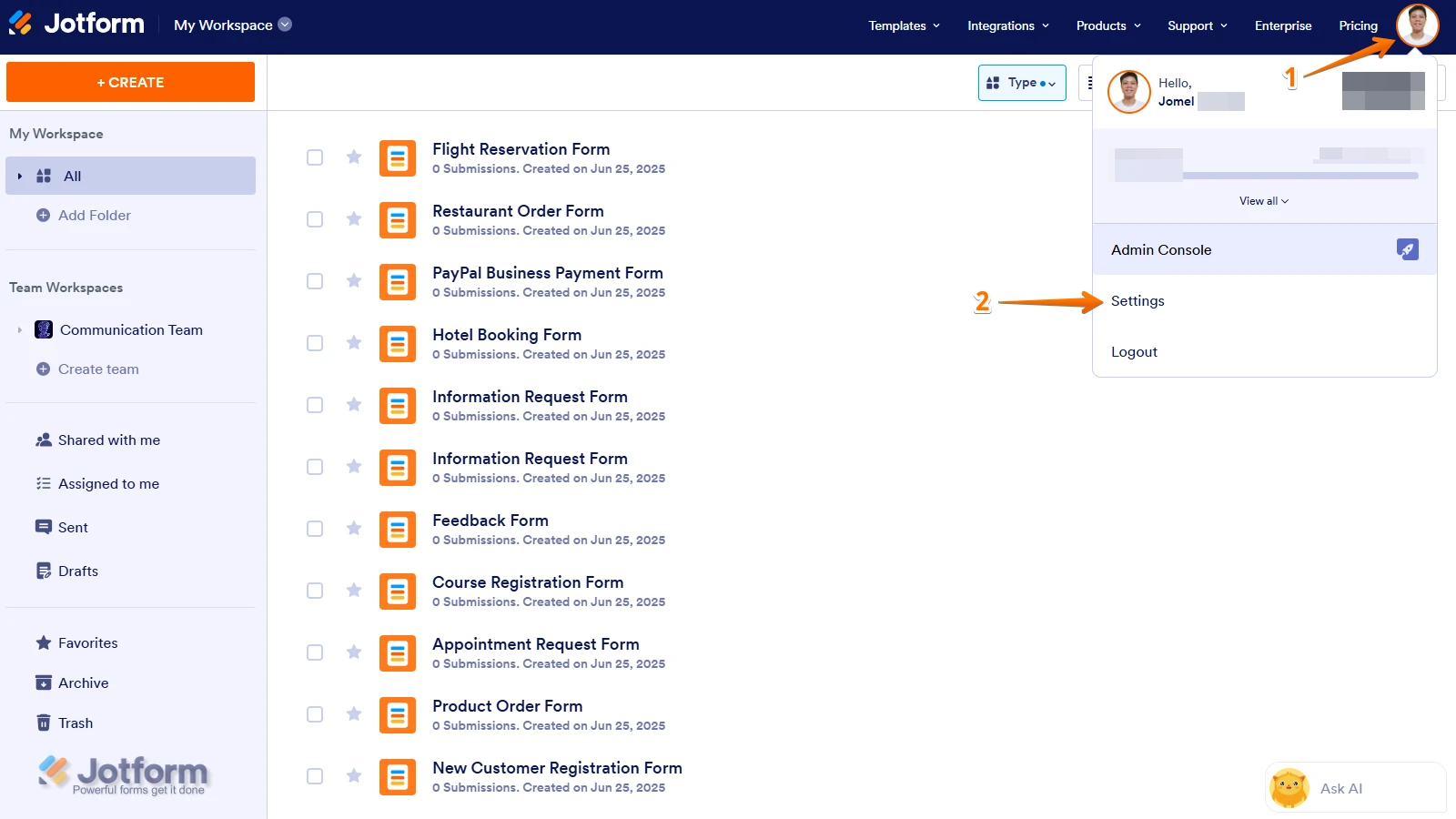
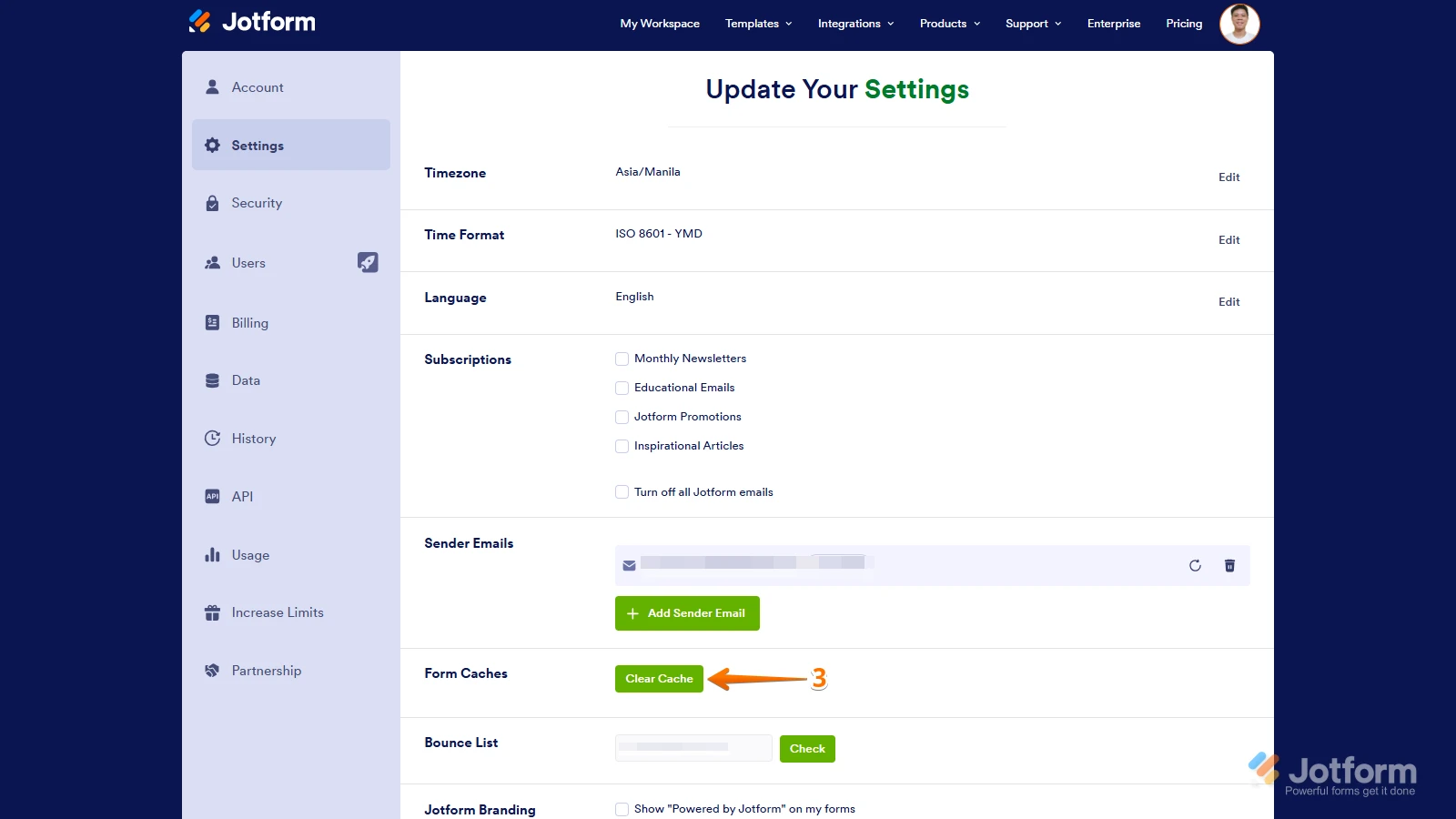
After that, you can try Clearing Your Form Caches. Since it isn't done automatically, it's easy to do it manually, and it might be able to resolve the issue on your end. Let me show you how:
1. On your Workspace page, click on your Avatar/Profile Image icon.
2. In the Dropdown menu, click on Settings.
3. In the Settings menu, click on Clear Cache. And that's it, you're done.
Additionally, you can use different devices, use incognito mode or private browsing, connect to different networks, and clear your browser caches and cookies to see if it will resolve the issue.
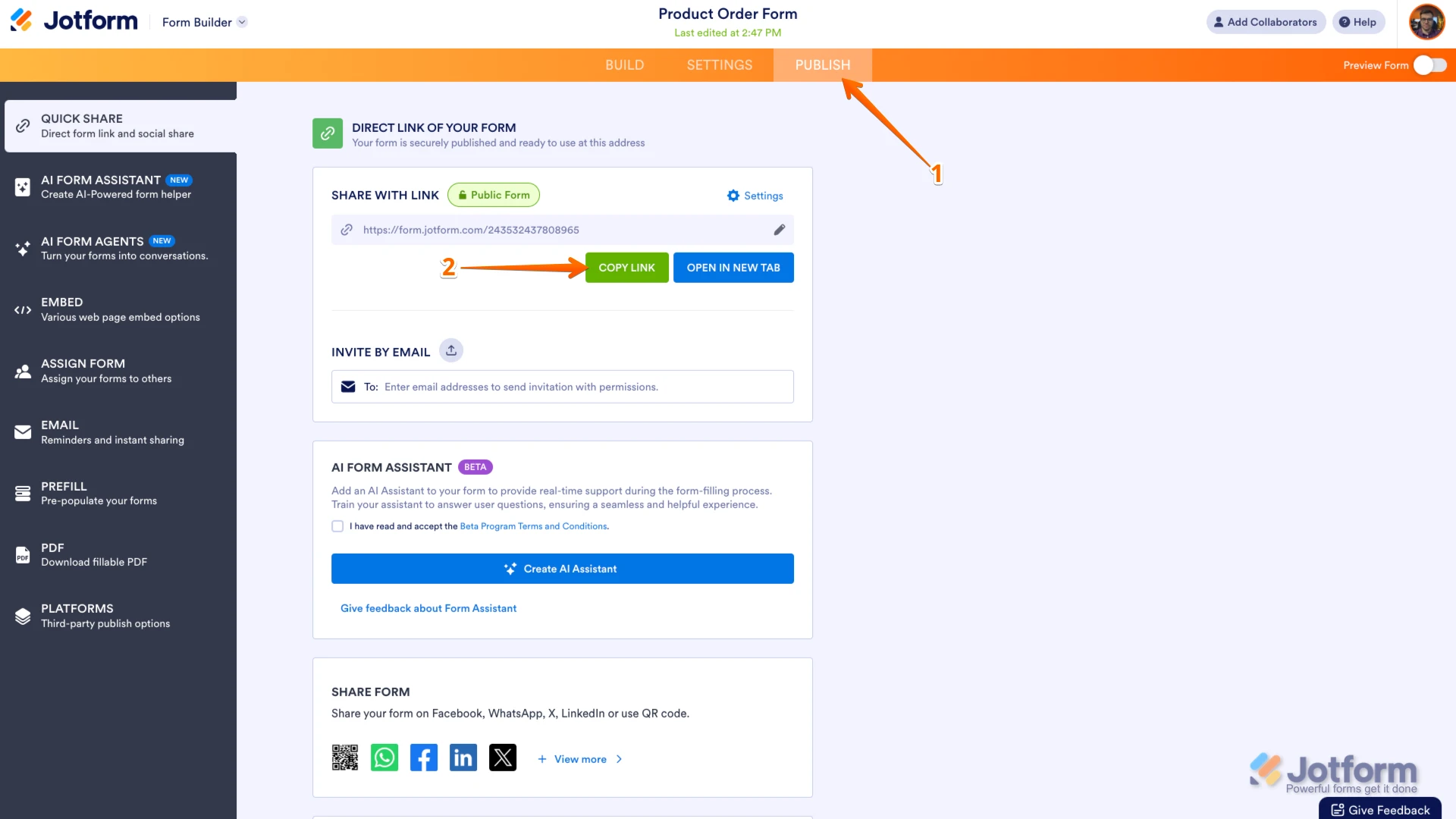
Also, I checked your account and saw that there is no form there yet. If the issue still persists, you can share with us the link to your form's URL so we can try to replicate the issue on our end. Let me show you how:
- In Form Builder, in the orange navigation bar at the top of the page, click on Publish.
- In the Quick Share tab, click on Copy Link in the Share With Link section.
That's it. Give it a try and let us know how it goes.

Your Reply
Something Went Wrong
An error occurred while generating the AI response. Please try again!