-
 blueprintcapitaltx
Hi JotForm Support Team,
I'm reaching out regarding a rendering issue with one of my forms.
Form URL: https://form.jotform.com/261025942321145
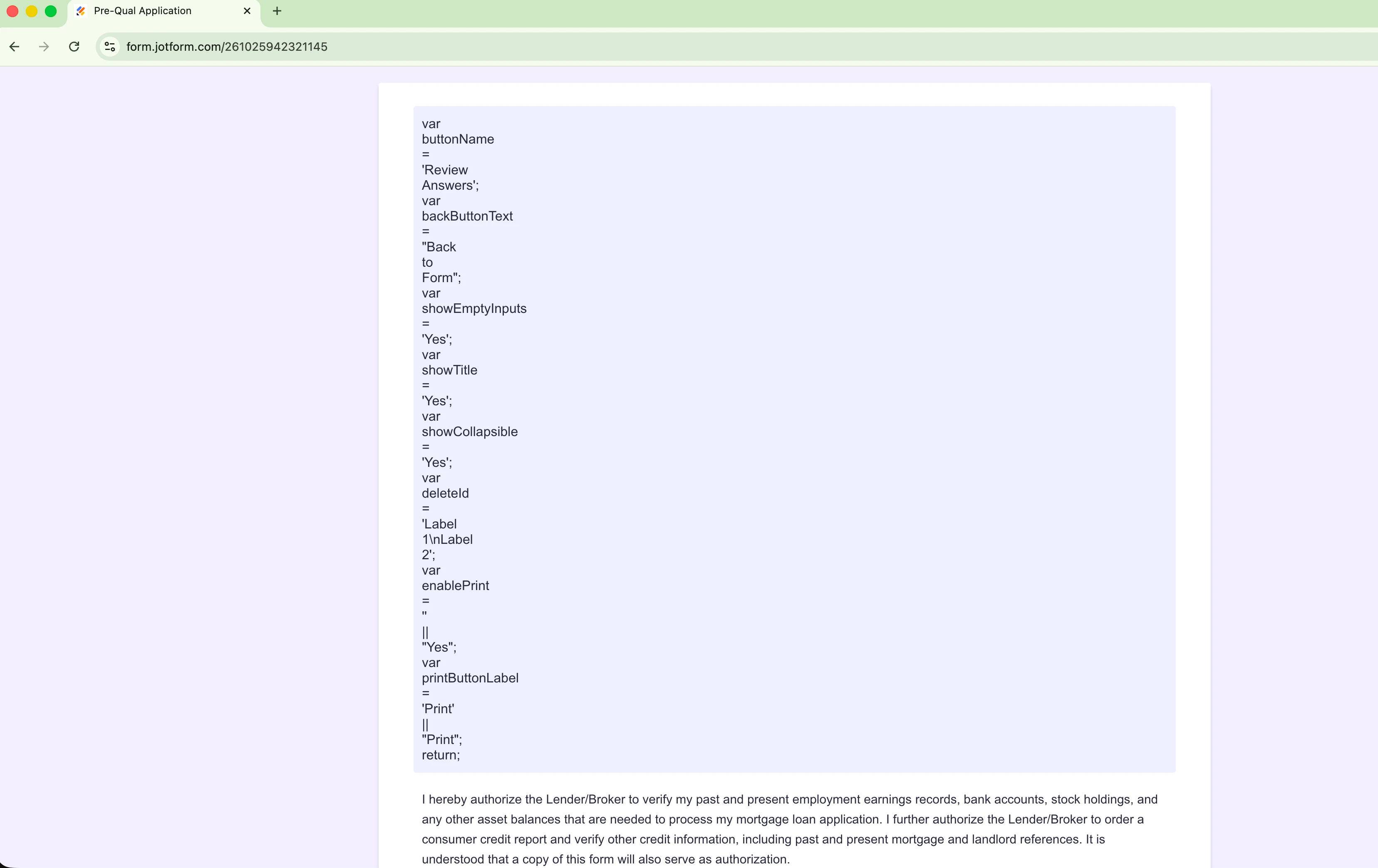
When the form is accessed, it displays raw JavaScript code instead of
rendering the actual form. The page shows variables such as buttonName,
backButtonText, showEmptyInputs, showCollapsible, deleteId, and others as
plain text rather than executing them as scripts.
I've already tried the following:
- Hard refreshing the browser (Cmd + Shift + R)
- Opening the form in an incognito window
- Testing in a different browser
The issue persists across browsers, which suggests this is not a
local/client-side problem.
Could you please investigate why the form's JavaScript is not initializing
correctly? This form is actively being used by clients, so a prompt resolution
would be greatly appreciated.
Please let me know if you need any additional information.
 Page URL: https://form.jotform.com/261025942321145
 -
 Podo: Support Specialist
Hi BLUEPRINT,
Thanks for reaching out to Jotform Support. I'm an AI assistant here to assist you.
I can help with general Jotform guidance, but I do not have information in the knowledge base about why a form is displaying raw JavaScript code instead of rendering correctly.
I don't know this information and our support team will handle your request.
If you want, you can share a screenshot of what appears on the page, and I can help check whether it matches any known Jotform issue in the knowledge base.
Let us know if you have any other questions.
-
 Kyle JotForm Support
Hi blueprintcapitaltx,
I cloned your form and was able to replicate the same issue you described. The raw JavaScript variables appearing instead of the form rendering correctly. After checking, the problem is tied to the Review Before Submit widget.
There’s an easy fix. Simply delete the current Review Before Submit widget from your form and then add it back again. This refreshes the widget’s script and resolves the rendering issue. Let me show you how:
1. In Form Builder, click on the Review Before Submit widget and select the Trash icon.
2. Now, click on Add Elements in the upper left to open the Form Elements menu.
3. Then, in the Form Elements menu on the left, go to the Widgets tab.
4. Search for Review Before Submit, then drag and drop it to your form and click on Update.
-
blueprintcapitaltx
Thank you. It worked.
 Let us know if you need any more help.
Your Reply
Something Went Wrong
An error occurred while generating the AI response. Please try again!