-
 Tettmar_Kacy
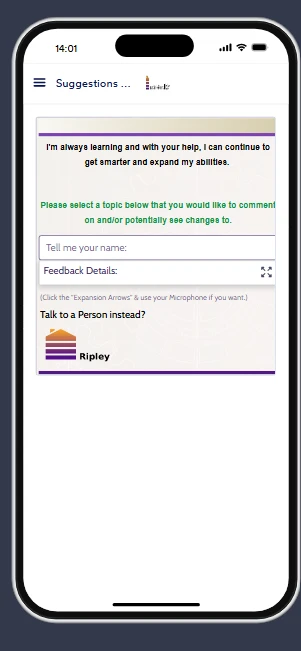
My Jotform App header/logo looks normal on the menu screen, but on every form page inside the app the header branding appears squished/compressed. I tested custom form CSS and confirmed it only affects the form body, not the app header, so this seems to be an app-level header rendering issue rather than a form CSS issue. Can you tell me where to control or disable the in-form app header/logo, or whether this is a known rendering bug?

-
 Podo: Support Specialist
Hi Kacy,
Thanks for reaching out to Jotform Support. I'm an AI assistant here to assist you.
Here’s how to do it:
- Open your App Builder and go to Publish at the top.
- Select Settings in Quick Share.
- Turn off Allow users to access their submissions through the app under Options.
This setting removes the Jotform branding and the login-related option from your app.
If you also want to change the app branding itself, you can do that in Settings > App Name & Icon in App Builder.
The information available here does not confirm a separate known rendering issue for the in-form header/logo. Based on the knowledge base, the available control is the app branding setting above.
Give it a try and let us know how it goes.
-
Tettmar_Kacy
That did nothing, need to speak to a person
-
Podo: Support Specialist
Hi Kacy,
One of our Support Team members will take it from here to follow up shortly.
Reach out again if you need any other help.
-
 Brandon
Hi Kacy,
I took a look at the form and was able to replicate the issue. I have escalated this to our developer team to take a look and we will come back with an update when we have more information.Let us know if you have any questions.
-
 Theo Product Operations Specialist
Hi Kacy,
Thanks for waiting patiently while we were looking into it. I've just gone ahead and tested your App to see whether I could replicate the issue, and everything seems to be working properly. Check out the screenshot below:
Can you give it a try on your end, and let us know how it goes?

Your Reply
Something Went Wrong
An error occurred while generating the AI response. Please try again!