-
 requestsprostart
Hello Jotform Support Team,
I am reaching out regarding a critical issue involving one of our forms titled “Contact Info Collection Form.”
A significant number of submissions appear to have been deleted or purged. Unfortunately, I am not certain exactly when this occurred, but the data is essential to our operations, including payroll processing, tracking raises and licensure status, and maintaining employee emergency contact information.
Given the importance of this data, I am requesting the following:
- Is there any way to recover deleted or purged submissions for this form from your system backups?
- What is the retention period for deleted submissions in Jotform?
- Is there an audit trail or activity log available that would indicate when these submissions were deleted and by whom?
Any assistance you can provide in recovering this data or identifying what occurred would be greatly appreciated. Please let me know if you need any additional details from my end to assist with this request.
Thank you in advance for your help. This is a time-sensitive matter, and we appreciate any urgency you can apply.
Best regards,
Sarah Betts | sarah@prostart-inc.com
ProStart, Inc. | 717.346.8866
-
 Podo: Support Specialist
Hi Sarah,
Thanks for reaching out to Jotform Support. I'm an AI assistant here to assist you.
For deleted submissions, Jotform Inbox keeps deleted entries in Trash for up to 30 days before they are permanently deleted.
You can restore deleted submissions from the submission table or Inbox by opening Trash, selecting the entries, and choosing Restore.
For your other questions, the knowledge base does not provide information about:
- Recovery from system backups after permanent deletion
- An audit trail or activity log showing when submissions were deleted and by whom
I don't know this information and our support team will handle your request.
Give it a try and let us know how it goes.
-
requestsprostart
I need a human to investigate this and give me actionable information, please.
-
Podo: Support Specialist
Hi Sarah,
One of our Support Team members will take it from here to follow up shortly.
Let us know if you have any other questions.
-
 Bojan Support Team Lead
Hi Sarah,
If form submissions have been purged from your account, there's no way to restore them. We do keep logs on when submissions were deleted and purged. And once you log in, IP is also saved, so you can try matching the two. Here's where to find logs:
- When you log in, click on your Profile photo from the upper right corner of the page.
- From the menu that pops-up, choose Settings.
- From the left menu, click on History.
- Set filter and date period for logs. Jotform keeps history for the last 60 days.

Reach out again if you have any other questions.
-
requestsprostart
Is there any way to help me hone in on the audit trail for that specific form? there are a lot of submission deletions in there. It's hard to know what's what.
-
Bojan Support Team Lead
Hi Sarah,
Unfortunately, these are the only logs available. At the moment, the only way to search for them is by using the browser search tool. Usually, you simply click CTRL + F, and a search bar appears, which you can use to isolate specific forms.
Reach out again if you have any other questions.
-
requestsprostart
What is the number for the contact information form? Or can you direct me where to find it?
-
Bojan Support Team Lead
Hi Sarah,
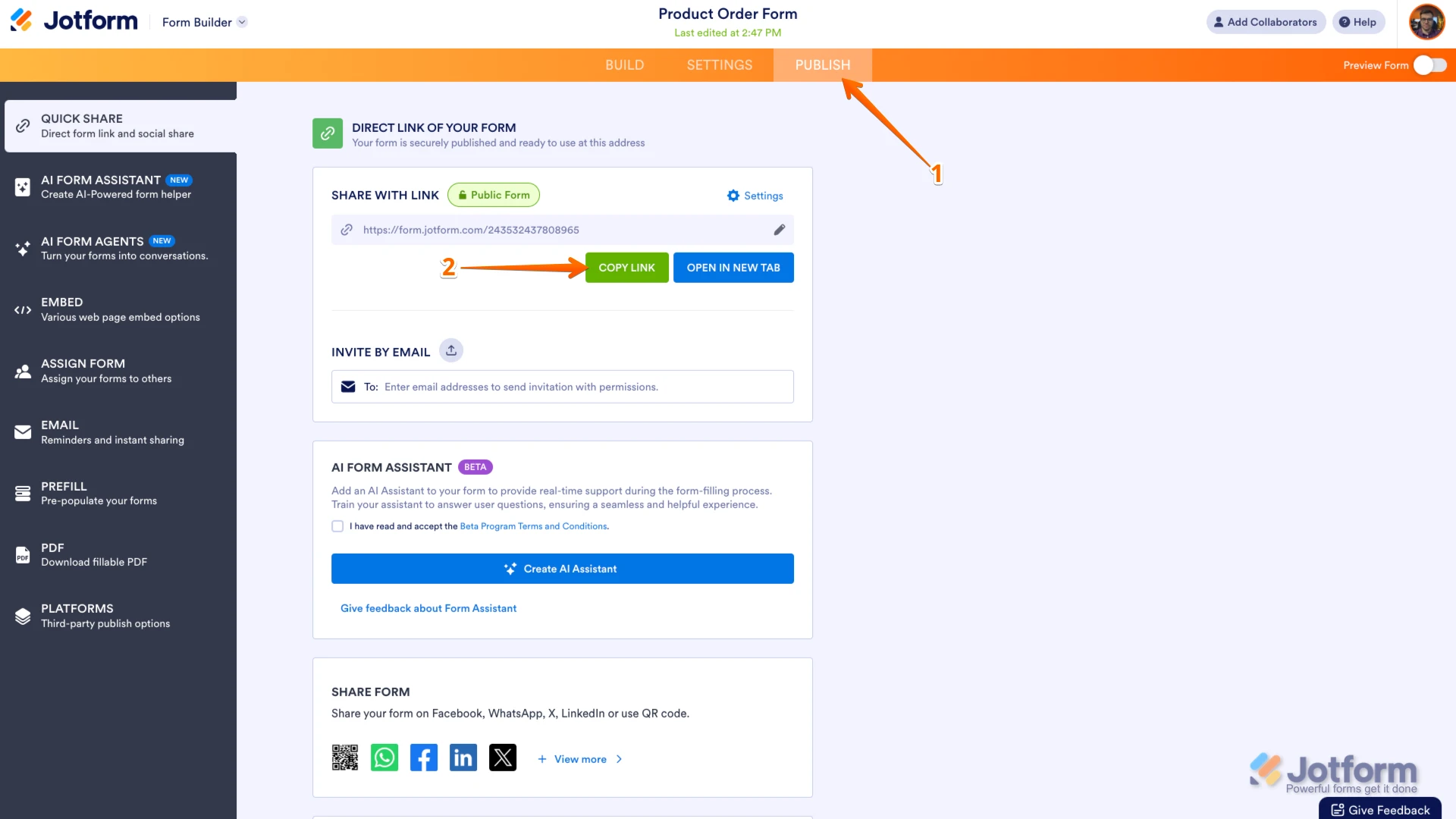
Form ID can be found in the URL of the form. URL of Contact Information Collection Form is https://www.jotform.com/form/233194658744164, so the ID of that form is 233194658744164. You can easily find your form's URL in Form Builder. Let me show you how:
- In Form Builder, in the orange navigation bar at the top of the page, click on Publish.
- In the Quick Share tab, click on Copy Link in the Share With Link section.
Reach out again if you have any other questions.

 Reach out again if you have any other questions.
Your Reply
Something Went Wrong
An error occurred while generating the AI response. Please try again!