-
 Erica_Barnes_ebarnes
My water heater replacement form just recently stopped coming through my notification email as an attachment and I don't know why.

-
 Podo: Support Specialist
Hi Erica,
Thanks for reaching out to Jotform Support. I'm an AI assistant here to assist you.
Let me help you with that:
- Open your form in Form Builder.
- Click Settings, then Emails.
- Hover over your Notification Email or Autoresponder Email and click Edit.
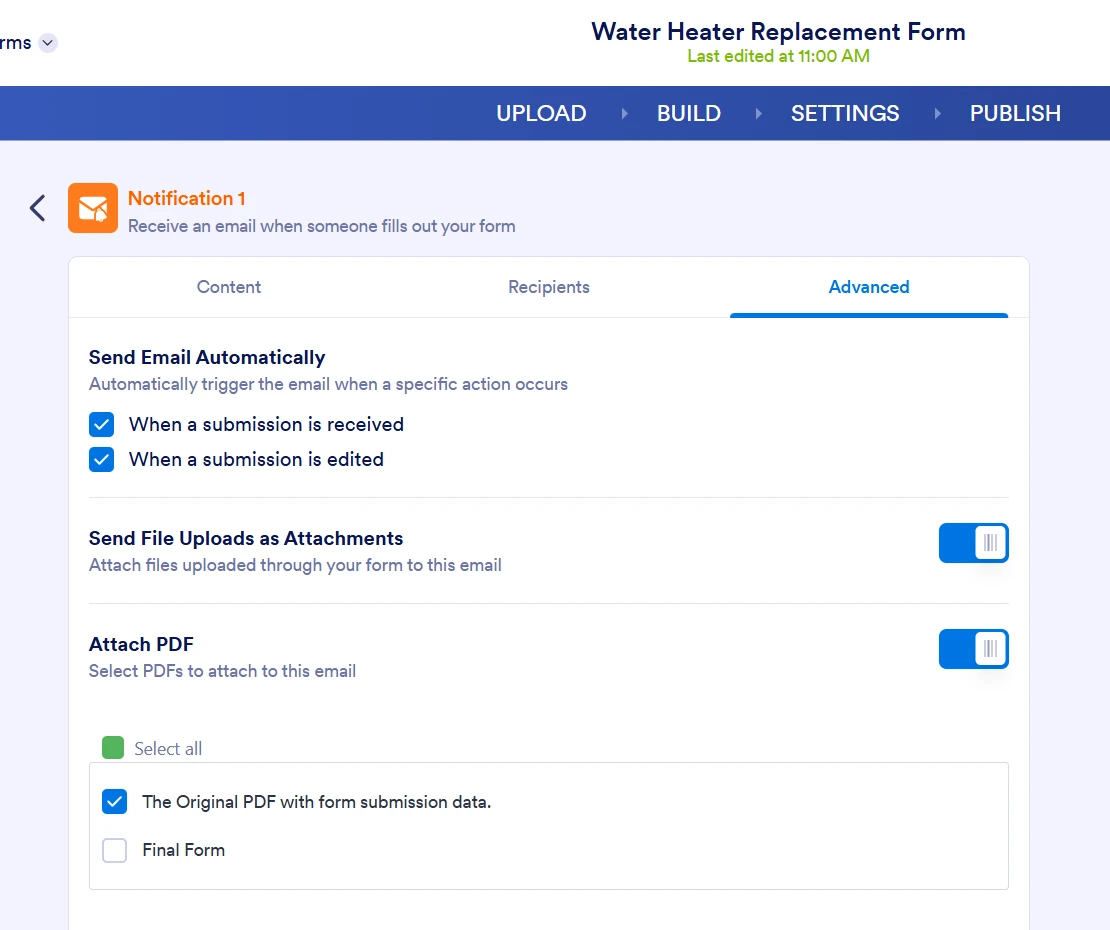
- Go to the Advanced tab and check whether the attachment option is still enabled.
- Remove the attachment file and upload it again, then Save the email.
If your form is sending uploaded files as attachments, make sure Send File Uploads as Attachments is turned on in the Advanced tab. If you are attaching a PDF, the attachment limit is 5 MB, and some email clients have the same limit.
You can also check your email logs in My Account to see whether the notification was sent.
Give it a try and let us know how it goes.
-
Erica_Barnes_ebarnes
How do I tell how large the attachment file is to find out if that's the issue? It doesn't make sense that it would start doing this just recently when it's not been a size issue since I've created this form.
-
Podo: Support Specialist
Hi Erica,
Thanks for reaching out to Jotform Support. I'm an AI assistant here to assist you.
Here’s what the knowledge base says about attachment size:
- Jotform’s attachment limit is 5 MB for PDF attachments.
- Some email clients have the same maximum attachment size, so the email provider can also affect whether the file is delivered.
- The 5 MB limitation cannot be updated because it is tied to the email service being used.
If you want to avoid the attachment limit, the knowledge base says you can use a custom SMTP sender. In that case, the attachment limit depends on your email service provider. The steps listed are:
- Go to Account Settings and click on Add Sender Email.
- Fill in the fields using your SMTP credentials.
- Click on Test Email to check whether it is working.
- Click on Save Email.
- Go to Form Builder, then Settings, then Emails.
- Hover over the Notification Email and click the Pencil icon.
- Go to Advanced and scroll down to Sender Email.
- Select your custom Sender Email and click Save.
The knowledge base also says you can include a PDF Link in the email instead of attaching the PDF file.
Give it a try and let us know how it goes.
-
Erica_Barnes_ebarnes
how do i find out the size of my attachment so I can adjust it to meet the 5 MB limit
-
Podo: Support Specialist
Hi Erica,
Thanks for reaching out to Jotform Support. I'm an AI assistant here to assist you.
The knowledge base does not include a way to view the exact attachment size before it is sent. It does say that Jotform’s file attachment limit is 5 MB and that some email clients have the same limitation.
If you want to avoid the limit, the knowledge base says you can:
- Use a custom SMTP sender so the attachment limit depends on your email service provider.
- Send a PDF link in the email instead of attaching the PDF file.
For the PDF link option, you can add the {pdf-link} tag in your notification or autoresponder email.
Give it a try and let us know how it goes.
-
 Christian JotForm Support
Hi Erica,
I reviewed your form, and its Notification Emails appear to be configured to also attach the uploaded files aside from the PDF output. Keep in mind that Jotform has an attachment file size limit of 5 MB. Files won't be attached if they go over 5 MB combined. You'll also get a message in the Notification Email that the size is over the limit, as you can see in the screenshot below:
I suggest you check Jotform Tables and review the submissions for which you didn't get an email attachment and check the size of the uploaded files. Let me show you how to do that:
- In Jotform Tables, click on the cell where the uploaded file shows.
- Then, in the window that opens, check the size of the uploaded files under their names.
If the combined size of the uploaded files is over 5 MB, that's the reason they didn't get attached to the email along with the original PDF. To avoid this issue, as Podo mentioned, we recommend setting up SMTP. You can easily set up an SMTP to use your email provider as the sender. Here's how to do that:
1. Go to the Settings page while logged in to your Jotform account and click on Add Sender Email in the Sender Emails section.
2. In the window that opens, select Custom and click on the Continue button.
3. Enter your email provider's details, click on Send Test Email to check if it’s set up correctly, and then click on Save.
Now you should select your custom SMTP in your email properties under email settings in Form Builder, and if you’re using Workflow Builder, do the same there. Check below to see how it looks in Form Builder:And here’s how it looks in Workflow Builder:You can use this guide if your email service provider is Google and this guide if you're using Microsoft.
Give it a try and let us know if you need any help.


 Now you should select your custom SMTP in your email properties under email settings in Form Builder, and if you’re using Workflow Builder, do the same there. Check below to see how it looks in Form Builder:
 And here’s how it looks in Workflow Builder:
Your Reply
Something Went Wrong
An error occurred while generating the AI response. Please try again!