-
 ced_adam
Hi,
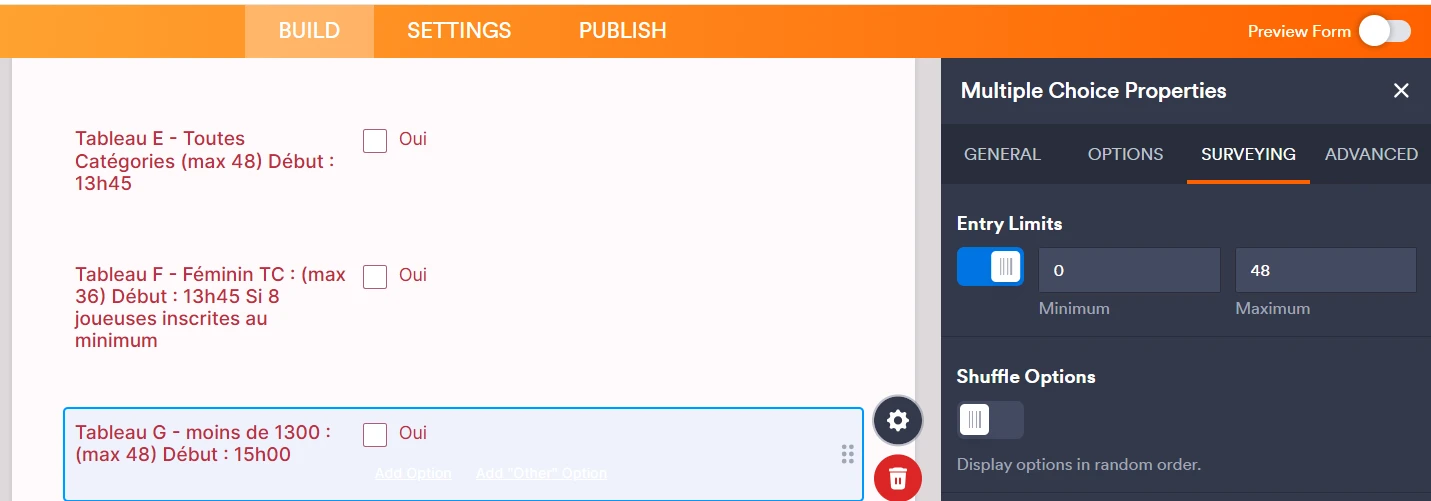
I need to limit the number of entries i a specific field (the form is used to collect subscription to a tournament, and we cannot host more than x participants per level (in my screen shot, a maximum of 48 people can subcribe to the level -13).
I probably miscunderstood the limit in the surveying entry limit since I have currently 50 subscriptions for 48 possible.
I do thank you for your feedback!
Kind regards, cedric

-
 Podo: Support Specialist
Hi cedric,
Thanks for reaching out to Jotform Support. I'm an AI assistant here to assist you.
You can set a limit on the total number of submissions through your form. Here’s how:
- Click on Settings in Form Builder.
- Select Form Status.
- Set the form to Disable at Submission Limit and enter your desired limit under Submission Limit.
- Click Save.
You can also customize the Warning Message in the same section. Once the form reaches the submission limit, it will be disabled and will display the warning message you set.
If you need to limit selections in a Multiple Choice field instead, you can turn on Entry Limits in the field’s Surveying tab and set the minimum and maximum number of selections.
Give it a try and let us know how it goes.
-
ced_adam
none of the answers meet my expectations : I can't limit the n# of subscriptions in overall and the limit in the multiple field survey does not work on the number of entries in the overall form.
Is there another way or can I have a chat with a real person?
-
Podo: Support Specialist
Hi cedric,
One of our Support Team members will take it from here to follow up shortly.
-
 Emre
EmreHi Cedric,
Thanks for reaching out to Jotform Support. I understand you want to limit the number of entries for a specific level in your tournament form.Since you have multiple levels to track, the Gift Registry widget is the best solution to manage individual limits in one place.
The issue you're facing with having 50 entries for a 48-person limit happened because the general form limit applies to the total number of submissions, not to specific choices. The Gift Registry widget will fix this by tracking each level's quota and disabling it once it's full.
Let me walk you through the setup:
- In Form Builder, click on Add Form Element on the left side of the screen.
- Go to the Widgets tab, search for Gift Registry, and add it to your form.
- Click on the Wand icon to open the Widget Settings.
- In the Items box, list each level followed by the limit in curly brackets. For example:
- Level -13 {48}
- Level -15 {30} - Click on Update Widget.
Give it a try and let us know if you have any other questions.
-
ced_adam
Ok, I wait for a team member to come back to me
-
ced_adam
Thank you for your cristal answer.
I did give a try and does work.
Unfortunately, it since my form was quite filled, I had to recreate each filled and edit each submission. It is not possible to update the field in spreadsheet view, so we've had to edit each of he 80 records.
Quite some work, but we managed it!
Thank you for your support :-)
Cedric



Your Reply
Something Went Wrong
An error occurred while generating the AI response. Please try again!