-
 risikawa
Hello,
I am currently experiencing an issue with PDF generation in Jotform.
Until around March, everything was working fine, and I was able to generate PDFs including Japanese text without any problems. However, recently, PDFs fail to generate properly when Japanese characters are included.
Here are the details:
- When the form contains only English text, the PDF is generated correctly.
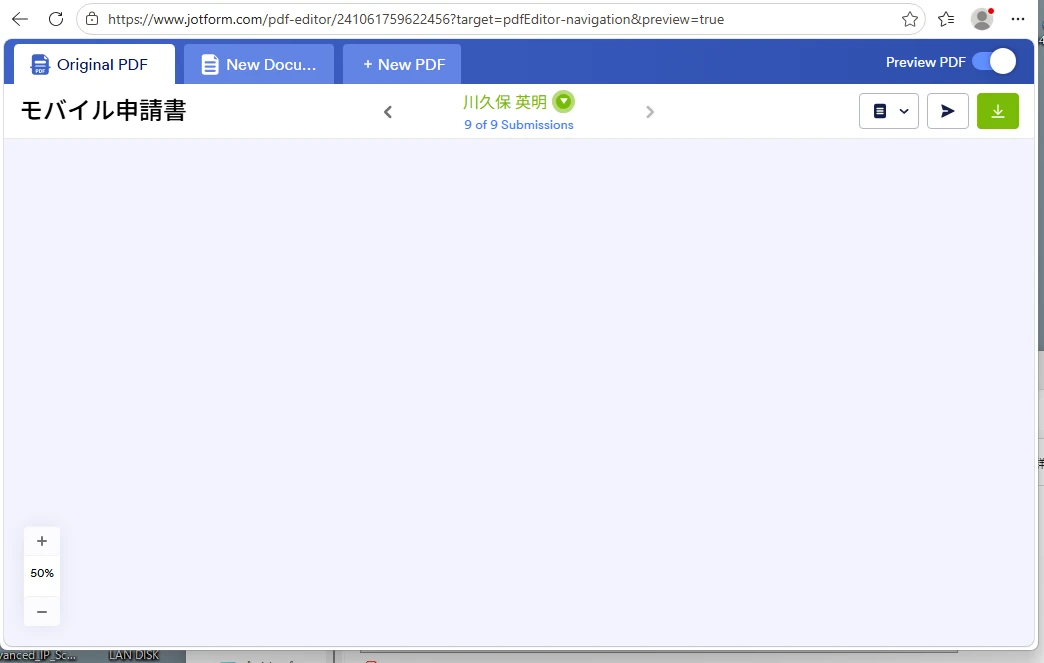
- When Japanese text is included, the PDF preview becomes blank, and the downloaded PDF is corrupted or cannot be opened.
- This issue occurs across multiple forms.
- The PDF background is a simple one-page file (91KB, RGB), and I have already tried converting it to an image-based PDF.
- Fonts have been set to standard options such as Noto Sans / Noto Serif.
- No special characters, images, or signature fields are used.
It seems that the issue is specifically related to handling Japanese characters in the PDF Editor.
Could you please advise if there have been any recent changes or known issues regarding Japanese text support in PDF generation?
Thank you for your support.
Best regards,
This issue is affecting our workflow, so any guidance would be greatly appreciated.
 Page URL: https://form.jotform.com/241061759622456
 -
 Podo: Support Specialist
Hi r,
Thanks for reaching out to Jotform Support. I'm an AI assistant here to assist you.
I found information about Smart PDF Forms and the PDF connection, but I do not have any knowledge base information confirming a recent change or known issue specifically about Japanese text support in PDF generation.
From the available information, these are the related PDF options I can confirm:
- Show PDF Thumbnail on the Welcome Page in Smart PDF Forms settings.
- Enable Preview PDF Button at the End of Your Form to let respondents preview the filled PDF.
- Customize Style in PDF Editor for the original PDF settings.
- Download PDF can be added on the Thank You page.
- Attach PDF can be enabled in email settings for the original PDF with submission data.
Since the knowledge base does not include a confirmed answer for the Japanese-character issue you described, I don't know this information and our support team will handle your request.
Reach out again if you need any other help.
-
risikawa
This problem suddenly started appearing in April, and I'm quite troubled by it. I would appreciate a response from the support team.
-
Podo: Support Specialist
Hi r,
One of our Support Team members will take it from here to follow up shortly.
Reach out again if you need any other help.
-
 Jotform Support Former Jotform Support
Hi risikawa,
I just want to confirm that everything was working fine until around March, and you were able to generate PDFs with Japanese text without any issues, is that right? It sounds like the issue started more recently, where PDFs aren’t generating correctly when Japanese characters are included. I’ll need a little time to look into this, and I’ll get back to you as soon as I can with an update.
-
Jotform Support Former Jotform Support
Hi Risikawa,
Thanks for your patience while I looked into this. I cloned and tested your form 241061759622456 to replicate the issue, but everything is working fine. You can check out the screencasts below to see my results:
- Preview Form:
- PDF Editor:
- Clear your browser cache and try again.
- Open the form in an Incognito/Private window.
- Try using a different browser.
- If possible, test on a different device.
- Additionally, check if you have added any browser extensions recently that are blocking the PDF from loading.
Give these a try and let us know if the issue persists.
-
risikawa
Hi, Rahul
I have tried all the suggested troubleshooting steps:
- Cleared browser cache
- Used Incognito/Private mode
- Tested on different browsers
- Tested on a different device
However, the issue still persists.
Additionally, I would like to emphasize that:
- The PDF generates correctly when using English-only input
- The issue occurs only when Japanese characters are included
- This behavior is consistent across multiple forms
Also, I have enabled the option to attach the Original PDF to the notification email, but the PDF is not attached when the email is received.
I have also recorded a video demonstrating the issue. I believe it will help clarify the problem, so please take a look at the video via the link below:
Since this was working correctly until around March, it seems likely that this may be related to a recent change or a bug affecting Japanese character handling in the PDF Editor.
Could you please escalate this issue to your technical team for further investigation?
Thank you for your assistance.
Best regards,
-
 Lorenz JotForm Support
Hi risikawa,
Let me take a look at this for you. To do that, we’ll need your permission to access your account. Don’t worry, you can turn it off again once we’re done. Let me show you how to do it:
1. In the top-right corner of your Workspace page, click on your Avatar/Profile Image icon.
2. Then, in the Dropdown menu that opens, click on Settings.
3. Next, in the panel on the left, click on the Security tab.
4. If you haven’t opened your Security page in a while, it’ll ask you to verify. To do that, click on Send Verification Code.
5. Then, enter the Verification Code you receive in your email.
6. Finally, at the bottom of the page, toggle on Jotform Support Access.
After we hear back from you, we’ll have a better idea of what’s going on and how to help. -
risikawa
Hi,Lorenz
I have enabled access to Jotform support, so please continue with the testing.
Thank you for your cooperation.
Best regards,
-
 Nikola JotForm Support
Hi risikawa,
I tested the reported issue from your account and on my cloned form, and I replicated it. I created a ticket and escalated this to our Developers. Although we don't know exactly when it'll be fixed, we’ll circle back to this thread when we have an update.
-
RRie
Hi,Nikola
Thank you for your verification.
I'm glad that you were able to reproduce the phenomenon, which means that my message got across.
Please proceed with escalating the issue.
It was working fine until around the end of March, so I'm counting on you.
Best regards,
-
 Kris JotForm Support
Hi risikawa,
My teammate has successfully escalated the issue to our developers. We'll reach out as soon as there's an update we can share with you.
Thank you for your patience and understanding, we appreciate it.
-
Nikola JotForm Support
Hi risikawa,
We just received an update from our developers that the issue is resolved. I tested it on my cloned form and was able to download and open PDF without any issues.
Let us know if there’s anything else we can help you with.
-
risikawa
Hi, everyone
Thank you for your prompt response.
We have confirmed that it is working correctly on our end as well.
We appreciate everyone's support.
Again, thank you for your quick response.
Best regards,
-
risikawa
-
Jotform Support Former Jotform Support
Hi risikawa,
I tested the cloned version of your form 251460511674453 and also tried downloading the Original PDF from the Inbox, but I was unable to download it on my end as well. I’ve passed this issue along to our Developers for further investigation. We’ll follow up with you as soon as we have any updates or news to share.
Just to keep everything clear, your other question about the Original PDF is not attached to the Notification Email, has been moved to its own thread, and someone from the Support Team will help you with it. Here’s the link.
-
risikawa
Hello Development Team,
I would like to provide an update regarding the PDF generation issue.
I was able to work around the issue by creating a cloned version of the form.
After creating the clone (Form ID: 261380286660459), I found that removing the input box {23} at the beginning of the form allowed the PDF to be generated successfully.
I then created the other input box and placed it into the form. After doing so:
* The PDF could be downloaded successfully
* The PDF was also correctly attached to the notification email
It seems that the original input field itself may have been corrupted or causing the issue internally.
The original problematic form (Form ID: 251460511674453) has been left unchanged for investigation purposes. If your team would like to continue testing, I will keep the form as-is and will not delete it.
Thank you very much for your support and investigation.
Best regards,
-
Nikola JotForm Support
Hi risikawa,
We received an update from our developers that the issue is resolved.
Reach out again if there’s anything else we can help you with.
-
risikawa
Thank you
Please close this case. If I have any further questions, I will contact you again.
Regards,



 After we hear back from you, we’ll have a better idea of what’s going on and how to help.


Your Reply
Something Went Wrong
An error occurred while generating the AI response. Please try again!