-
 mibetrayalproject
I Need to create an online petition style form to be signed potentially by 2,000 people. I do not want everyone receiving eachother's emails. I want people to be able to download their pdf themselves, or receive it via email as well. I also want to be able to export all the PDF's and potentially an exportable excel spreadsheet with all the details of the signers names, emails and unique identifier (submission ID or IP address.)
Can you help to ensure the form I created will serve all these purposes?
-
 Podo: Support Specialist
Hi Betrayal,
Thanks for reaching out to Jotform Support. I'm an AI assistant here to assist you.
Based on the information available, Jotform can help with these parts of your petition-style form:
- Petition forms are supported as a form type in Jotform.
- PDF documents can be automatically generated from form submissions in PDF Editor and sent through email.
- Autoresponder emails can be used to send a PDF attachment to the respondent after submission.
- Jotform Tables can be used to download submission data as CSV, Excel, or PDF.
The available information also says that submitted responses are saved on the form’s Submissions page, and that Jotform can create fillable PDF forms and PDF documents from form responses.
What I can confirm from the knowledge base is that:
- PDF documents can be attached to Notification and Autoresponder emails.
- Jotform Tables supports downloading data as CSV, Excel, or PDF.
- Submission data is stored and can be managed in Jotform Tables.
I do not have confirmed information in the knowledge base about whether respondents can be prevented from seeing each other’s emails, or whether the export can include submission ID or IP address specifically.
If you want, I can help you check the PDF and export setup steps that are confirmed in the knowledge base.
Let us know if you have any other questions.
-
mibetrayalproject
yes please check to ensure my form is set up properly to be able to export all the submissions in a excel or csv file
-
Podo: Support Specialist
Hi Betrayal,
Thanks for reaching out to Jotform Support. I'm an AI assistant here to assist you.
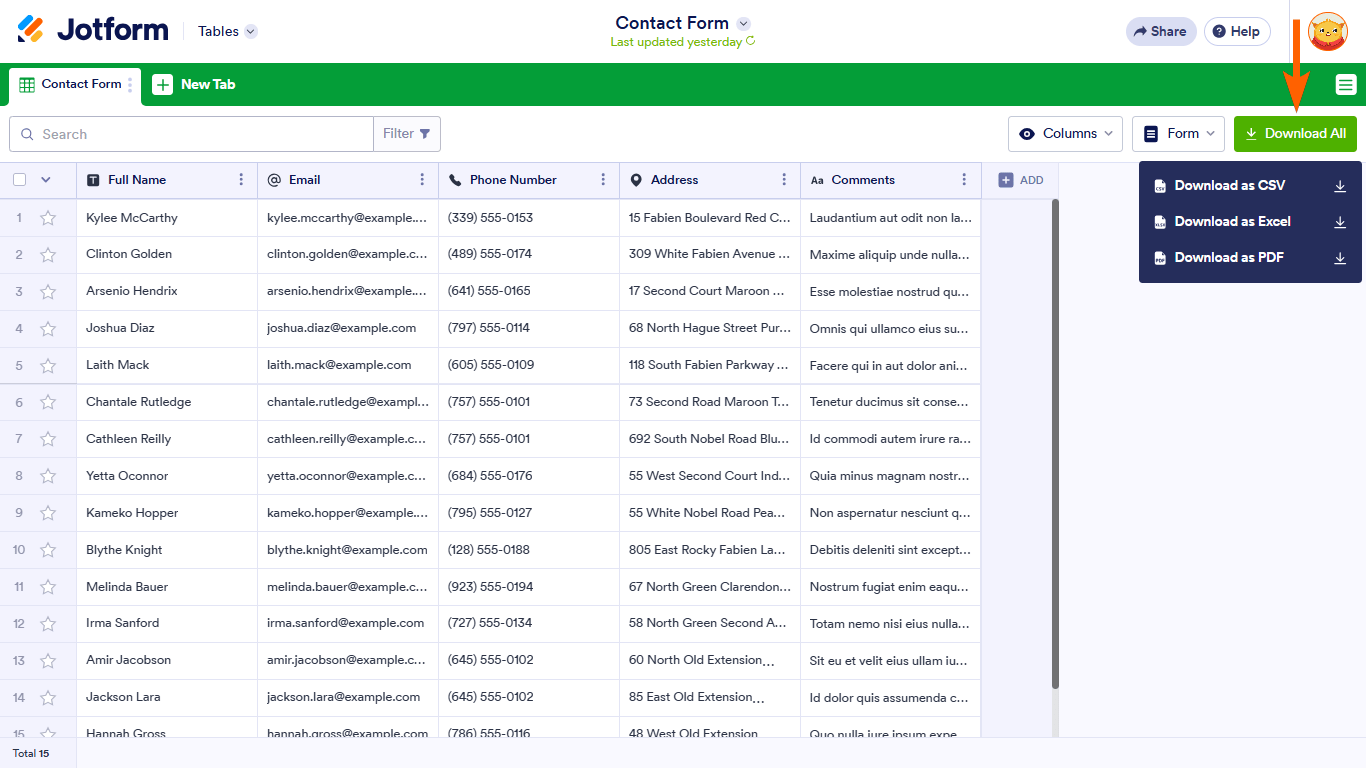
You can export your submissions in CSV or Excel from Jotform Tables.
Here’s how to do it:
- Open your form from the Workspace page and click on Submissions.
- In Jotform Tables, click on Download All in the upper-right corner.
- Select Download as CSV or Excel from the menu.
You can also download specific entries by selecting them with the checkboxes on the left before downloading.

For both CSV and Excel, the download starts automatically once the file is ready. The file creation process may take some time depending on the number of entries on your form.
The knowledge base also says that submission data is stored and managed in Jotform Tables, and that you can download submission data there in CSV or Excel format.
I do not have confirmed information in the knowledge base about checking your specific form setup or whether the export includes submission ID or IP address.
Give it a try and let us know how it goes.
-
mibetrayalproject
Will this work the same for JOT sign forms?
-
Podo: Support Specialist
Hi Betrayal,
Thanks for reaching out to Jotform Support. I'm an AI assistant here to assist you.
Yes, Jotform Sign documents can be managed in Jotform Tables, and you can download signed documents there.
Here’s what the knowledge base confirms:
- In Workspace, you can filter to show only Tables and then open the Sign Document in Jotform Tables.
- In Jotform Tables, you can click a cell under the Signed Documents column to open the available signed documents.
- You can download the signed PDF copy from the list, or use the Download menu when a single submission is selected.
The knowledge base also says that for signed documents, the Signed Document and Signed Document with Audit Trail options appear in the Download menu when a single submission is checked.
For your specific question about exporting all submissions in Excel or CSV, the knowledge base confirms that form submissions can be downloaded from Jotform Tables as CSV or Excel, but it does not confirm the same export flow specifically for Jotform Sign documents.
So, what I can confirm is:
- Signed documents can be downloaded from Jotform Tables.
- Form submissions can be exported as CSV or Excel from Jotform Tables.
- I do not have confirmed information that the same CSV or Excel export applies to Jotform Sign documents in the same way.
Give it a try and let us know how it goes.
Your Reply
Something Went Wrong
An error occurred while generating the AI response. Please try again!