-
 sarahwicklund
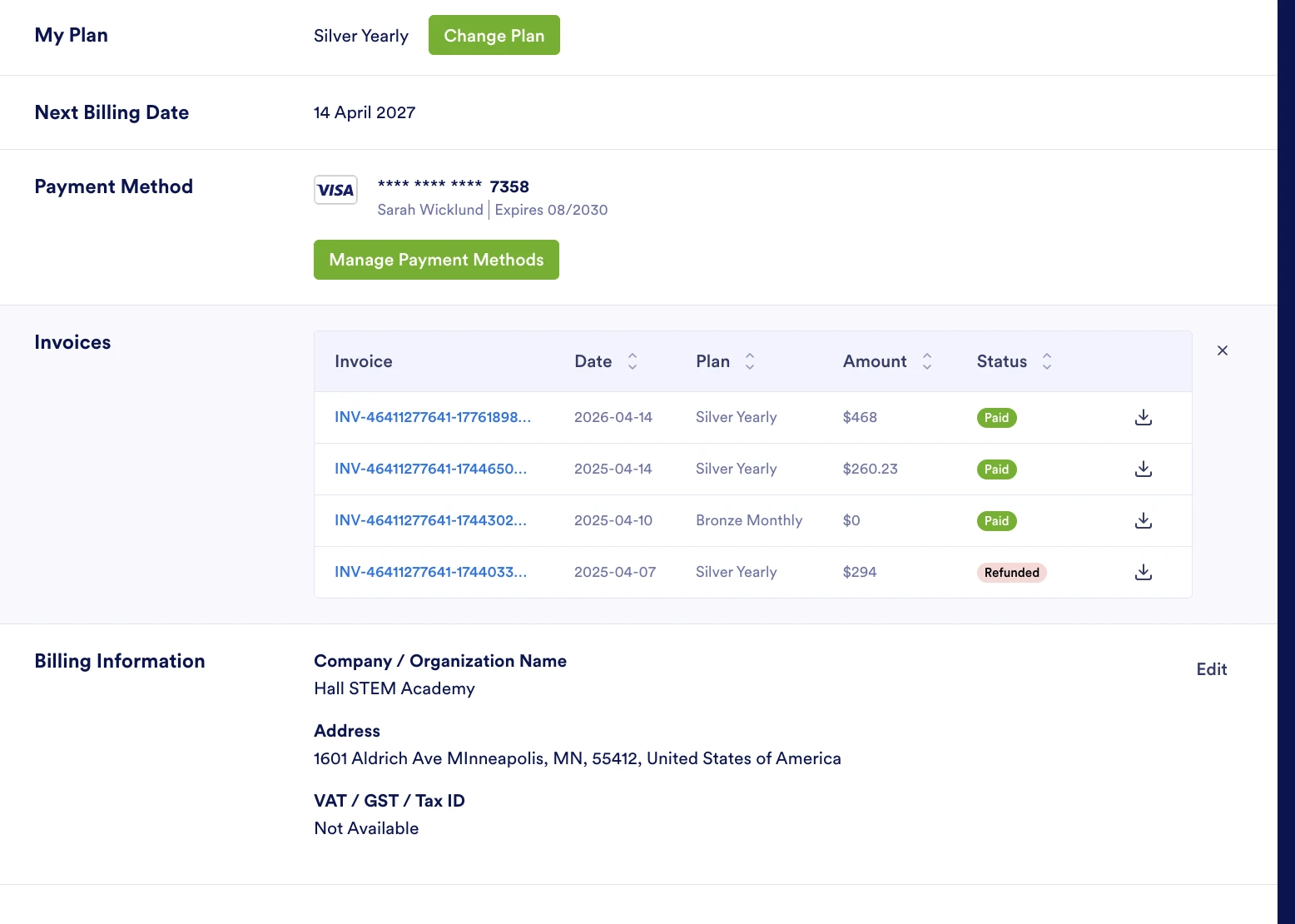
Good afternoon. I need help understanding my most recent yearly subscription charge. It was twice as much as last year. I have attached a pic for reference.
Thanks!

-
 Podo: Support Specialist
Good afternoon! I can definitely help you look into that.
Since I can’t see your account details from here, the best way to understand why your yearly subscription charge increased (for example, plan change, added taxes, or currency changes) is to review your invoices and billing details in your Jotform account.
Here’s how you can check your invoices and billing info:
- Go to your account’s billing page by opening this link: Billing on my account.
- If you’re on a paid plan, click the Billing tab on the left.
- If you’re on the Starter/Free plan, the Billing tab is not available — instead, go to the Upgrade tab to see available plans and related info.
- Under Invoices, compare:
- The plan name (to see if you upgraded from last year),
- The billing period (monthly vs yearly),
- Any taxes or additional charges that may have been added this year.
- To download or view a specific invoice:
- Find the invoice for last year and this year in the list.
- Click the download icon next to each invoice to open or save it.
If you’d like, you can tell me what plan name and amount you see on last year’s invoice vs this year’s, and I can help you interpret exactly why it’s showing as double.
-
 Mikhail JotForm Support
Hi Sarah,
The reason your renewal charge is higher is that your first subscription included the Regular Fifty Silver Yearly Discount, which is offered to new yearly subscribers. This discount only applies to the initial subscription period. Upon renewal, the plan renews at the regular standard price.
You can review our Pricing page to see the current plan rates and included features. You may also check your account invoices to view the detailed breakdown of your previous and current charges. It’s easy to Check Your Invoices. Let me show you how:
- Log in to your Jotform account, and then go to the Billing tab.
- Now, in the table of invoices, click on an Invoice ID to open it in a new tab.
- To download the invoice as a PDF, click on the Download icon on the right.
Let us know if you need any more help. -
sarahwicklund
Thank you for the explanation. I would like to go down to the Bronze level please, Silver is outside my budget. Are you able to make the switch and refund me for the difference?
-
 Bojan Support Team Lead
Hi sarahwicklund,
I've gone ahead and reached out to our relevant team to check on your account. We’ll get back to you as soon as we get an update from them.
-
Bojan Support Team Lead
Hi sarahwicklund,
As a one-time courtesy, the difference between the regular and discontinued price has been refunded. Your next billing date will be on April 14, 2027, when you'll be charged the full price. You can cancel your subscription at any time. If you do, you won't be charged any more, and you can continue using the purchased plan until it ends. Alternatively, you can always switch plans. Changing your plan is easy. Let me show you how:
1. Log in to your Jotform account, go to the Pricing page, and click on Upgrade or Downgrade under the subscription plan you want.
2. In the Choose Your Payment Schedule section, select Yearly or Monthly.
3. Then, enter your billing details in the Billing details section.
4. In the Choose your Payment Method section, select Credit/Debit Card or PayPal.
5. If you choose Credit/Debit Card, you can enter your Credit/Debit Card information below the Credit/Debit Card option.
6. Next, in the top-right corner of the page, in the Summary section, tick the box next to I’ve read and agree to the Terms of Service, and click on Pay.
But, if you select PayPal as the payment, a PayPal Payment window will open, where you can log in and complete your payment after clicking on the Pay with PayPal button. Check out this screenshot below:After the subscription is successfully paid, the features and limits for the chosen subscription plan will be applied to your account right away.Reach out again if you have any other questions.


Your Reply
Something Went Wrong
An error occurred while generating the AI response. Please try again!