-
 rhaga
rhagaHello.
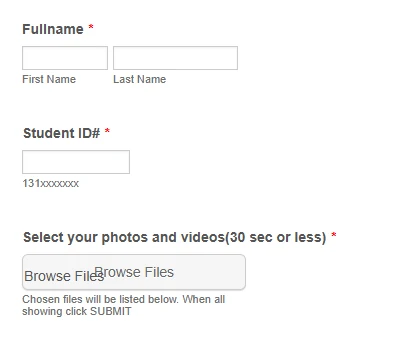
I have an form where parents of students are able to upload pictures that we might use at their graduation for a senior slideshow. We've used this in the past and I don't recall it happening, but now I'm getting a weird double label and I can't figure out where it's coming from. Do you know where I can remove it?
Thank you
 Page URL: https://form.jotform.com/252174621700145
 -
 Keenly JotForm Support
Hi Richard,
Thanks for reaching out to Jotform Support. It looks like your form is using a theme other than the default one. The extra 'Browse Files' text may be showing because of a theme-related issue on the form. You can hide that extra text by Injecting CSS Codes into your form. Let me show you how:
1. First, copy this code:
#input_4 + p,

#input_4 ~ p {

  display: none !important;

}
2. In Form Builder, click on the Paint Roller icon on the upper-right side of the page.
3. Then, in the Form Designer menu on the right, go to the Styles tab.
4. Finally, paste the CSS code into the Inject Custom CSS code field.
Check out the result:
Let us know if you have any other questions. -
rhaga
Thank you.
I guess I was using the Old Default Theme and once I changed to the new one it went away. There was no reason for me to remain on the old theme, so changing it was fine. I've been making Clones of the forms for years so I didn't even think to check that.
Thanks again.
-
 Podo: Support Specialist
Hi Richard Haga,
Your request has been answered and the thread is closed.
If you have another question or need more help, feel free to reply here and we'll assist you right away.

Your Reply
Something Went Wrong
An error occurred while generating the AI response. Please try again!