-
 DynaReno_admin
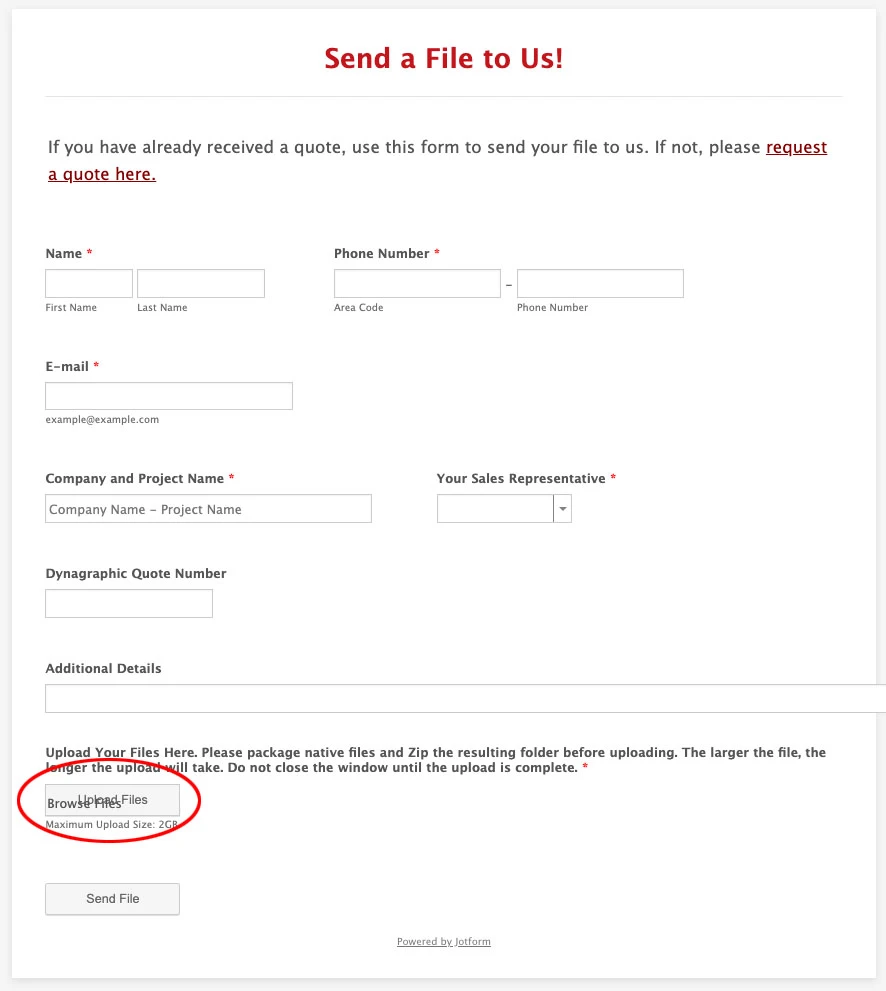
Screenshot attached.
The "Upload Files" button on our form has extra 'alt text' that is visible. I don't see anything in the settings of the form that would generate that text.
I've tried multiple browsers (Chrome and Safari)
The extra text doesn't show up when editing the form on the JotForm website.
Thanks,
Jeff Sell
Prepress Manager
DynaGraphics
Reno, NV Page URL: https://form.jotform.com/71724883892167
 -
 Podo: Support Specialist
Hi Jeff,
Thanks for reaching out to Jotform Support. I'm an AI assistant here to assist you.
I don’t have information in the knowledge base about visible extra alt text on the Upload Files button. The available information only covers file upload settings, allowed file types, image upload preview, login requirements for uploaded files, and page title settings.
I don't know this information and our support team will handle your request.
Reach out again if you need any other help.
-
 Bojan Support Team Lead
Hi Jeff,
This is possible to solve with custom CSS code. Here's how:
1. Copy the following CSS:
.qq-uploader p {

 display: none !important;

}
2. Open your form in the Form Builder, and click on the Paint Roller icon from the right.
3. Open the Styles tab in Form Designer panel on the right.
4. Paste previously copied CSS here.You can also check out this guide for more information.
-
DynaReno_admin
That got it!
Thanks
Jeff

Your Reply
Something Went Wrong
An error occurred while generating the AI response. Please try again!