-
 yourlifemydesign
Hello,
I noticed I have not received payments in my PayPal account since last year. I would like to see the payments received for 2025 and 2026 on these (3) forms for "total add-ons":
- customization form
- 2025 customization form
- 2026 customization form
I accept $25 payments for total add-ons and it's supposed to go to my PayPal account. When I try and run a report and filter for last year, it shows nothing.
-
 Podo: Support Specialist
Hi Lali,
Thanks for reaching out to Jotform Support. I'm an AI assistant here to assist you.
According to the knowledge base, payment submissions are counted only when the payment is valid and completed. The video also explains that if a payment does not go through, it will not count as a submission. You can see this in the video below at 1:53.
For payment forms, the knowledge base says that if a payment was received but the submission is not visible, it may be in Incomplete Payments in Jotform Tables. Here’s how to check:
- Open your Workspace page and show only Forms.
- Select the form you want to review and click Submissions.
- Click the three dots next to the main tab and choose Incomplete Payments.
- Hover over the submission and click View Details.
- Click Complete if the payment was already received and you want it added to the main submission table and reports.
The knowledge base also notes that marking an incomplete payment as completed adds it to the table and reports, and that this works only if the connection is in Live mode.
For your case, the key point is that if your report filtered by last year shows nothing, the knowledge base only confirms that completed payment submissions appear in reports, while incomplete ones must be checked in Incomplete Payments.

Give it a try and let us know how it goes.
-
yourlifemydesign
I do not see Incomplete Submissions/payments when I click on 3 dots.
-
Podo: Support Specialist
Hi Lali,
Let me help you with that.
If you do not see Incomplete Payments in the three dots menu, the knowledge base says that incomplete submissions can only be viewed in Jotform Tables. It also says you need to open the form in Jotform Tables first, then use the main tab menu or the three dots menu there to find Incomplete Payments or Incomplete submissions.
Here’s how to check it:
- Open your Workspace page and make sure only Forms are shown.
- Select the form and click Submissions to open it in Jotform Tables.
- Click the three dots next to the main tab, or open the main tab menu in the upper-left corner.
- Choose Incomplete Payments or Incomplete submissions, depending on what appears in your view.
- Open a submission and click View Details to review it.
The knowledge base also says that if your account is using Reusable Payment Connections, you will not see the three dots icon next to your current payment method. In that case, the payment connection is managed from Form Builder through the Product List element and the Payment Card icon.
If you want, I can help you narrow down whether you are looking at Submissions, Jotform Tables, or the payment connection screen.
Give it a try and let us know how it goes.
-
yourlifemydesign
-
Podo: Support Specialist
Hi Lali,
Let me help you with that.
If you do not see Incomplete Payments in the three dots menu, the knowledge base says that incomplete submissions can only be viewed in Jotform Tables. It also says you need to open the form in Jotform Tables first, then use the main tab menu or the three dots menu there to find Incomplete Payments or Incomplete submissions.
Here’s how to check it:
- Open your Workspace page and make sure only Forms are shown.
- Select the form and click Submissions to open it in Jotform Tables.
- Click the three dots next to the main tab, or open the main tab menu in the upper-left corner.
- Choose Incomplete Payments or Incomplete submissions, depending on what appears in your view.
- Open a submission and click View Details to review it.
The knowledge base also says that if your account is using Reusable Payment Connections, you will not see the three dots icon next to your current payment method. In that case, the payment connection is managed from Form Builder through the Product List element and the Payment Card icon.
If you want, I can help you narrow down whether you are looking at Submissions, Jotform Tables, or the payment connection screen.
Give it a try and let us know how it goes.
-
yourlifemydesign
Can I please talk to someone - none of this is working and I do not understand what you are asking me to do. In my payment properties, it shows the payment method as : debit and credit card. Not PayPal checkout. Where are my payments going to.
-
Podo: Support Specialist
Hi Lali,
One of our Support Team members will take it from here to follow up shortly.
-
 Kyle JotForm Support
Hi Lali,
I checked your account and only found the Customization Form has no submissions, and the 2026 Customization Form has two submissions recorded. All payments from these forms are directed straight to your PayPal account. For 2026, the two submissions are the only records we have, and those payments should already be reflected in your PayPal account. You can check out with PayPal Support.
You can check the submission table for your form to view the payment details recorded in the 2026 Customization Form. You can View Your Form Submissions from your Jotform Submissions Table in just a few easy steps. Let me show you how:
- On your Workspace page, check the box next to the form you want to view submissions for.
- Then, in the menu on the upper-left side of the page, click on Submissions to see all the submissions for that form in your Tables.
-
yourlifemydesign
"customization form" has PayPal integration and Debit and credit card checked under payment properties
"2026 customization form" has PayPal integration and Debit and credit card checked under payment properties.
I have not received a PayPal payments since jury of 2025 and cannot run a report on Jotform that shows payments received for 2025 or 2026
-
yourlifemydesign
are you saying that once I delete a submission, there is no record of it anymore?
-
yourlifemydesignAre you saying that once I delete a submission, there is no record of it
anymore?
I was deleting submissions because in the past I was running out of space
and thought this is what I was supposed to do.
... -
 Gian_D JotForm Support
Hi Lali,
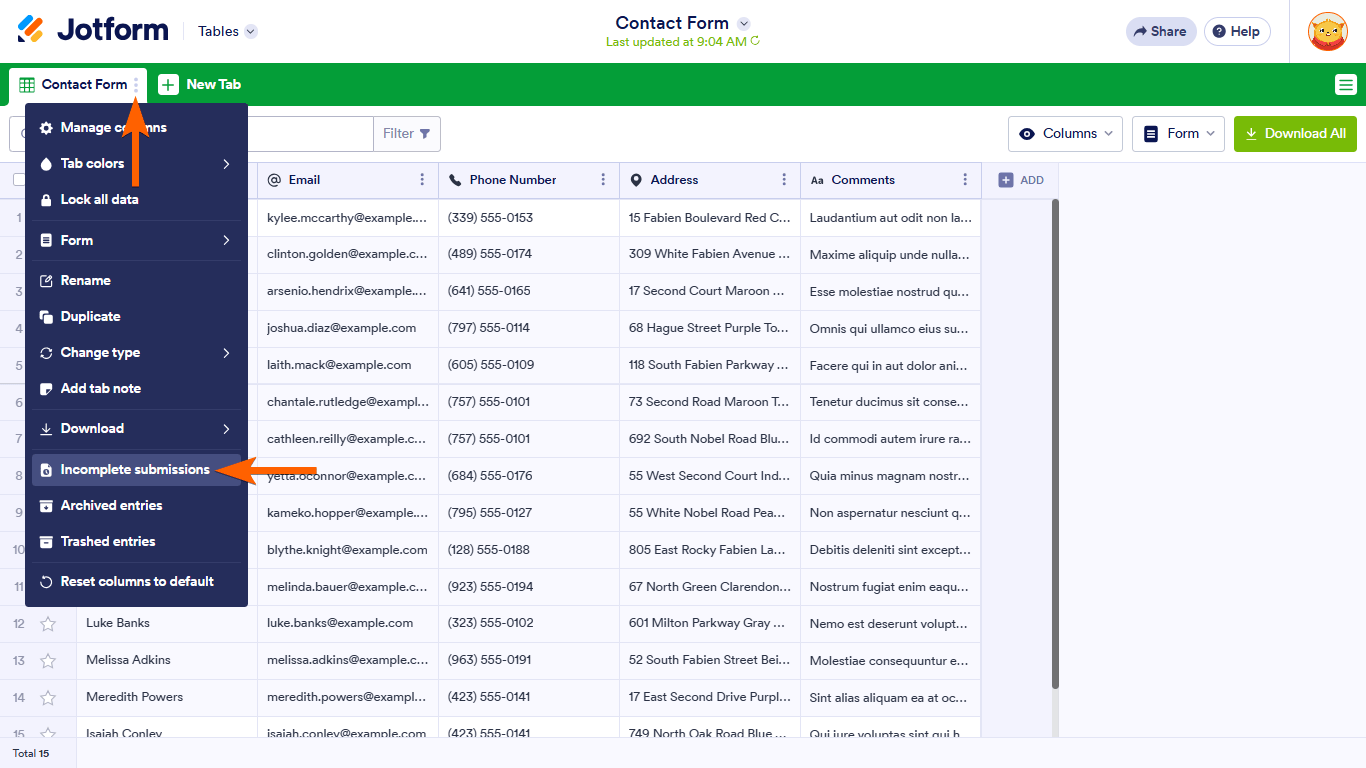
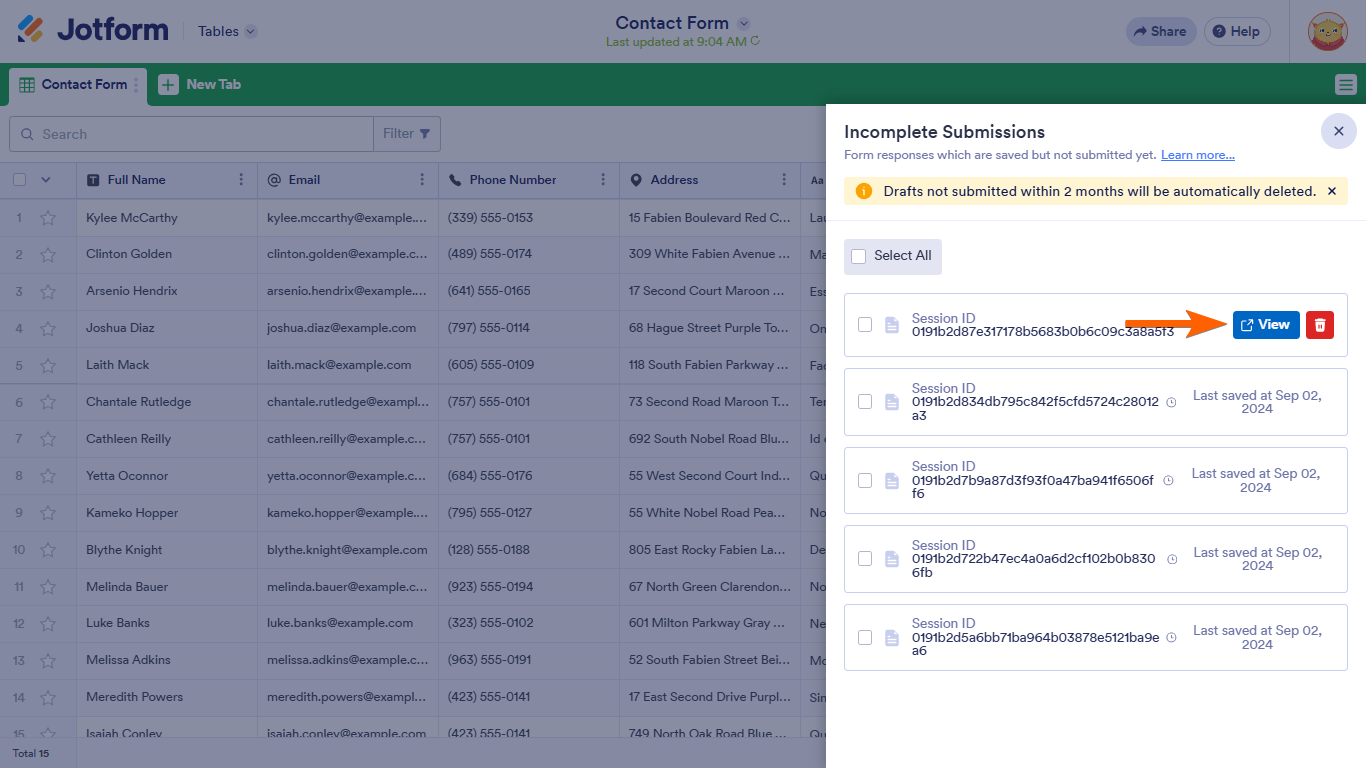
If the submission has been purged already, we can no longer recover it, but if the submission is still in the Trashed Entries folder, we can still recover it. Let me show you how to do it:
1. In Tables, click on the Three Dots icon on the upper left side of the page.
2. Then, click on Trashed Entries in the menu that opens.3. After that, tick the checkbox of the submission that you want to recover on the right side of the page.
4. Next, click on Restore on the upper right side of the page.That's it. Do you have further question regarding your submissions?
As soon as we hear back from you, we can work on getting you a solution for this.


Your Reply
Something Went Wrong
An error occurred while generating the AI response. Please try again!