-
JJon
I cant use the loom video recorder, it doesent support sdk anymore and has no login to connect the the service, the button i addedd to the form is not connected to anything?
-
 Podo: Support Specialist
Hi Jon,
Thanks for reaching out to Jotform Support. I'm an AI assistant here to assist you.
Here’s how to do it:
- Click on Add Element in Form Builder.
- Go to the Widget tab and search for Loom Video Recorder Widget.
- Open the Widget Settings by clicking the wand icon.
- Paste the Public App ID of your Loom video in the Public APP ID option.
- Click Update Widget to save the changes.
The Loom Video Recorder works only on Chromium-based browsers.
To create a new Loom application, the available steps are:
- Go to your Loom Developer page and click Create application.
- Enter your application name, choose SDK Standard for the SDK type, and add jotform.io and jotform.com under Domains allowing SDK setup.
- Click Create application, then copy the Public App ID.
If you want to embed a Loom video instead of using the recorder, the available setup is different:
- Click Add Element in Form Builder.
- Search for Loom Video Embed under the Widgets tab.
- Paste the Public Link Loom video in the Loom Video URL field.
- Click Update.
Give it a try and let us know how it goes.
-
JJon
loom doesnt have a Public App ID , or i just cant find it?
-
Podo: Support Specialist
Hi Jon,
Thanks for reaching out to Jotform Support. I'm an AI assistant here to assist you.
The Loom Video Recorder setup in Jotform uses a Public App ID. According to the available information, you need to create a Loom application first, then copy the Public App ID from that application and paste it into the widget settings.
Here’s how to do it:
- Go to your Loom Developer page and click Create application.
- Enter your application name, choose SDK Standard for the SDK type, and add jotform.io and jotform.com under Domains allowing SDK setup.
- Click Create application, then copy the Public App ID.
- Paste that Public App ID into the Public APP ID field in the Loom Video Recorder widget settings.
- Click Update Widget to save the changes.
If you do not see a Public App ID in your Loom account, the available information only confirms that it is created through the Loom Developer application setup described above.
Give it a try and let us know how it goes.
-
JJon
it keeps taking me to looms main page and i have no access to any developer sdk or app id info
-
Podo: Support Specialist
Hi Jon,
Thanks for reaching out to Jotform Support. I'm an AI assistant here to assist you.
The available information says the Loom Video Recorder widget requires a Public App ID. To set it up, you need to create a Loom application in the Loom Developer page, choose SDK Standard, add jotform.io and jotform.com under domains allowing SDK setup, then copy the Public App ID and paste it into the widget settings.
The available information also says the widget works only on Chromium-based browsers.
If you are only trying to show a Loom video on your form, there is also a separate Loom Video Embed widget. For that widget, you paste the Public Link Loom video instead of a Public App ID.
Here’s how to do it:
- Open Form Builder and click Add Element.
- Search for Loom Video Recorder Widget under the Widget tab.
- Click the wand icon, then paste the Public APP ID in Widget Settings.
- Click Update Widget to save the changes.
If you want the embed option instead:
- Open Form Builder and click Add Element.
- Search for Loom Video Embed under the Widgets tab.
- Paste the Loom video public link in the Loom Video URL field.
- Click Update.
Give it a try and let us know how it goes.
-
 Reymae JotForm Support
Hi Jon,
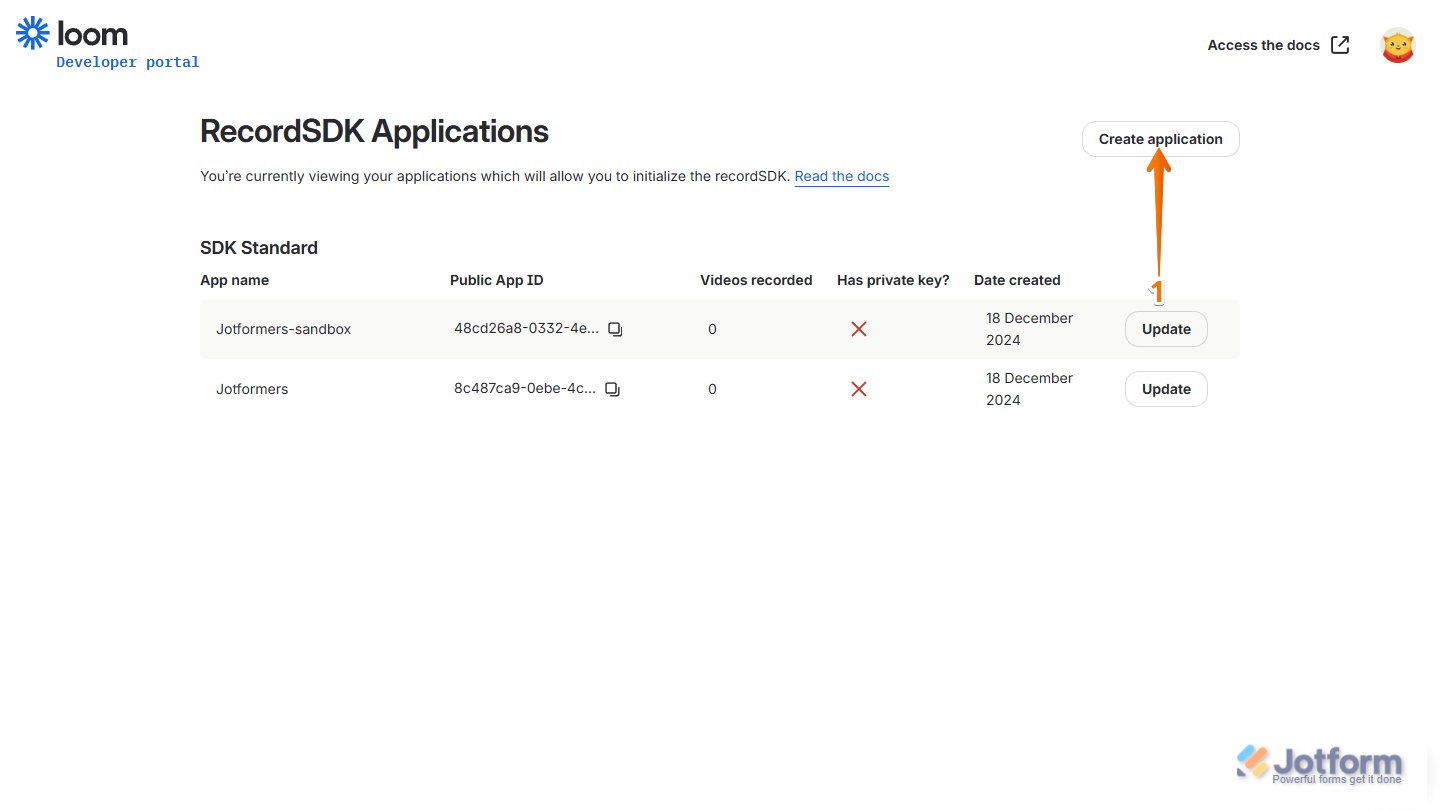
It's really easy to create a Loom application so you can generate a Public App ID. Let me show you how:
1. In your Loom Developer page, click on Create Application on the right-side of the page.

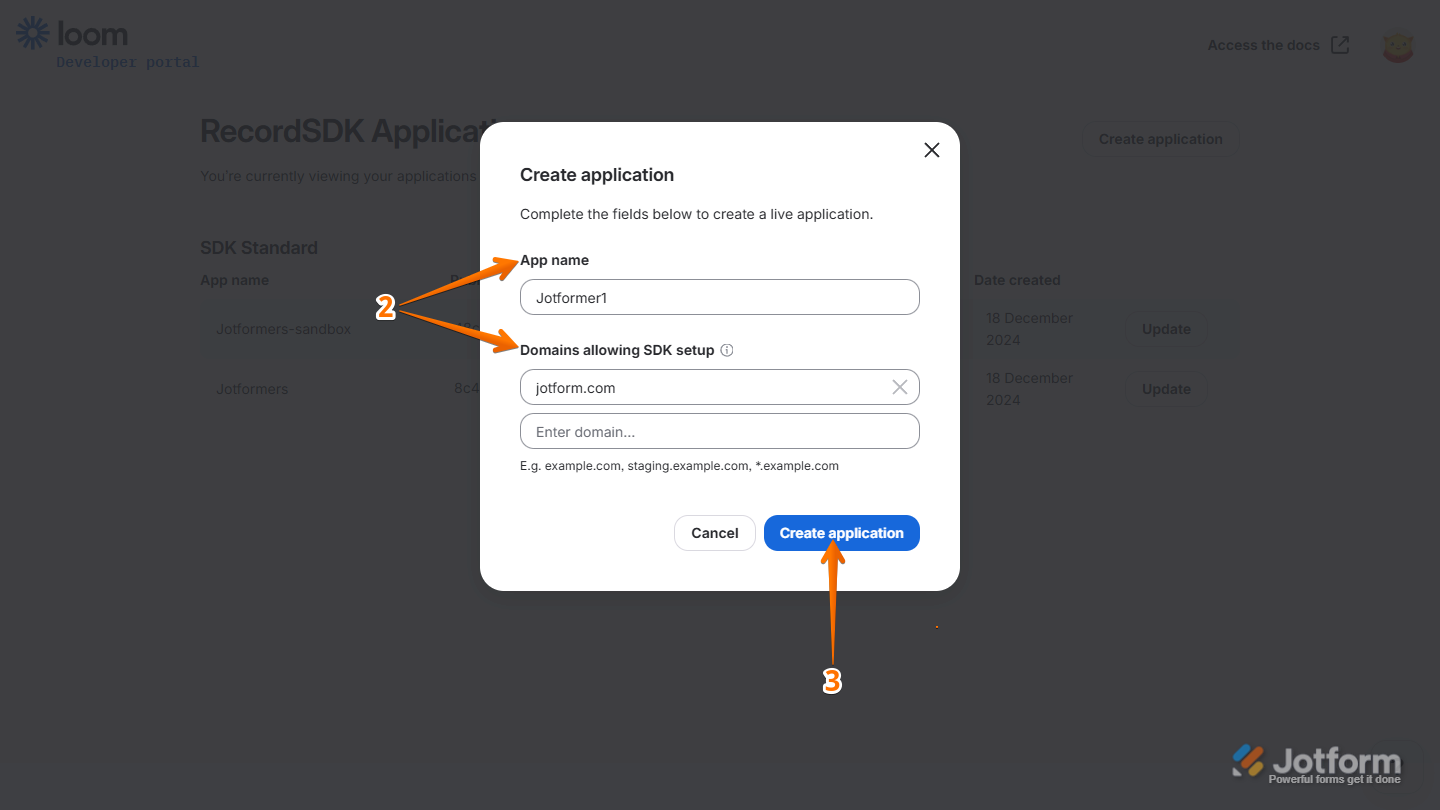
2. In the Create Application window set up the App Name and Domain Allowing SDK Setup.
3. Then, click on Create Application.
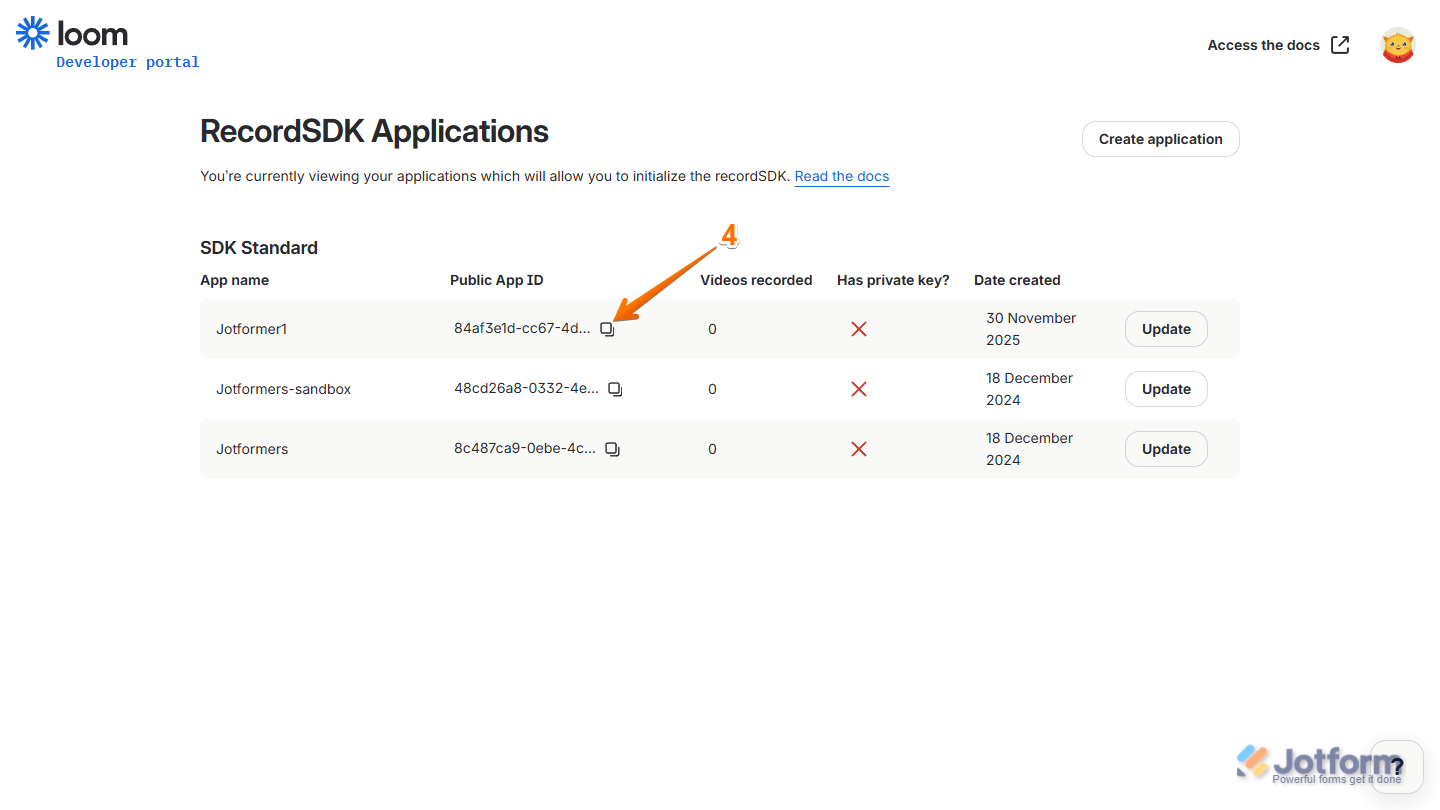
4. Now, you can click the Copy icon to get the Public App ID.
Reach out again if there’s anything else we can help you with.
Your Reply
Something Went Wrong
An error occurred while generating the AI response. Please try again!