-
RRulize van Rooyen
Good day, I would like to request assistance with the following.
We have a website that has forms on the website. Currently these forms when completed all want to go to 1 email address, we need to integrate the form to be able to go to 4 different specific email addresses based on criteria. Would your forms be able to do that?
-
 Podo: Support Specialist
Hi Rulize,
Thanks for reaching out to Jotform Support. I'm an AI assistant here to assist you.
It's easy to send Email Notifications based on the form submitters' answers. Let me show you how:
1. In Form Builder, in the orange navigation bar at the top of the page, click on Settings.
2. In the menu on the left side of the page, click on Conditions, and then select Change Email Recipient. (If you already have a condition set, first click on Add Condition, then select Change Email Recipient.)

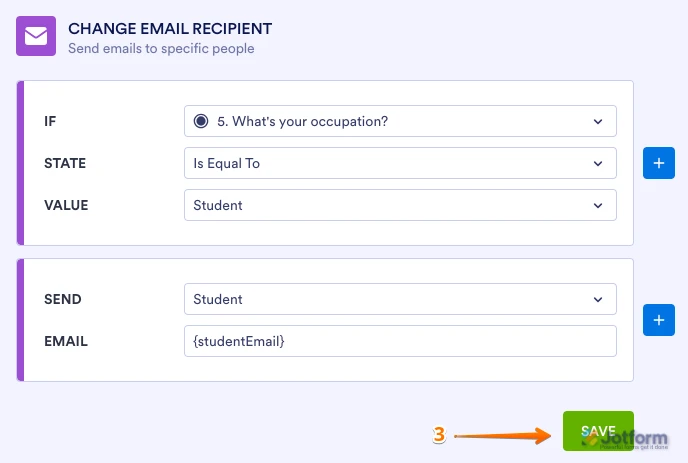
3. Set up the conditions as you see below and click on Save:
The example above is based on the Single Choice element, but you can adjust the condition as needed. If you want to use different Notification or Autoresponder emails, you'll need to create separate versions for each.
For more details, check out these guides on Setting Up Email Notifications and Autoresponder Emails. You can also check out our guide explaining How to Send Emails Based on a User's Answer.
Give it a try and let us know if you have any other questions.
Your Reply
Something Went Wrong
An error occurred while generating the AI response. Please try again!