-
 dpjonlinex
whats the problem? it have list on whitelist
noreply@formresponse.comreturns@jotform.com
but still error to receive verification code. is there a way to setup the config to avoid the problem in the future?
thank you for your help
-
 Podo: Support Specialist
It sounds like your email is already whitelisting our sender addresses, so we’ll need to check more specific details on your side.
To move forward, could you please tell me which email address is supposed to receive the verification code (the exact email you’re testing with)? After that, I can guide you step by step on what to adjust so this doesn’t happen again.
-
dpjonlinex
the email is dani@aviaventura.com
-
Podo: Support Specialist
Thanks for the email address, Dani.
There was an error while processing the request on my side, so I couldn’t check further right now, but here are a few things you can try to avoid issues receiving Jotform verification codes in the future:
- Make sure these sender addresses are allowed in your email system (both in whitelist and not blocked anywhere else):
- noreply@formresponse.com
- noreply@jotform.com
- noreply@jotmail.com
- returns@jotform.com
- Add those emails to your contacts/address book in your email client.
- Check your Spam/Junk, Promotions, and any quarantine folder in your email security or gateway.
- If you use a company domain (which you do), ask your IT/email admin to:
- Whitelist Jotform’s sending domains and IPs at the server/gateway level.
- Make sure SPF, DKIM, and DMARC settings on aviaventura.com are not blocking or heavily filtering external transactional emails.
- If possible, try another email address (like a personal Gmail/Outlook) just to confirm whether the issue is domain-specific.
If you can tell me which email provider or system you use for dani@aviaventura.com (e.g., Microsoft 365, Google Workspace, or another), I can share more precise configuration steps you can pass to your IT team.
- Make sure these sender addresses are allowed in your email system (both in whitelist and not blocked anywhere else):
-
dpjonlinex
I did listing those email on whitelist from our side, but still error
-
Podo: Support Specialist
Hi Dani,
Since you have already whitelisted the sender emails but are still experiencing issues receiving the verification code, here are some additional steps you can try to resolve the issue:
- Add the sender emails to your contacts/address book in your email client to help ensure they are recognized as safe.
- Check your Spam, Junk, Promotions, and quarantine folders in your email security or gateway to see if the emails are being filtered there.
- Ask your IT or email administrator to whitelist Jotform’s sending domains and IP addresses at the server or gateway level, which is often more effective than client-side whitelisting.
- Verify SPF, DKIM, and DMARC settings for your domain (aviaventura.com) to make sure they are not blocking or filtering external transactional emails like Jotform’s verification codes.
- Try using a different email address (such as a personal Gmail or Outlook) to determine if the issue is specific to your domain or email system.
If you let me know which email provider or system you use for dani@aviaventura.com (e.g., Microsoft 365, Google Workspace, or another), I can provide more precise configuration instructions for your IT team.
Give it a try and let us know how it goes.
-
dpjonlinex
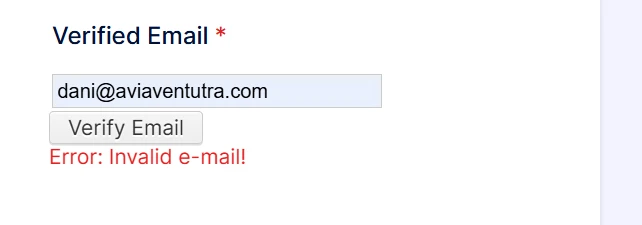
it was Error: Invalid e-mail!
while i trying to request verification code, but if i using another email. it just work fine -
Podo: Support Specialist
Hi Dani,
The error "Invalid e-mail!" when requesting a verification code for your email address may indicate an issue with how the email is recognized by our system. Since other emails work fine, it suggests the problem might be specific to this email address.
If you can’t update your email address because the current one is unavailable and you can’t access the verification email, can you submit the form on the How to Recover Your Jotform Account page, and our team will look into it?
Reach out again if you have any other questions.
-
 Rose Enterprise Support
Hi Dani,
I checked our Bounce List, and I can see that the email dani@aviaventura.com is added to it. Here's the reason:
Reason(s) : bounced (host aviaventura.com[103.229.73.186] said: 554 5.7.1 Service unavailable; Client host [209.127.149.207] blocked using cbl.abuseat.org (in reply to RCPT TO command))
I removed the email from the Bounce List. Can you give it another try?
Let us know if there’s anything else we can help you with.
-
dpjonlinex
it works, thank you for your help
-
Podo: Support Specialist
Hi Dhani Pradana J,
Your request has been answered and the thread is closed.
If you have another question or need more help, feel free to reply here and we'll assist you right away.
Your Reply
Something Went Wrong
An error occurred while generating the AI response. Please try again!