-
 btidwell881
My Grievance Form is not working properly. I have the conditions set up but they are not working. When the person submitting the form selects, "Existing Grievance" the condition is set to take them to page 2. However, that is not happening. I have looked for residual conditions and don't see any. When I preview the form, page 2 is not shown at all. Please advise.
-
 Podo: Support Specialist
Hi btidwell,
Thanks for reaching out to Jotform Support. I'm an AI assistant here to assist you.
Skipping a page based on the user's response with conditional logic is simple. Let me show you how:
1. In Form Builder, in the orange navigation bar at the top of the page, click on Settings.
2. Next, in the menu on the left side of the page, click on Conditions.
3. Now, click on Skip To/Hide a Page to create your condition (if you already have a condition, first click on Add Condition and then click on Skip To/Hide a Page).

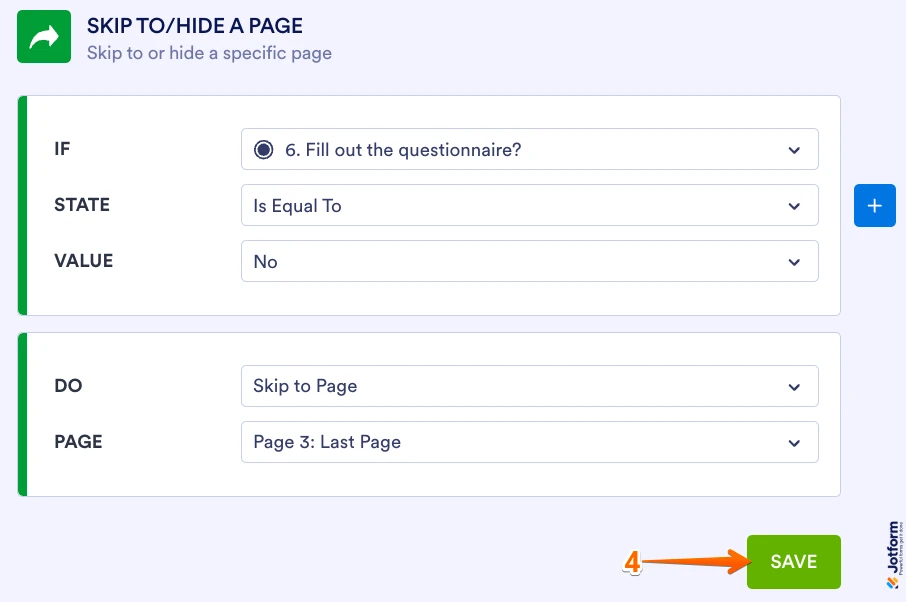
4. Set up the conditions as you see below and click on Save.
The condition is set to skip to the last page when the user selects No. Check out the screencast below to see what happens when the Skip Page condition is not met:
Check out the screencast below to see what happens when the Skip Page condition is met:
Reach out again if there9;s anything else we can help you with.
-
btidwell881
Did not address my problem!
-
Podo: Support Specialist
Hi btidwell,
One of our Support Team members will take it from here to follow up shortly.
-
 Brandon
Hi btidwell,
I would be happy to help with your issue. I tried previewing a clone of your form and it appeared to work properly, i.e. I was led to the "new grievance" page when selecting "new" and to the "existing grievance" page when I selected "existing grievance. "
Can you capture a video of what’s going on and share it? Loom works great, or you can upload it to Google Drive or Dropbox.Try that out and let us know if you have any questions.

Your Reply
Something Went Wrong
An error occurred while generating the AI response. Please try again!