-
 jenndoneshair
Hello,
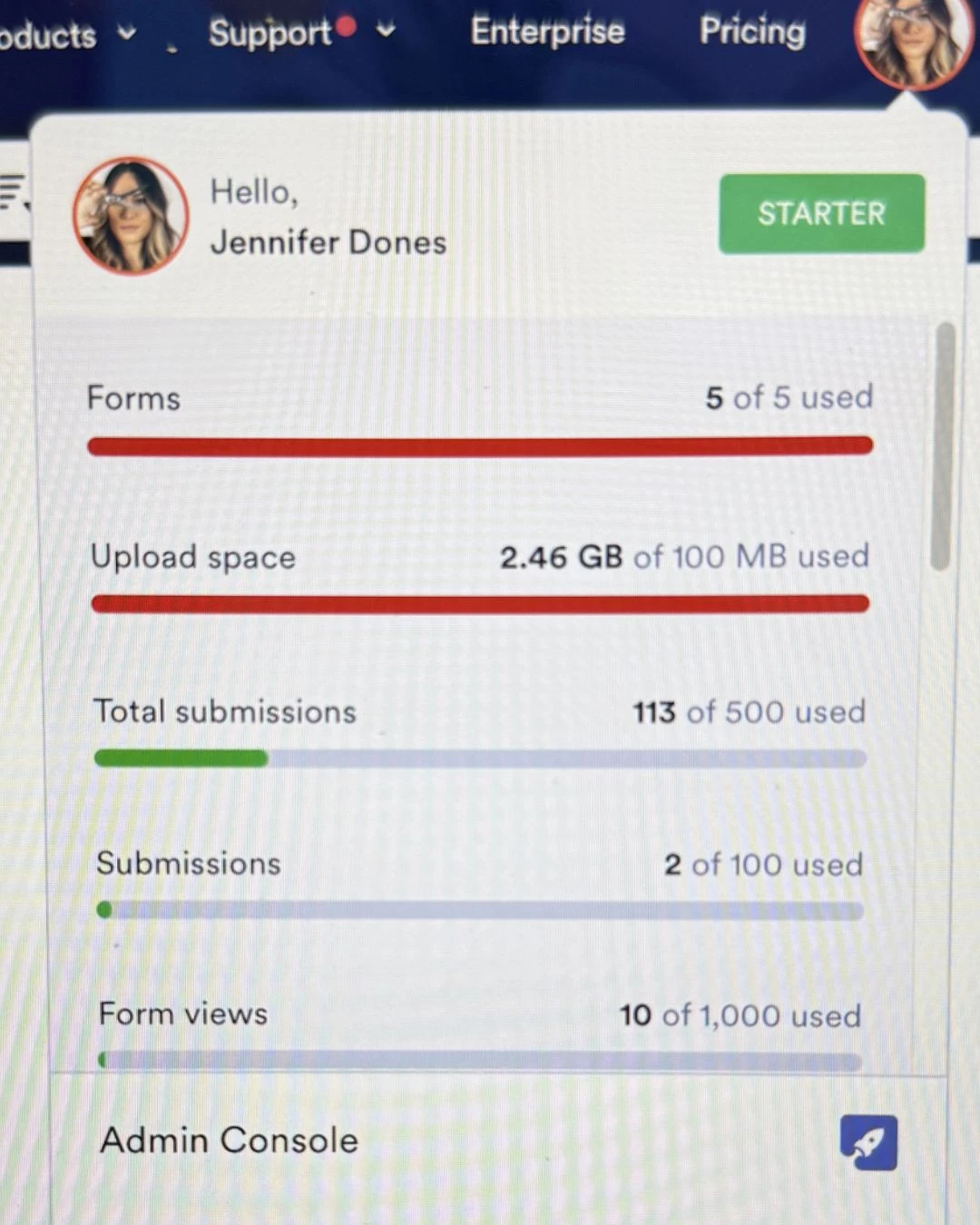
I’m currently experiencing an issue where new potential clients are unable to complete my digital consultation form.
On February 24, 2026, I paid $408 for my membership, so I’m unsure why my account is limiting form submissions. I have already tried troubleshooting by deleting previous submissions and removing unused forms, but the issue is still showing that I’ve reached a limit.
This is affecting my ability to book new clients, so I would appreciate assistance as soon as possible in resolving this.
Thank you.
 Page URL: https://form.jotform.com/222697586214162
 -
 Podo: Support Specialist
Hi Jennifer,
Thanks for reaching out to Jotform Support. I'm an AI assistant here to assist you.
It seems there is an issue checking your account plan details at the moment, which is preventing me from directly verifying your submission limits and account status.
To better assist you, could you please provide a screenshot or the exact message you see when the form submissions are limited? This will help in diagnosing the issue more accurately.
Once we hear back from you, we'll be able to move forward with a solution.
Reach out again if you need any other help.
-
jenndoneshair
-
Podo: Support Specialist
Hi Jennifer,
It looks like your account might be hitting a submission limit. Let me show you how to check and increase your monthly submission limit permanently without upgrading your plan:
- Go to your Workspace page and click on your Profile Image/Avatar in the top-right corner.
- Select Settings from the menu that appears.
- Go to the Increase Limits page on the left side of the screen and complete the tasks to increase your account's submission limits.
If you want to make sure your form is not automatically disabled after reaching a certain number of submissions, check the form settings:
- In Form Builder, click Settings in the top orange navigation bar.
- Under Form Settings, in the Form Status section, click on Enabled.
- Select Disable at Submission Limit if you want to set a submission limit or ensure it is not enabled if you want to allow unlimited submissions.
Let us know if you need any more help.
-
 Jerlan JotForm Support
Hi Jennifer,
I have deleted the files that belong to deleted or missing submissions from our server logs, and your upload space is now at 0.00 B / 100.00 MB. Try to refresh your account or log out and then log back in.
Give it a try and let us know how it goes.


Your Reply
Something Went Wrong
An error occurred while generating the AI response. Please try again!