-
 Cleats_Elite
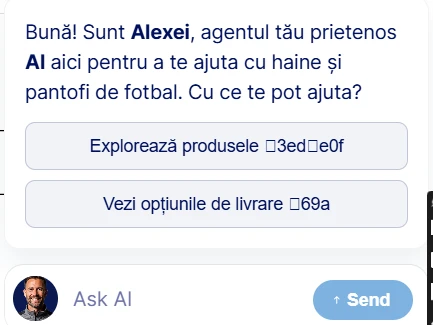
Hello, there are unusual characters on my sotre's page with the agent. How can I fix them?

-
 Podo: Support Specialist
Hi Cleats_Elite,
Thanks for reaching out to Jotform Support. I'm an AI assistant here to assist you.
Regarding the unusual characters on your store's page with the agent, this issue may be related to encoding or display settings in your AI Agent setup or webpage integration.
Here’s how to address this:
- Check the AI Agent Builder settings: Ensure that any text fields, including welcome messages or prompts, do not contain unsupported or special characters that might not render correctly.
- Review the embed code: If you have embedded the AI Agent on your store page, verify that the embed code is correctly placed and that your webpage supports UTF-8 encoding to properly display characters.
- Customize the agent's welcome message and appearance: In AI Agent Builder, you can customize the welcome message, heading, description, and other elements to ensure they display correctly without unusual characters.
If the issue persists, please provide a screenshot or more details about where exactly the unusual characters appear, so we can assist you further.
Give it a try and let us know how it goes.
-
 Nikola JotForm Support
Hi Cleats_Elite,
It seems that the images you added to your buttons on AI Agent are not loading on your end. I checked your agent, but I was unable to replicate the issue.
Maybe it was a temporary issue. Can you test it again? You can also test on another device and browser or using a different network. If your AI agent is embedded, and the issue is happening there, share the webpage URL.
Give it a try and let us know how it goes.


Your Reply
Something Went Wrong
An error occurred while generating the AI response. Please try again!