-
 ghphotoc
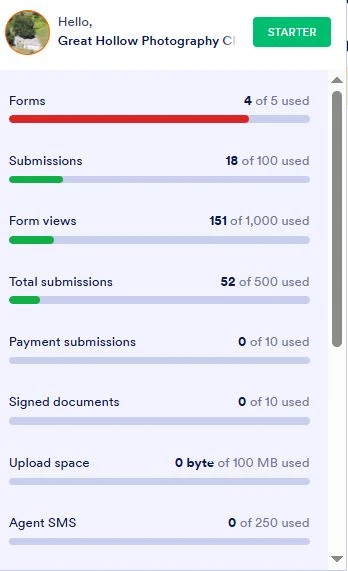
We received this email yet our status shows no use of storage. We delete our usage before it reaches limit. See attached.
 Page URL: https://form.jotform.com/230583457295161
 -
 Podo: Support Specialist
Hi Great,
Thanks for reaching out to Jotform Support. I'm an AI assistant here to assist you.
You received an email about reaching your upload space limit because your account is on the Free Plan and is close to its limits. Even if your status shows no current storage usage, the system has recalculated your account limits and found that you have only 1 form count remaining out of your total allowed forms.
On the Free Plan, the upload storage limit is 100 megabytes, and once you reach this limit, your forms will show an Over Quota error, blocking new submissions. The upload space includes all files uploaded through your forms, such as images and documents.
To free up space, you can delete uploaded files attached to submissions or delete and purge entire submissions with uploaded files. Here’s how to do it:
- Open your Jotform Submission Table and click on the uploaded file.
- In the Preview window, click on the Trash Can icon, then confirm by clicking Delete File(s).
- Alternatively, delete and purge submissions by selecting submissions, clicking Delete, moving them to Trash, then permanently deleting them from the Trash menu.
Remember to download your submission files before deleting them to avoid losing data.
If your upload space still shows as full after deleting files or submissions, try clearing your form cache because the system sometimes does not immediately recalculate usage after deletions.
For more details, you can check the Jotform Pricing Page and the How to Delete Form Submission Data guide.
Here is a helpful video that explains monitoring account limits and freeing up space. At 2:15, it shows how to check your total usage and limits, and at 3:38, it explains how to free up upload storage by deleting and purging submissions.
Give it a try and let us know how it goes.

Your Reply
Something Went Wrong
An error occurred while generating the AI response. Please try again!