-
 lolashouseofbostons
When signers of my document clicked on an initial block, it used to automatically put the initials in the selection box but now it puts the signature alway as the default. How can I change that?

-
 Podo: Support Specialist
Hi Gigi,
Thanks for reaching out to Jotform Support. Regarding your issue with the initial block defaulting to the signature instead of initials, this behavior is related to the signature field settings in your document.
To address this, you may want to check the settings of the signature and initial fields in your document's Sign Builder to ensure the initial block is correctly configured to accept initials by default.
If you want to customize the signature style, you can do the following:
- Open your document in Sign Builder.
- Click on the Signature field and then click on Change Style.
- Choose the Signature Font that you want to use and save the changes.
Let us know if you need any more help.
-
lolashouseofbostons
This didn’t answer my question. Need more help.
-
Podo: Support Specialist
Hi Gigi,
Thanks for your patience. Currently, in Jotform Sign, the behavior of the initial block defaulting to the signature instead of initials is controlled by the field settings in the Sign Builder. Unfortunately, there is no direct option to set the initial block to default to initials instead of the signature automatically.
To ensure the initial block works as expected, please verify that you have added an Initial field (not a Signature field) in your Sign Builder template where you want the initials to appear. The initial field is specifically designed to capture initials, while the signature field captures full signatures.
If your signers are seeing the signature instead of initials, it may be due to the field type used or a recent update in the Sign Builder behavior.
For now, the best approach is to double-check your document template in the Sign Builder and confirm that the initial blocks are set as Initial fields, not Signature fields.
Let us know if you need further assistance with this.
-
lolashouseofbostons
Initial blocks are fine. This just started happening when I want trying to get the answers to my questions to appear in all caps.
-
Podo: Support Specialist
Hi Gigi,
Thank you for the additional information. Since your initial blocks are set correctly and this issue started when you tried to make the answers appear in all caps, it may be related to how the text formatting or input settings are interacting with the signature and initial fields.
One possible factor is the Jotform Sign Automation feature. If this feature is enabled, it can affect how signatures and initials are applied and displayed on your document.
Let me show you how to check and disable Jotform Sign Automation if needed:
- In Form Builder, click on Settings in the top navigation.
- Select Sign from the menu on the left.
- Toggle off the Enable Jotform Sign Automation option.
Keep in mind that disabling Sign Automation means the signatures you collect will no longer be legally binding, and you will be able to edit submissions that include signature fields.
If this does not resolve the issue, please provide more details about how you set the answers to appear in all caps (e.g., custom CSS, widget, or other method) so I can assist you further.
Let us know if you need any other help.
-
lolashouseofbostons
There is no toggle for Enable Jotform Sign Automation option.
-
Podo: Support Specialist
Hi Gigi,
Thank you for letting me know that there is no toggle for the Enable Jotform Sign Automation option in your settings.
This option is typically found in Form Builder under Settings > Sign. If you do not see this toggle, it might be due to the type of form or document you are working with, or recent changes in the interface.
Since the initial blocks are fine and this issue started when you tried to make the answers appear in all caps, the problem may be related to how the text formatting is applied rather than a Sign Automation setting.
Could you please provide more details on how you applied the all caps formatting? For example, did you use custom CSS, a widget, or some other method? This information will help me assist you better.
Once we hear back from you, we’ll have a better idea of what’s going on and how to help.
-
lolashouseofbostons
I did adjust the CSS
-
Podo: Support Specialist
Hi Gigi,
Since you mentioned that you adjusted the CSS and the initial block is now defaulting to the signature, it is possible that the custom CSS is affecting the behavior of the initial field.
To help resolve this, please review your custom CSS to ensure it is not overriding or interfering with the initial field's functionality. Specifically, check for any styles applied to the initial or signature fields that might cause this behavior.
If you want, you can temporarily remove the custom CSS and test if the initial block behaves correctly again. This will help identify if the CSS is the cause.
Let us know if you need further assistance with adjusting the CSS or any other help.
-
lolashouseofbostons
I don’t want to mess it up anymore. I’d like a live agent to take a look at this for me please.
-
Podo: Support Specialist
Hi Gigi,
One of our Support Team members will take it from here to follow up shortly.
-
 Jotform Support Former Jotform Support
Hi Gigi,
I tested this on a sample form, and the name on the Signature Field is usually the name indicated on the field upon sending the document:
If you usually send only initials in this part of sending the document, then only initials will appear on the signature field by default when viewed. Otherwise, if you put the complete name, then it will show that instead. If that’s not quite what you’re looking for, can you share a bit more info so I can help you better?
-
GGigi
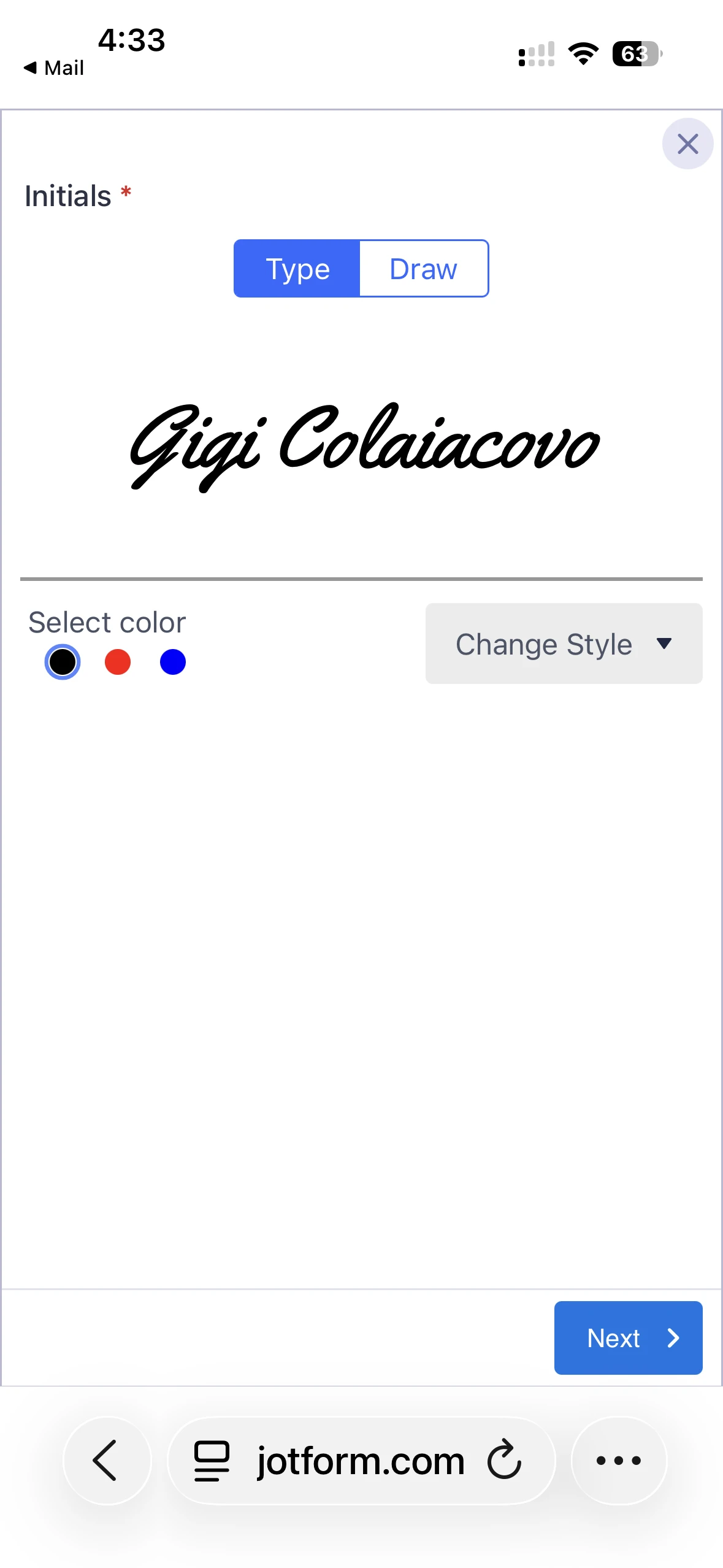
Yeah, that’s not it. I haven’t done anything differently when I’m tagging for initials and signatures. Before it would automatically bring up my initials as a default when the box called for initials and my full signature when it calls for a signature. Now it alway give the full name.
-
 Sheena JotForm Support
Hi Gigi,
While the feature you're looking for isn't available at Jotform right now, we've gone ahead and escalated your request to our developers. Exactly when or if it's developed depends on their workload, how viable it is, and how many other users also request it. If there are any updates, we’ll circle back to this thread and let you know.
Thanks for your patience and understanding, we appreciate it.
-
GGigi
This is simply not true. It had been pulling up initials when it called for it automatically before I tried to make some changes.
-
 John JotForm Support
Hi Gigi,
I tested one of my Sign Documents to see if I can replicate the issue, but everything worked the way it should. Check out my results in the screencast below:
As you can see, the Initials field is automatically prefilled with my initials. Does this happen across all Sign Documents in your account or only with a specific document? You can share the link to the document so we can take a closer look, and if any changes were made prior to the issue, it would also be very helpful if you could let us know exactly what those changes were.
After we hear back from you, we’ll have a better idea of what’s going on and how to help.
-
GGigi
Yes! That is how it used to work and how I want it to work now! I was trying to have the output from my Puppy Application appear in all caps and changed the CSS because it was shrinking the Name and Address files on the form. I added the first line.
if you could reset my Application form back to 2/8/26 (this was before I played around with it), that would be ideal. I did try to revert back but got lost in all the updates I did.
My page background in Build mode still isn’t why it should be. Just preview and you’ll see the correct background picture.
here is the link to the form. Please restore back to 2/8/26 please. I think that will fix all of my issues. Thank you! 🙏🏼
-
GGigi
Sorry, forgot the link. 🤦🏻♀️
-
 Silvano JotForm Support
Hi Gigi,
I checked your form but I am unable to see any initials field. Can you double check and share the correct link?
After we hear back from you, we’ll know what’s going on and how to help.
-
GGigi
No, there aren’t any initial fields on that form but it sent it to you to just revert it back to the previous version as of 2/8/26. This is where I made all of those updates that caused this problem.
-
Jotform Support Former Jotform Support
Hi Gigi,
Unfortunately, we’re not able to revert a Sign document back to a specific date (like 2/8/26). At the moment, Jotform Sign doesn’t support restoring a document to an exact previous version from our end.
Let us know if there’s anything else we can help you with.
-
GGigi
Well, then can you please look at my JotSign and tell me why the Initials field is automatically prefilled with my initials and then change to signature for a signature field. Could this be because I turned Sign Automation off? I can’t turn it back on because there is no toggle.
John was th closest to answering my question above. Here is the link to my form:
https://form.jotform.com/222821170003136
-
 Mary JotForm Support
Hi Gigi,
For your form Lola's House of Bostons & Rescue Puppy Application, the option to enable Jotform Sign Automation cannot be toggled on because there is no Signature field. I also checked your revision history and do not see any changes related to a Signature field. Can you check again if this is the correct form?
Once we hear back from you, we can get moving on a solution.
-
GGigi
So if it’s not associated with any of the changes I made to that form, how come in JotSign I still don’t get the automatic initials as option in my initial fields when signing?
-
Mary JotForm Support
Hi Gigi,
I made a test on a sample form and everything is working correctly:
-
GGigi
I email the documents, not a link. I understand how it’s supposed to work, and has worked that way before for me. Now, it does not, only brings up full signature, and I’m trying to find out how to fix it.
can you take a look at my account and tell me why it’s not working now?
-
Jotform Support Former Jotform Support
Hi Gigi,
Since it's working from our end and we can't replicate the issue, can you provide a screen recording of the issue? Starting from the moment you click on the link to sign the document, to the part where you are clicking on the initial field? You can upload it to Google Drive, Dropbox, or record with Loom and send us the link. This will help us with the investigation.
When we hear back from you, we’ll be ready to move forward.
-
GGigi
Here it is…
-
Mary JotForm Support
Hi Gigi,
I'm afraid we did not receive any attachment. Can you try sending it again?
Once we hear back from you, we can get moving on a solution.
-
GGigi
-
GGigi
don’t know why it’s disappearing 🤷🏻♀️
-
Sheena JotForm Support
Hi Gigi,
We did not receive any link to the screen recording. If you have uploaded it to Google Drive, could you share the URL with us? Also, make sure the permissions are set so that anyone with the link can access it, allowing us to review it.
Once we hear back from you, we'll be able to help you with this.
-
GGigi
-
GGigi
I paste it here but it disappears when I send it. 🤷🏻♀️
-
 dblegee367ScreenRecording_04-11-2026 23-53-16_1.mp4drive.google.comOn Apr 12, 2026, at 12:42 AM, Jotform <noreply@jotform.com> wrote:
... -
Mary JotForm Support
Hi Gigi,
I was able to open the recording. I also made a test using a mobile and still could not replicate the issue. Here is the result:
I just cleared your form cache, can you try creating a new Send Document to Sign and see if the issue persists?
Give it a try and let us know how it goes.
-
GGigi
I created a new sign document and it still
shows the signature when I go to sign the initials block. 😔
-
Sheena JotForm Support
Hi Gigi,
To help us better understand and troubleshoot the issue, could you let us know what device you are using and which browser you are opening the signing URL with? Also, if possible, try testing the signing process on a different device or browser to see if the issue persists. This information will help us identify if the problem is device- or browser-specific.
Give it a try and let us know if you need any help.
-
GGigi
I tried it on my iPhone using Safari and just tried it on my laptop using chrome and both yielded the same results.
-
Jotform Support Former Jotform Support
Hi Gigi,
Before I get this escalated, can we try this last troubleshooting step? Can you remove the current Initials field and add it back to the Jotform Sign Document?
Keep us updated and let us know if you need any more help.
-
GGigi
I just created the last 2 documents tonight, so replacing the field will not yield any different results for me.
-
Jotform Support Former Jotform Support
Hi lolashouseofbostons,
Since we can't replicate the issue, I created a ticket and escalated this to our Developers. Although we don't know exactly when it'll be fixed, we’ll circle back to this thread when we have an update.
-
lolashouseofbostons
Any word on a fix yet? This is happening on all of my Sign Documents I send out. All parties are getting the signature default, rather than the initial one in the initial fields. If you look at my last few documents, you will see that all signed with signature default.
Please, I would love to see this fixed. Thank you!
-
 Camila JotForm Support
Hi lolashouseofbostons,
I’ve gone ahead and moved your other question to a separate thread to keep things tidy, and someone from our Support Team will help you out with it here.
Let us know if you have any other questions.
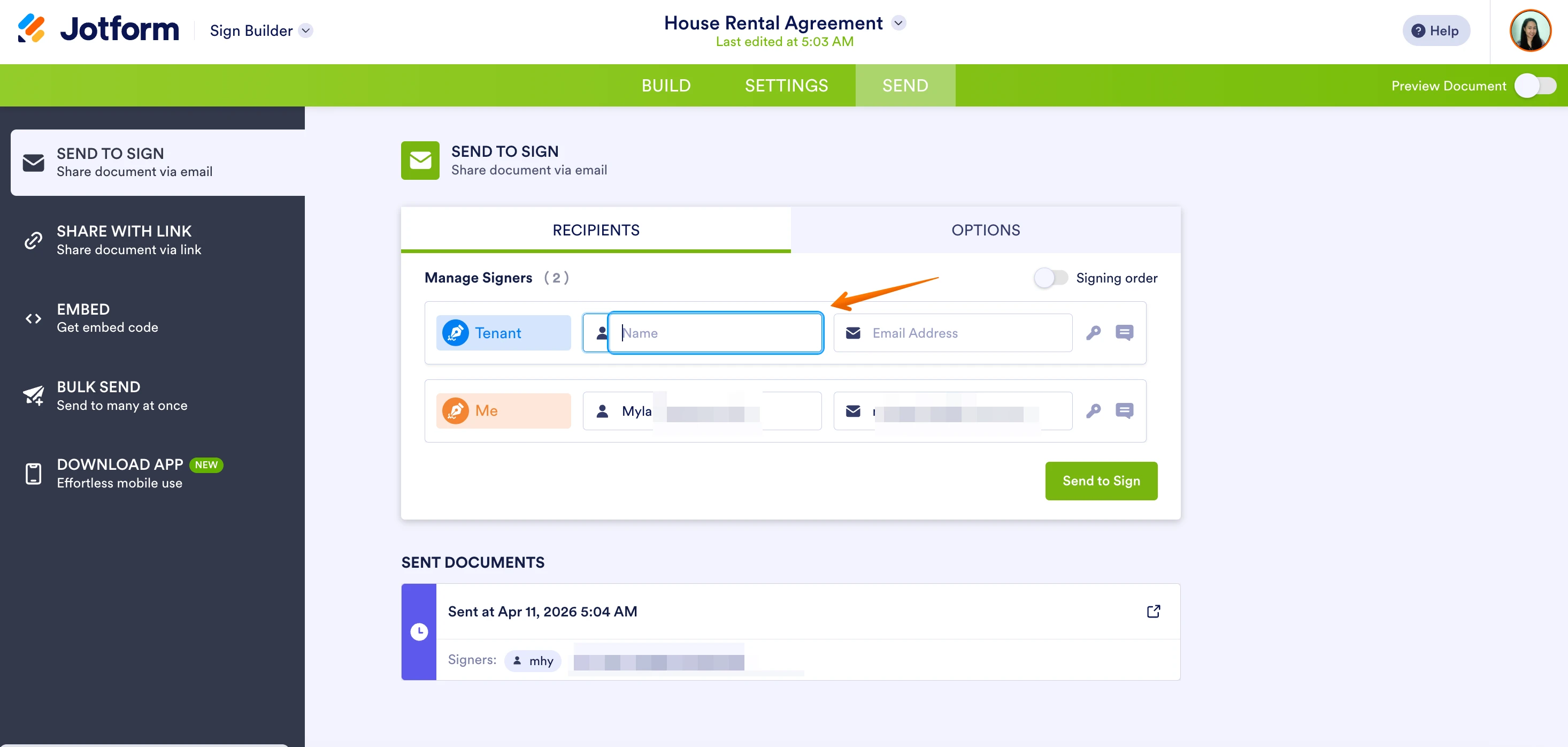 If you usually send only initials in this part of sending the document, then only initials will appear on the signature field by default when viewed. Otherwise, if you put the complete name, then it will show that instead.

 If the document was shared using the share link feature as seen below, then the initials will not be visible, users will need to enter them manually:
 Let us know if you have any other questions.

Your Reply
Something Went Wrong
An error occurred while generating the AI response. Please try again!