-
 shellilange
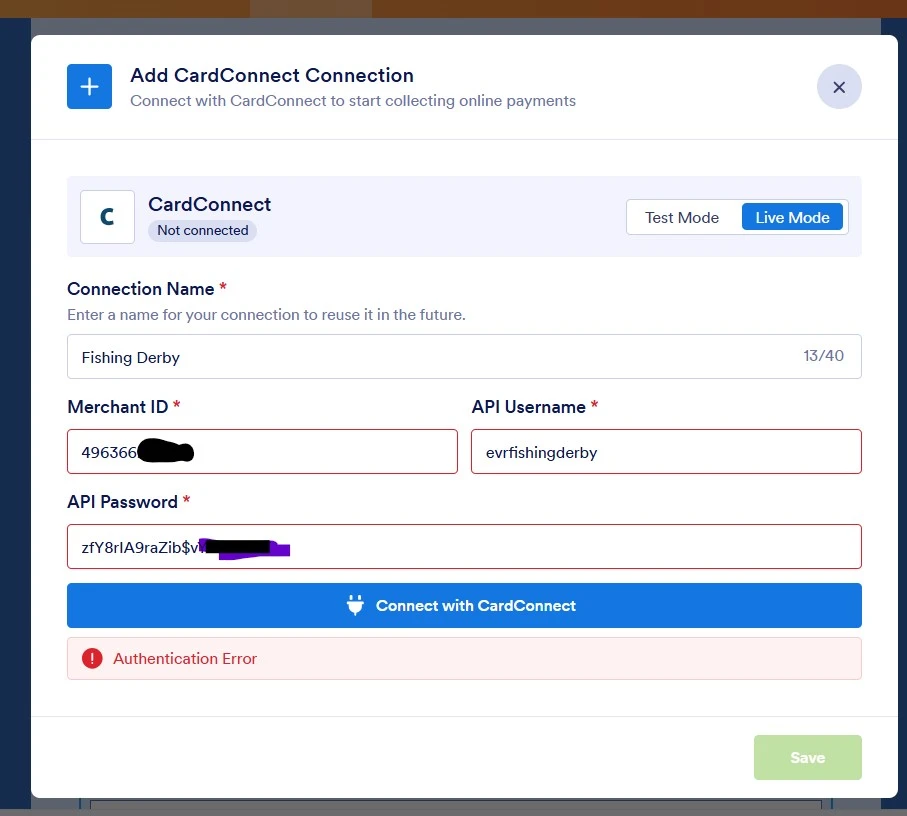
I've done everything Podo has suggested, but he was stumped and referred me to customer support. I received the credentials from Card Connect:
https://cardpointe.cardconnect.com/account/#/administration/credentials
Attached is a copy of the error page and the jot form
Thank you,
Shelli Lange
702-301-6285 cell

-
 Podo: Support Specialist
Thanks for following up, Shelli — I know payment errors can be frustrating.
To check what’s going wrong with your CardConnect integration and that error page you mentioned, I’ll need to look directly at your form’s setup.
• Please send me either:
- The direct link (URL) to the form, or
- The form ID (the long number in the form URL)
Once I have that, I’ll review how CardConnect is configured in your form and help you sort out the error step by step. Let me know too if this is happening on every submission or only sometimes.
-
shellilange
-
Podo: Support Specialist
Hi Shelli,
Regarding the authentication error you are encountering with your CardConnect payment integration on your form titled "Create Ticket WFF," here are some key points to check and steps to troubleshoot:
- Ensure your CardConnect credentials are correctly entered: Merchant ID, Merchant Site (subdomain of your CardConnect dashboard), API Username, and API Password must be accurate.
- Merchant Site: This should be the subdomain part of your CardConnect dashboard URL. For example, if your dashboard URL is jotformers.cardconnect.com, enter jotformers as the Merchant Site.
- Currency: CardConnect supports USD only, so ensure your form's currency is set accordingly.
- Captcha: You must add a captcha field in your form and select it in the CardConnect payment settings.
- Check API Credentials: If you have not created an API Username and Password, you need to generate them in your CardConnect account.
- Authentication Errors: These often occur due to incorrect credentials or configuration mismatches. Double-check that your API Username and Password are current and correctly input in the form settings.
If everything appears correct but the error persists, it may be useful to regenerate your API credentials in CardConnect and update them in your form.
Give it a try and let us know how it goes.
Your Reply
Something Went Wrong
An error occurred while generating the AI response. Please try again!