-
 markwilkoff
Hi,
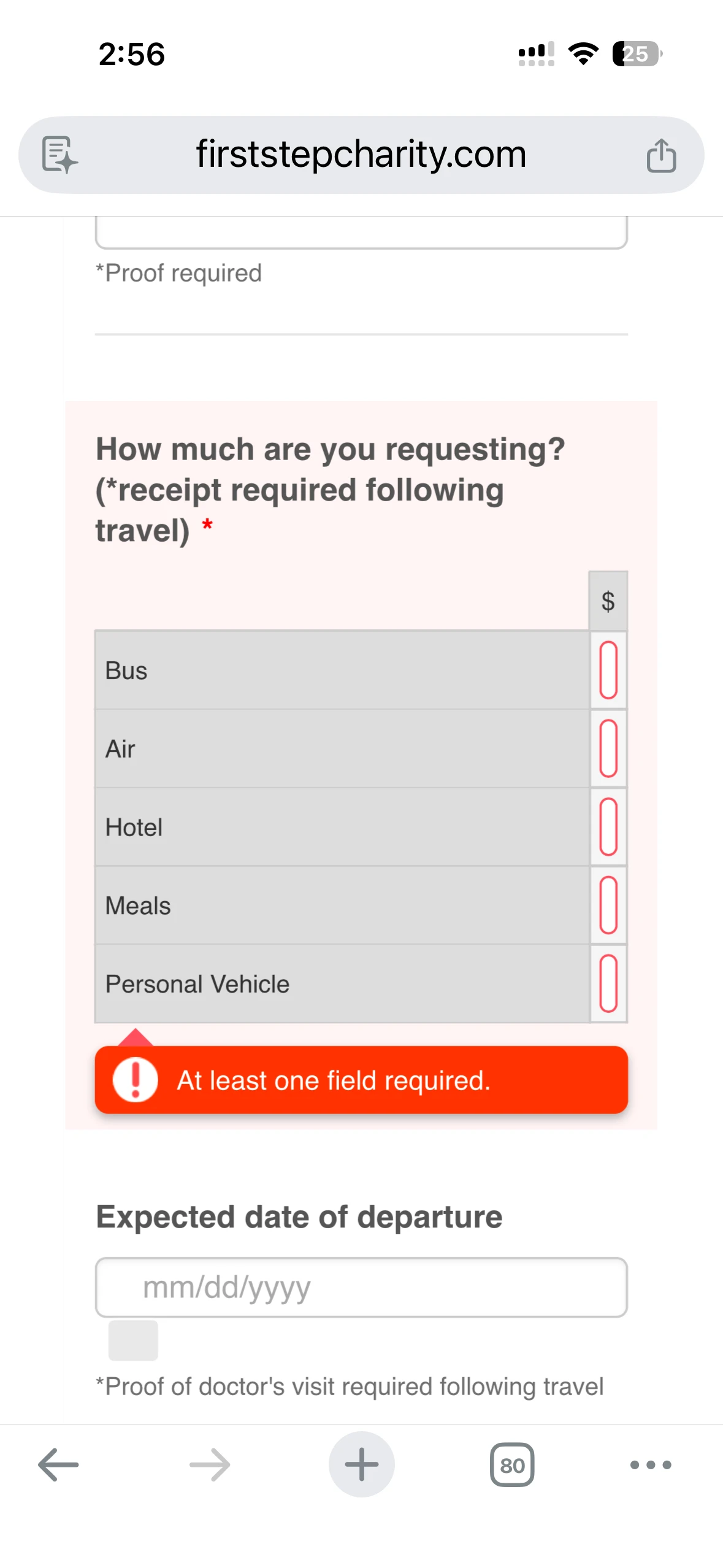
The Fist Step Charity Requesting Assistance Form does not display correctly on a mobile device.
Please see attached image. This is NOT a problem with The Wix website. It has been verified.
This app was working up until a short time ago. Did something change?
Please help us fix this.
You can reach me at colleen@madisonwebworks.com
I would prefer a phone call at 608-438-6904
Thank you.

-
markwilkoff
-
 Keenly JotForm Support
Hi Mark,
Thanks for reaching out to Jotform Support. No phone support, but I’ll stick with you until we get things resolved. Now, coming back to your question, you can fix the issue with the form field that isn’t displaying correctly on mobile by Injecting CSS Codes into your form. Let me show you how:
1. First, copy this code:
@media screen and (max-width: 768px) {

  #id_30 .form-matrix-table {

    width: 100% !important;

  }


  #id_30 .form-matrix-values input.form-textbox {

    min-width: 120px !important;

    width: 100% !important;

  }


  #id_30 .form-matrix-row-headers,

  #id_30 .form-matrix-values {

    display: table-cell !important;

    width: auto !important;

  }

}
2. In Form Builder, click on the Paint Roller icon on the upper-right side of the page.
3. Then, in the Form Designer menu on the right, go to the Styles tab.
4. Finally, paste the CSS code into the Inject Custom CSS code field.
Check out the result:
Give it a try and let us know how it goes.


Your Reply
Something Went Wrong
An error occurred while generating the AI response. Please try again!