-
 BienestarisWellbeing
Hi I'm having trouble with figuring out the most appropriate way to handle an issue. I am helping with coordinating a Community Health Fair and we're using Jotform to register people who want to get services. I've used the setting of Unique Field to minimize duplicate submissions as we're only allowing one service per person per day. However, it has been brought to my attention that parents are unable to sign up their children as the household only has one email. How would you recommend working around this? Not all the participants have children so the issue has only been brought up with people that want to register their kids.
-
 Podo: Support Specialist
Hi BienestarisWellbeing,
Thanks for reaching out to Jotform Support. I'm an AI assistant here to assist you.
You can prevent the same person from filling out your form multiple times based on a Unique Field in just a few simple steps. Let me show you how:
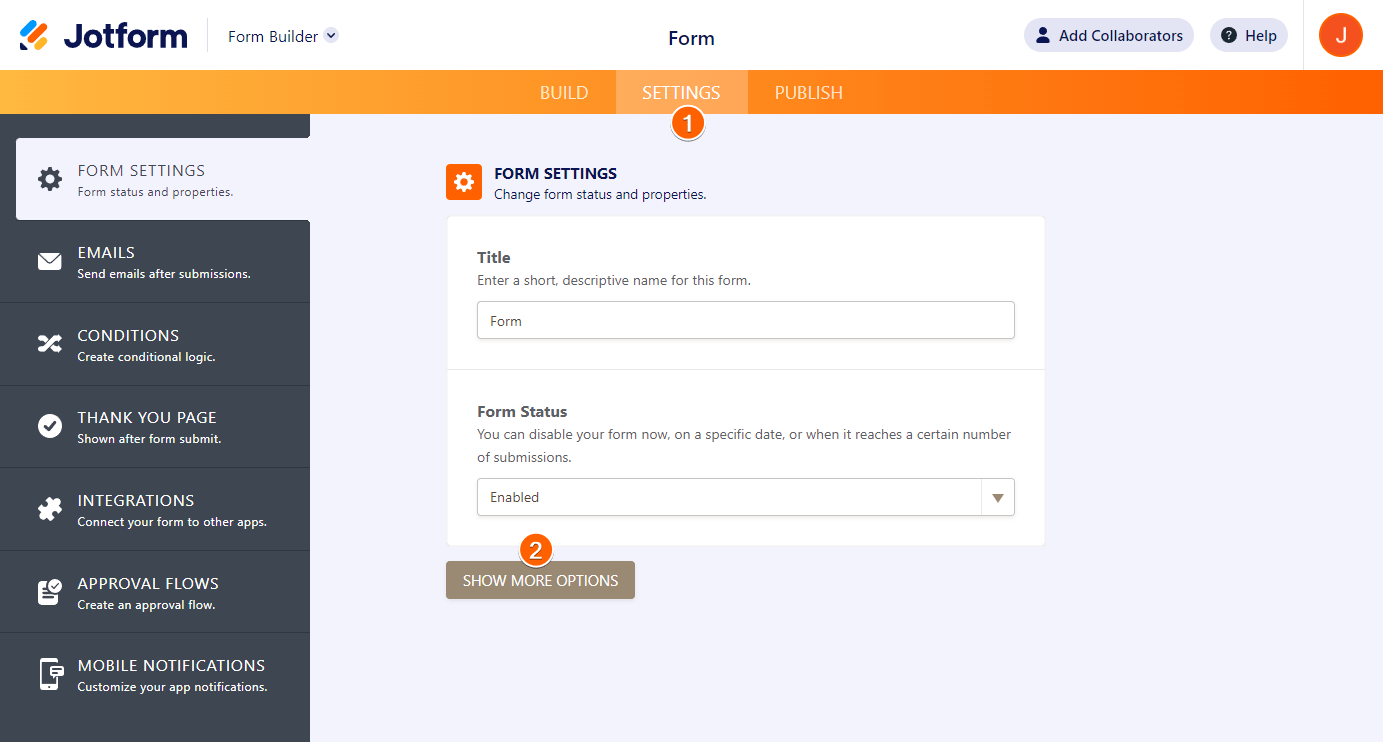
- In Form Builder, in the orange navigation bar at the top of the page, click on Settings.
- Next, click on Show More Options.
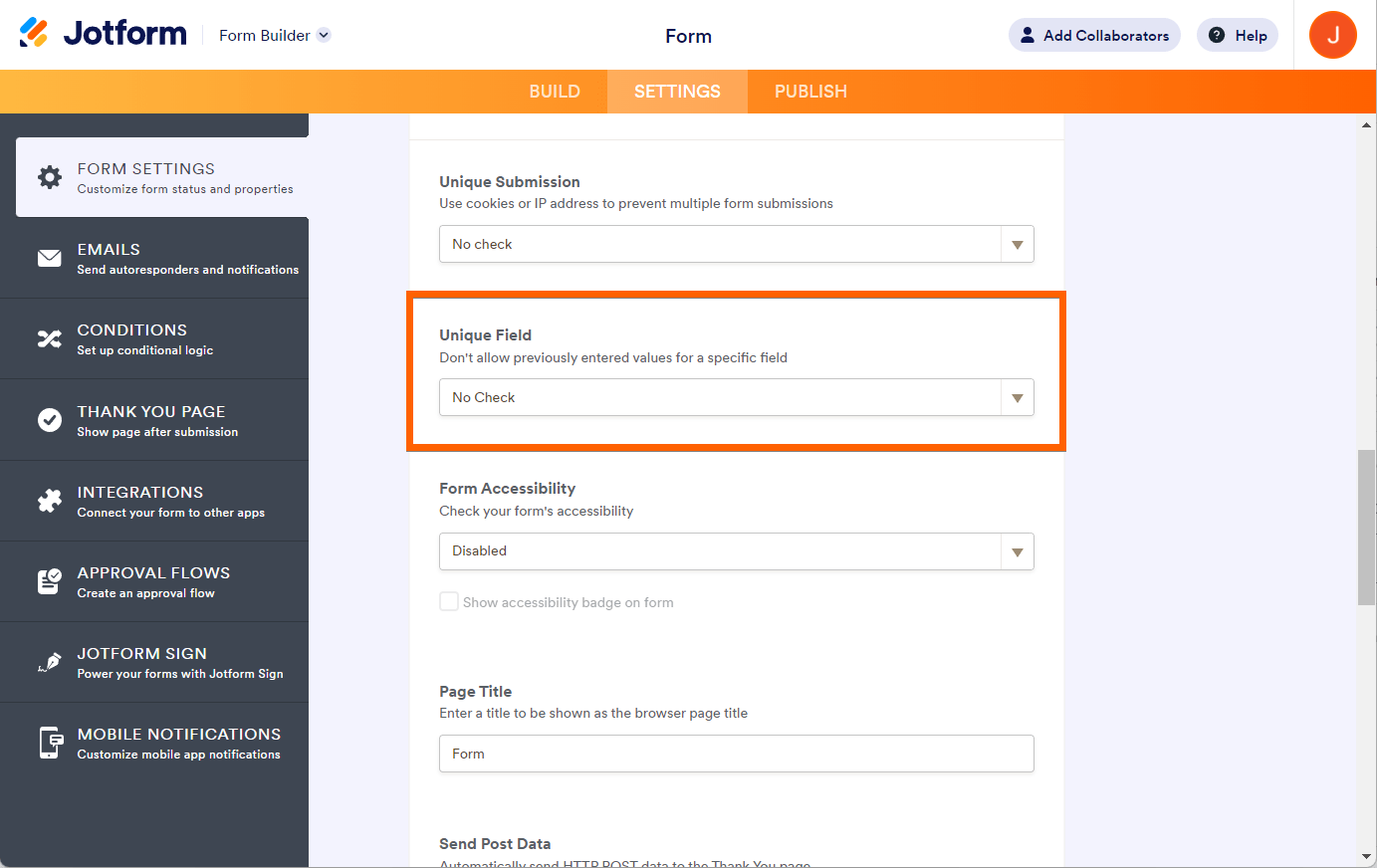
- Now, scroll down to the Unique Field section and select the field you want to use.

Since your issue is that parents share one email but need to register multiple children, a workaround could be to use a different unique identifier for each child, such as a combination of name and birthdate or a unique ID number for each child, instead of using the email as the unique field. This way, each child can be registered separately even if the email is the same.
Reach out again if there’s anything else we can help you with.
-
BienestarisWellbeing
Hi,
Thanks for providing a SOP of using Unique Field. However that help me with the problem I'm having.
-
Podo: Support Specialist
Hi BienestarisWellbeing,
Currently, the Unique Field feature in Jotform works with fields like Email, Short Text Entry, Dropdown, and Number to prevent duplicate submissions based on the selected field. Unfortunately, it does not support validating entries dynamically as users fill out the form.
Since parents share one email but need to register multiple children, the recommended workaround is to use a different unique identifier for each child, such as a combination of the child's name and birthdate or a unique ID number for each child, instead of relying on the email field as the unique identifier. This allows multiple registrations from the same email address while still preventing duplicate entries for each child.
Here’s how you can set the Unique Field:
- In Form Builder, go to the Settings tab.
- Click on Show More Options.
- Scroll down to the Unique Field section and select the field you want to use as the unique identifier (e.g., child's name or ID number).
This way, parents can register each child separately even if they use the same email address.
Reach out again if you need any other help.
-
BienestarisWellbeing
Not all of the participants have children though so to use a child's name as unique field would not be helpful. Also, I live in a community where there's a lot of the same combination of first names and last names so using full name as unique identifier would not work either.
-
Podo: Support Specialist
Hi BienestarisWellbeing,
Thank you for sharing more details about your situation. Given that not all participants have children and that many people share common first and last names in your community, using just a child's name or full name as a unique identifier may not be effective.
Currently, Jotform's Unique Field feature supports only Email, Short Text Entry, Dropdown, and Number fields for preventing duplicate submissions. However, it does not support dynamic validation during form filling or complex combinations of fields as unique identifiers.
One possible workaround is to create a custom unique identifier field that combines multiple pieces of information to make it more specific. For example, you could create a Short Text Entry field where the registrant enters a combination of child's name, birthdate, and another unique detail (such as a household number or a unique code you assign). Then, set this combined field as the Unique Field to prevent duplicates.
This approach allows parents to register multiple children even if they share the same email address, while also accommodating participants without children by leaving that field blank or using a different unique identifier for them.
Unfortunately, Jotform does not currently offer a built-in feature to automatically combine multiple fields for the Unique Field setting or to differentiate between households with shared emails dynamically.
If you need more tailored solutions, you might consider adding conditional logic or using separate forms for different participant types, but these would require manual setup and management.
Reach out again if you need any other help.
-
 Nikola JotForm Support
Hi BienestarisWellbeing,
You can set up the unique field limit using multiple fields. This guide will show you how. In your case, I think that you can combine the email and the child's name field or any other field that will be unique for each user.
Let us know if you have any other questions.
-
BienestarisWellbeing
Thank you Nikola! That solution was absolutely brilliant. I should have asked sooner. Thank you so much.
-
Podo: Support Specialist
Hi BIW,
Your request has been answered and the thread is closed.
If you have another question or need more help, feel free to reply here and we'll assist you right away.


Your Reply
Something Went Wrong
An error occurred while generating the AI response. Please try again!