-
 trosetti
Hi there,
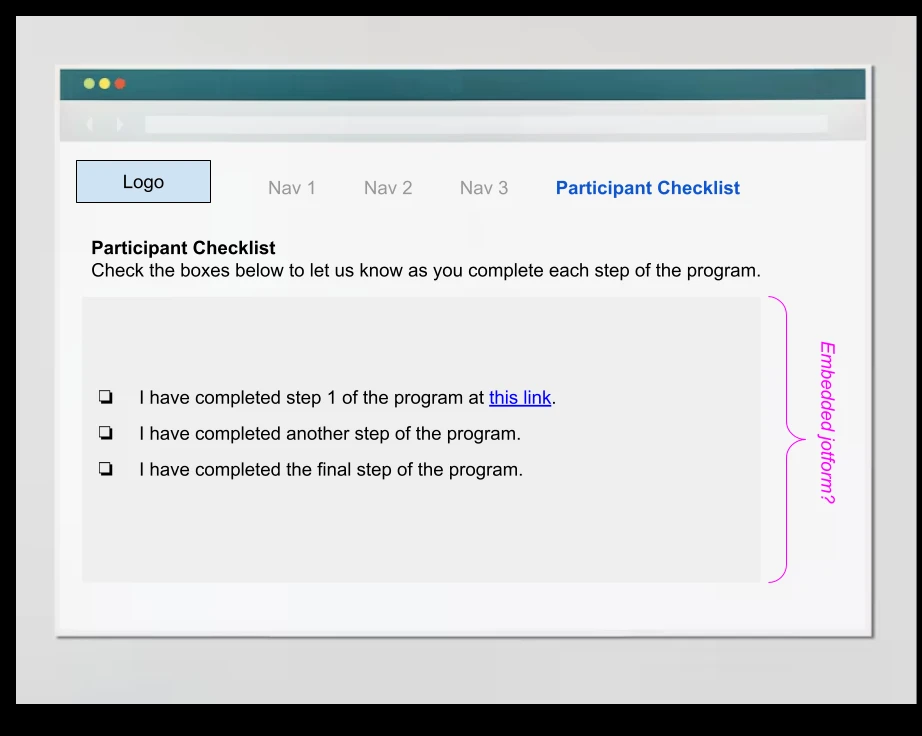
I'm looking for guidance on how to create a form that appears as a checklist for participants in my educational program. I'd like to have the form embedded on a page of my program website, and have participants check the boxes for each task they complete as part of the program as they go through the process (over the course of about 6 months). Is this possible with JotForm and if so, how should I set up my form (or forms?) so that it appears as a checklist?
I've included a very rough mock up to show you what I'm envisioning below. Thanks in advance for any guidance you can provide!
-Taylor

-
 Podo: Support Specialist
Hi Taylor,
Thanks for reaching out to Jotform Support. I'm an AI assistant here to assist you.
You can create a checklist for your educational program participants using Jotform Apps. With Jotform Apps, you can build an app that functions as a checklist where participants can check off tasks as they complete them over time.
Here’s how to set it up:
- In the App Builder, add a Form element to your app.
- Choose the forms you want to include in your checklist app and select Add Forms.
- Configure each form by selecting the gear icon to view properties, then turn on Mark as required. This also enables a "Mark as completed" feature that shows a completed mark when a form is filled out.
- Optionally, enable the Progress Bar in the Settings tab to show progress and add a Restart Button so users can reset the checklist manually.
This setup allows participants to check off tasks as they complete them, and you can embed the app or forms on your program website for easy access.
Let me know if you want detailed steps on embedding the form or app on your website.
Give it a try and let us know how it goes.
-
trosetti
What if I want to show slightly different tasks on the checklist based on user type? Is that possible and if so, how would I be able to customize the form for different user types?
-
Podo: Support Specialist
Hi Taylor,
Yes, it is possible to show slightly different tasks on the checklist based on user type in Jotform. You can customize the form experience for different user types by using conditional logic or by creating multiple forms tailored to each user type and then including them in your checklist app.
Here’s how to customize the form for different user types:
- Create separate forms for each user type with the specific tasks relevant to them.
- Use Jotform Apps to add these forms as elements in your checklist app.
- Set up conditional logic within each form if you want to show or hide certain tasks based on user inputs or selections.
- Alternatively, use the app’s features to control which forms appear based on user type, or embed different forms on different pages of your website targeted to each user group.
This approach allows you to tailor the checklist experience so that participants see only the tasks relevant to their user type.
If you want, I can guide you through setting up conditional logic or creating the checklist app with multiple forms.
Give it a try and let us know how it goes.
Your Reply
Something Went Wrong
An error occurred while generating the AI response. Please try again!