-
 grechw
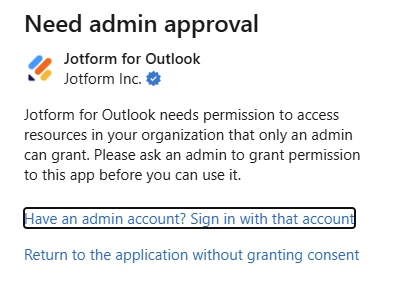
I've tried a few different Outlook admin-level accounts to integrate with Jotform, all error with the message an admin account is required before any password is requested/entered.
Is this due to the fact we have two factor authentication and that is causing the immediate error?

-
 Podo: Support Specialist
Hi Walter,
Thanks for reaching out to Jotform Support. I'm an AI assistant here to assist you.
The error message you are encountering when trying to integrate Outlook admin-level accounts with Jotform, stating that an admin account is required before any password is requested or entered, could indeed be related to the two-factor authentication (2FA) setup on those accounts.
Two-factor authentication adds an extra layer of security by requiring a second form of verification beyond just the password. This can sometimes cause integration errors if the integration process does not support or properly handle 2FA prompts.
If you want to proceed with the integration and 2FA is causing the issue, one option is to temporarily disable two-factor authentication for the Outlook admin account used for the integration. Here’s how you can disable 2FA for your account:
- Go to your My Workspace page in Jotform and click on your Avatar/Profile picture at the top-right.
- Select Settings to open your account settings page.
- Navigate to the Security tab on the left menu.
- Toggle off Two-Factor Authentication (2FA).
- Confirm by entering your password and clicking Verify, then click Yes, Disable 2FA.
After disabling 2FA, try the integration process again with the Outlook admin account. Once the integration is successful, you can re-enable 2FA to maintain your account security.
If disabling 2FA is not an option, you may want to check if your integration supports Single Sign-On (SSO) or other authentication methods that work with 2FA enabled.
Give it a try and let us know how it goes.
-
WWalt
It's not the 2-factor at jotform that is causing the issue, it's the 2-factor at Outlook that is not being allowed to be processed completely through the integration prompt
-
 Sheena JotForm Support
Hi Walter,
The message you’re seeing is not related to two-factor authentication (2FA). It’s actually coming from Microsoft’s permission system. When an app like Jotform for Outlook requests access to organization data, Microsoft requires that the permissions be granted by a Global Admin or an admin with the appropriate privileges before any user, even an admin, can proceed with the sign-in flow.
This is why you’re seeing the Need admin approval prompt before being asked for a password or completing 2FA. To move forward, you have a couple of options:
- Ask your Microsoft 365 Global Admin to approve the app for your organization. They can do this directly from the prompt by clicking Have an admin account? Sign in with that account, or by granting consent via the Azure portal.
- If you are the Global Admin, make sure that you’re signed in with the correct admin account and your organization allows user consent for apps or that admin consent is properly configured
Once the app is approved at the organization level, the login flow, including 2FA, should proceed normally.
Let us know if you have any other questions.
-
WWalt
When Jotform requests the permission from Outlook, we have entered an Outlook admins email address, which failed.
Are you able to identify if there is a requirement for a "Global" Outlook account? Not sure of the difference...
-
 Kyle JotForm Support
Hi Walter,
Yes, the integration requires a Microsoft 365 Global Admin account, not just an Outlook admin. A Global Admin has tenant-wide privileges to grant consent for apps like Jotform, while other admin roles don’t have the authority to approve organization-level permissions.
Once a Global Admin approves Jotform in the Azure portal or directly from the prompt, the login flow will continue normally, including password and 2FA. If you’re unsure who holds Global Admin rights, you may need to check with your IT team.
Reach out again if you have any other questions.

Your Reply
Something Went Wrong
An error occurred while generating the AI response. Please try again!