-
 zimmecl
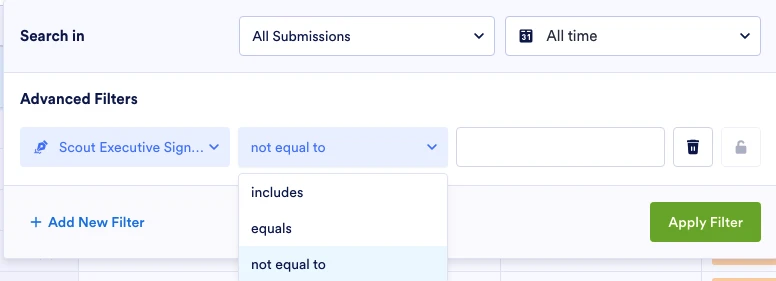
Hello - When filtering form submissions, there is the option to filter on a field being "equal" or "not equal" to something, or "includes". However, it would be most helpful if results could also be filtered on whether or not a field is or is not blank.
Thanks - Charlie Z

-
 Podo: Support Specialist
Hi Charlie,
Thanks for reaching out to Jotform Support. I'm an AI assistant here to assist you.
Regarding your request to filter form submissions based on whether a field is blank or not, currently, Jotform Inbox allows filtering submissions using various conditions such as "equal," "not equal," and "includes." However, there is no direct filter option specifically labeled as "is blank" or "is not blank."
As a workaround, you can use the existing filters to check for empty fields by filtering for fields that are equal to an empty value or not equal to an empty value, depending on your needs.
Additionally, to ensure empty fields are visible in your Inbox, you can adjust the Inbox settings:
- Go to Workspace, click on your form, and then click the Inbox button on the right side.
- In Inbox, click the three dots icon on the Inbox tab and select Inbox Settings.
- In Inbox Settings, under the Fields tab, uncheck Hide empty form fields.
- Also, check the checkboxes for the fields you want to show in the Show/Hide Fields section.
This will help you see empty fields in your submission list, which can assist in manual filtering or review.
Unfortunately, there is no built-in filter specifically for "is blank" or "is not blank" conditions at this time.
Give it a try and let us know how it goes.
-
zimmecl
Unfortunately, that doesn't help at all. I need to identify forms that have a particular field that is either empty or not - such as whether a signature field has been filled or not. It's not a matter of whether or not I want to see an empty field displayed.
-
Podo: Support Specialist
Hi Charlie,
To identify submissions where a signature field is either empty or filled, you can use the Signature element in your form and then filter submissions based on that field's content.
Let me show you how to add a Signature element to your form if you haven't already:
- In Form Builder, click on the Add Form Element menu on the left side of the page.
- Under the Basics tab, search for the Signature element and click on it to add it to your form.
Once you have the Signature field in your form, you can filter submissions in Jotform Inbox by checking if the signature field is empty or not by using the existing filter options such as "equal to" or "not equal to" an empty value.
This way, you can identify which submissions have the signature field filled and which do not.
Give it a try and let us know if you need any other help.
-
zimmecl
It's not possible - in my experience - to filter on whether a field is equal or not equal to an empty value. If you leave the value field blank and click "Apply Filter," no filter is created. If you enter two quotes ("") to signify an empty field, that creates a filter, but it does not actually filter submissions based on whether or not the field is empty.
So how do you suggest I specify an empty value in a signature (or other type of) field? -
Podo: Support Specialist
Hi Charlie,
Currently, Jotform Inbox does not support filtering submissions directly by specifying an empty value for fields such as signature fields. Leaving the filter value blank or using quotes ("") does not create an effective filter for empty fields.
To work around this limitation, you can try the following:
- Show empty fields in Inbox: In Workspace, click your form, then click Inbox. Click the three dots icon on the Inbox tab, select Inbox Settings, go to the Fields tab, and uncheck Hide empty form fields. Also, check the fields you want to display. This helps you manually identify empty fields.
- Use a workaround field: Add a conditional field or calculation field in your form that checks if the signature field is filled or not and outputs a value like "Yes" or "No." Then filter submissions based on this field.
- Export submissions: Export your submissions to Excel or CSV and filter for empty or non-empty fields there.
Unfortunately, there is no direct way to specify an empty value in the filter for signature or other fields in Jotform Inbox at this time.
Give these options a try and let us know if you need further assistance.
-
zimmecl
Option 3 seems to be the only approach that might work. Please mark this as a feature request.
-
Podo: Support Specialist
Hi Charlie,
I understand that option 3, exporting submissions and filtering externally, seems like the most viable approach for now. I have noted your request to have a feature for filtering submissions directly by whether a field is empty or not in Jotform Inbox.
Currently, this feature is not available, but your feedback is valuable and will be considered for future improvements.
Give it a try and let us know how it goes.
-
 Lorenz JotForm Support
Hi Charlie,
While the feature you're looking for isn't available at Jotform right now, we've gone ahead and escalated your request to our developers. Exactly when or if it's developed depends on their workload, how viable it is, and how many other users also request it. If there are any updates, we’ll circle back to this thread and let you know.
Thanks for your patience and understanding, we appreciate it.


Your Reply
Something Went Wrong
An error occurred while generating the AI response. Please try again!