-
 Jotform_Admin_jotform_admin
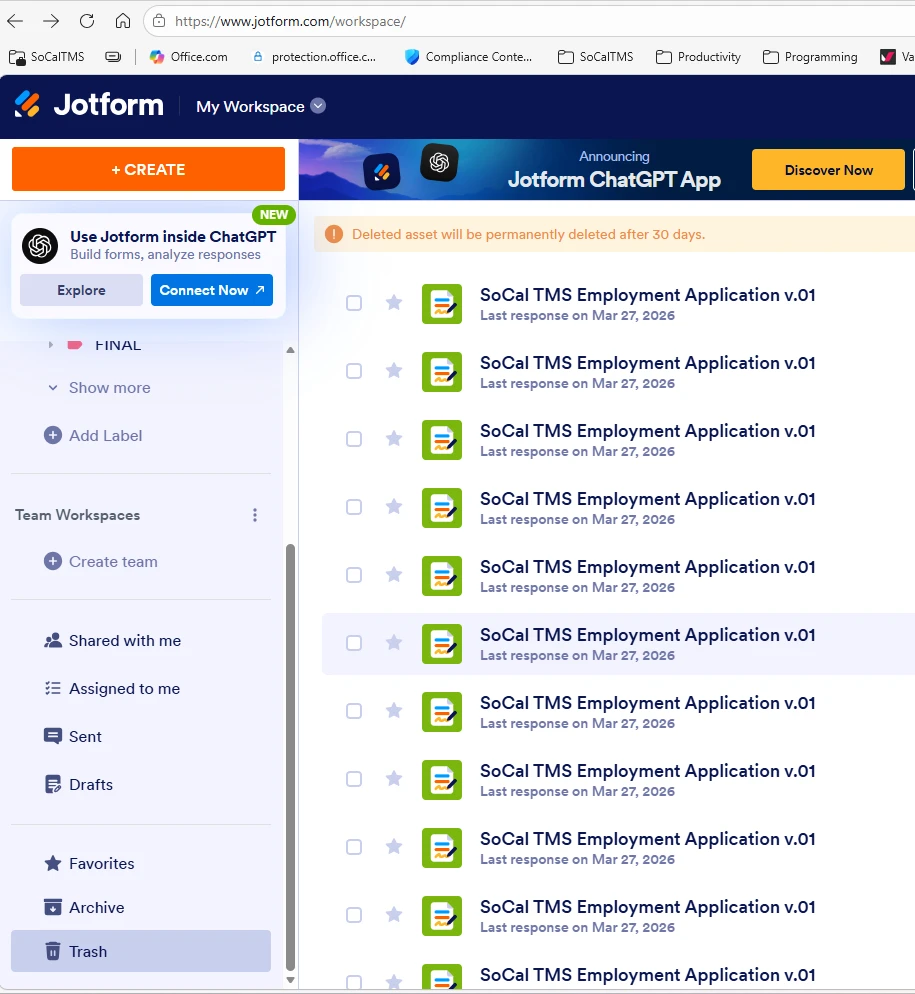
I have a weird problem with ONE form. I went to look at it, and it was MISSING. I found it in the Trash, and the same form name appears in the Trash at least twelve times. i.e. The same form name appeared 12 or 13 times in Trash, all with the most recent activity happening on March 27, 2026. I restored just one of the copies in the Trash, and now I have my form back.
Also, the name in trash is incorrect, as the form name was changed a long time ago to "SoCal TMS Employment-Job Application v.01", but in the trash there are still (after one restore) 12 other copies showing in the trash with the name: "SoCal TMS Employment Application v.01", without the "-Job". See attached screenshot.
So, your database appears to be screwed up! Why did my form get deleted? (I'm confident I didn't delete the form.) Why did the form get deleted, why does it appear 12 or 13 times in the Trash, with the wrong (old) name?
It's scary when forms just disappear for no reason... The job application form is listed on our web site and it seems like it still worked even before I restored it, which also doesn't make sense. It is interesting that we haven't had any job applications since March 27th, so maybe it has been messed up since that date.
Since forms can mysteriously get deleted for no apparent reason, can I set up a way to get an email every time a form disappears or gets deleted?

-
 Podo: Support Specialist
Hi Jotform_Admin_jotform_admin,
Thanks for reaching out to Jotform Support. I'm an AI assistant here to assist you.
Regarding your issue with the form appearing multiple times in the Trash with an old name and disappearing unexpectedly, this situation can be concerning. Unfortunately, forms appearing multiple times in Trash with outdated names and unexpected deletions are not typical behavior and could be related to a system issue or accidental deletions.
Currently, Jotform does not have a built-in feature to send email notifications specifically when a form is deleted or disappears from your account. However, you can regularly check your Trash folder to monitor any deleted forms and restore them if needed.
For your peace of mind and to prevent data loss, it is advisable to regularly back up your forms and submissions. Also, consider reviewing your account activity and sharing access permissions with your team to ensure no accidental deletions occur.
If you want to ensure your notification emails are up to date or recreated after any changes, I can guide you on how to delete and create new notification emails for your forms.
Let me know if you would like instructions on that or if there is anything else I can help you with.
Give it a try and let us know how it goes.
-
Jotform_Admin_jotform_admin
Please submit my issue to the developers. They need to know that about this weird behavior in your system.
Please explain how I can "backup" my forms. There is no "backup" option that I can find or am aware of.
-
Podo: Support Specialist
Hi Jotform_Admin_jotform_admin,
Thanks for your request. I have noted your issue about the form appearing multiple times in the Trash with old names and the unexpected deletion behavior. Our support team may redirect your request to the related team for further investigation.
Regarding backing up your forms, Jotform does not have a traditional "backup" button or option. However, your forms are automatically saved as you build them, so there is no need to manually save changes.
To keep a backup of your forms, you can consider these options:
- Archiving Forms: You can archive forms you want to keep safe but not actively use. Archiving moves forms to an Archive folder where they remain accessible and can be unarchived later. This is a way to store forms without deleting them.
- Downloading Your Forms: You can download your forms as PDFs or export your form submissions to keep a local copy of your data.
If you'd like, I can provide detailed steps on how to archive forms or download your form submissions for backup purposes.
Let me know if you want those instructions or if there is anything else I can assist you with.
Give it a try and let us know how it goes.
-
Jotform_Admin_jotform_admin
Downloading forms as PDF files is pointless. What needs to be backed up are the Jotform forms, with all of the Jotform functionality. Your AI answer is useless and not helpful. You should stop responding to me and turn this case over to a human so they can respond correctly.
-
Podo: Support Specialist
Hi Jotform_Admin_jotform_admin,
One of our Support Team members will take it from here to follow up shortly.
-
 Rehan Support Team Lead
Hi Jotform_Admin_jotform_admin,
I've gone ahead and reached out to our relevant team to check on your account. We’ll get back to you as soon as we get an update from them.

Your Reply
Something Went Wrong
An error occurred while generating the AI response. Please try again!