-
CChris Blythe
I am trying to add JotForm to Digital Expierence site in salesforce but I get this error
This page has an error. You might just need to refresh it. Action.prototype.finishAction Error [Error during LWC component connect phase: [Failed to execute 'appendChild' on 'Node': parameter 1 is not of type 'Node'.] Callback failed: aura://ComponentController/ACTION$getComponent] Failing descriptor: {markup://jotform:aiAgent}
What do I need to do? -
 Reymae JotForm Support
Hi Chris,
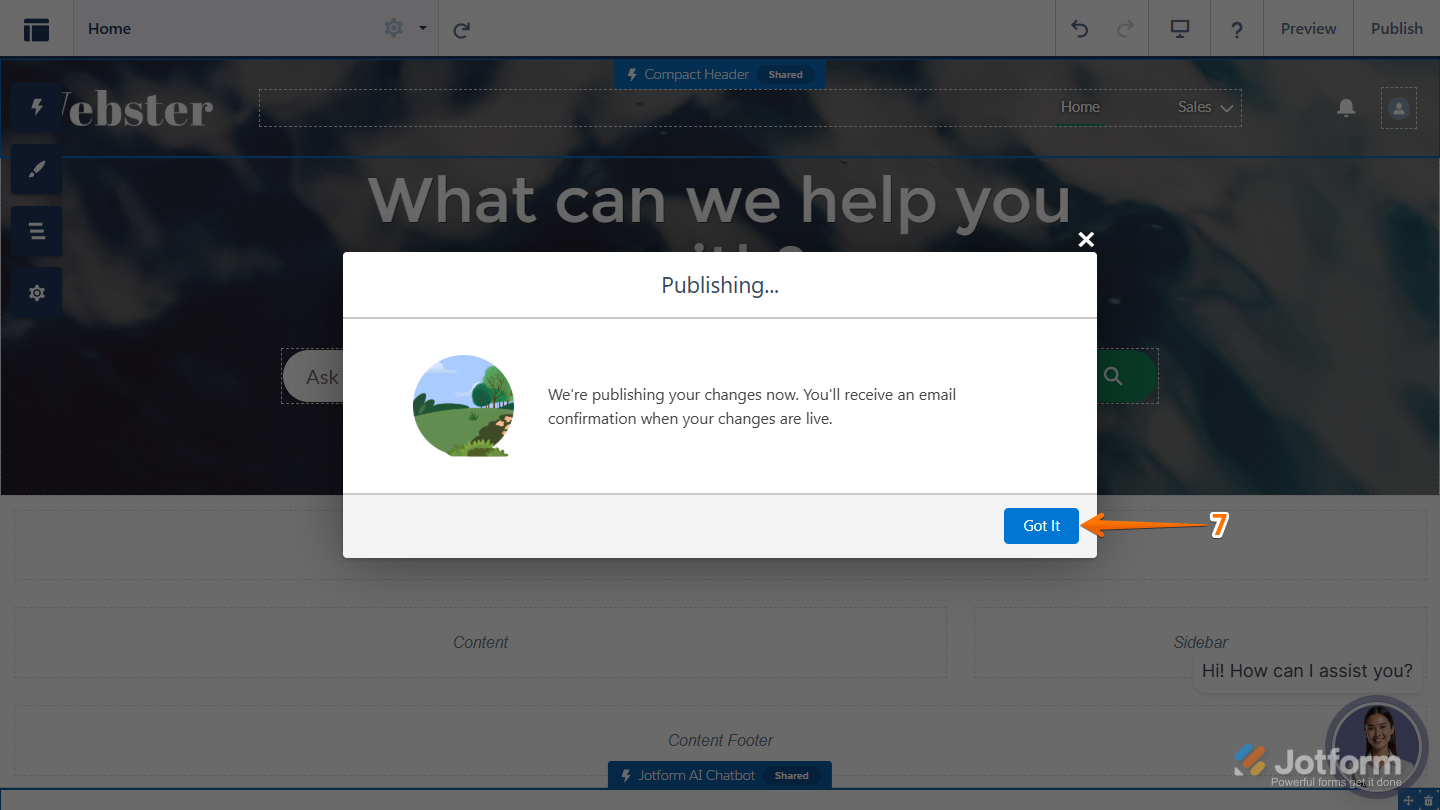
Thanks for reaching out to Jotform Support. The error typically happens when the AI Agent was embedded incorrectly. Adding the Jotform AI Chatbot to your Salesforce is really easy. Let me show you how:
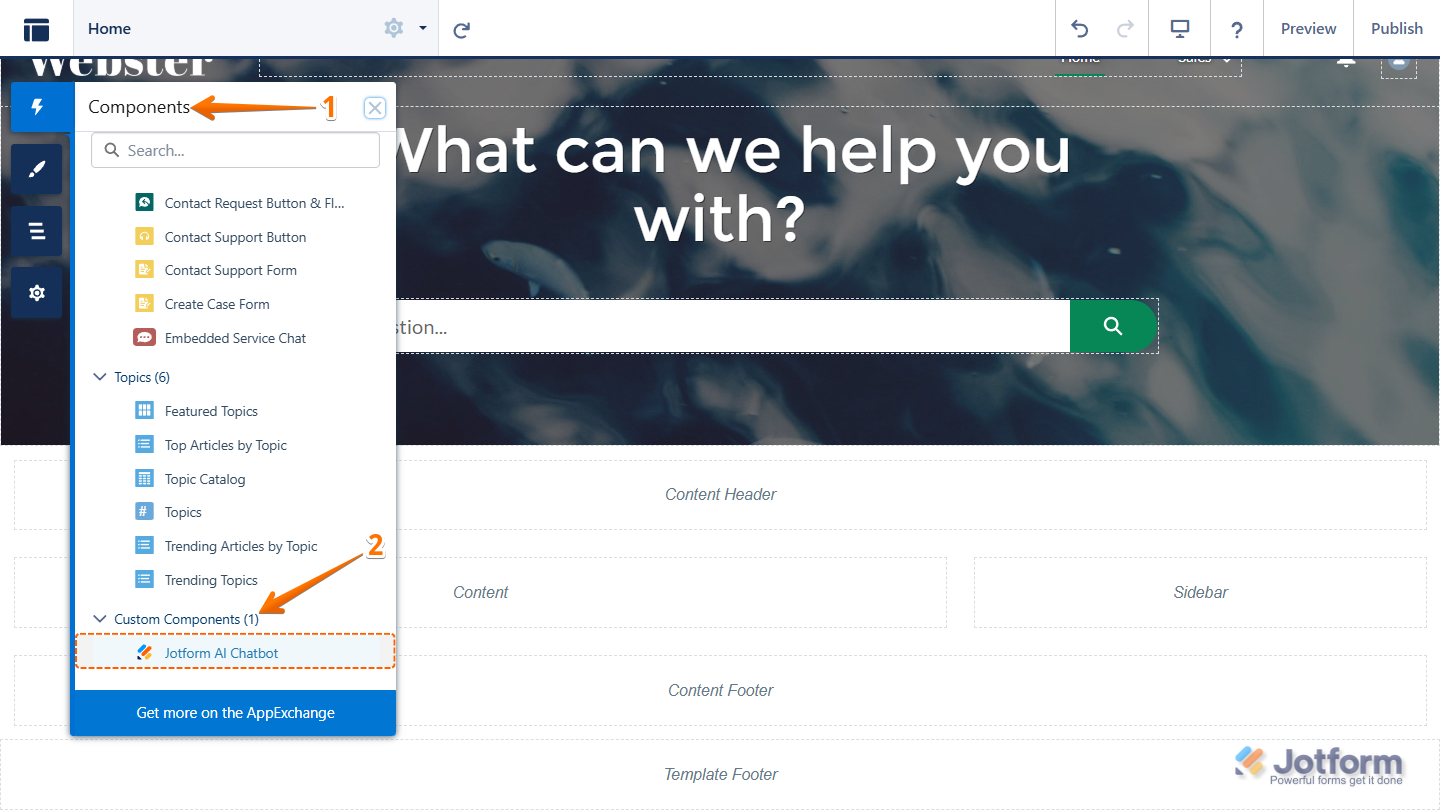
1. In Experience Builder, open the Components panel from the left menu.
2. Scroll to Custom Components, then drag the Jotform AI Chatbot into your site’s header or footer.

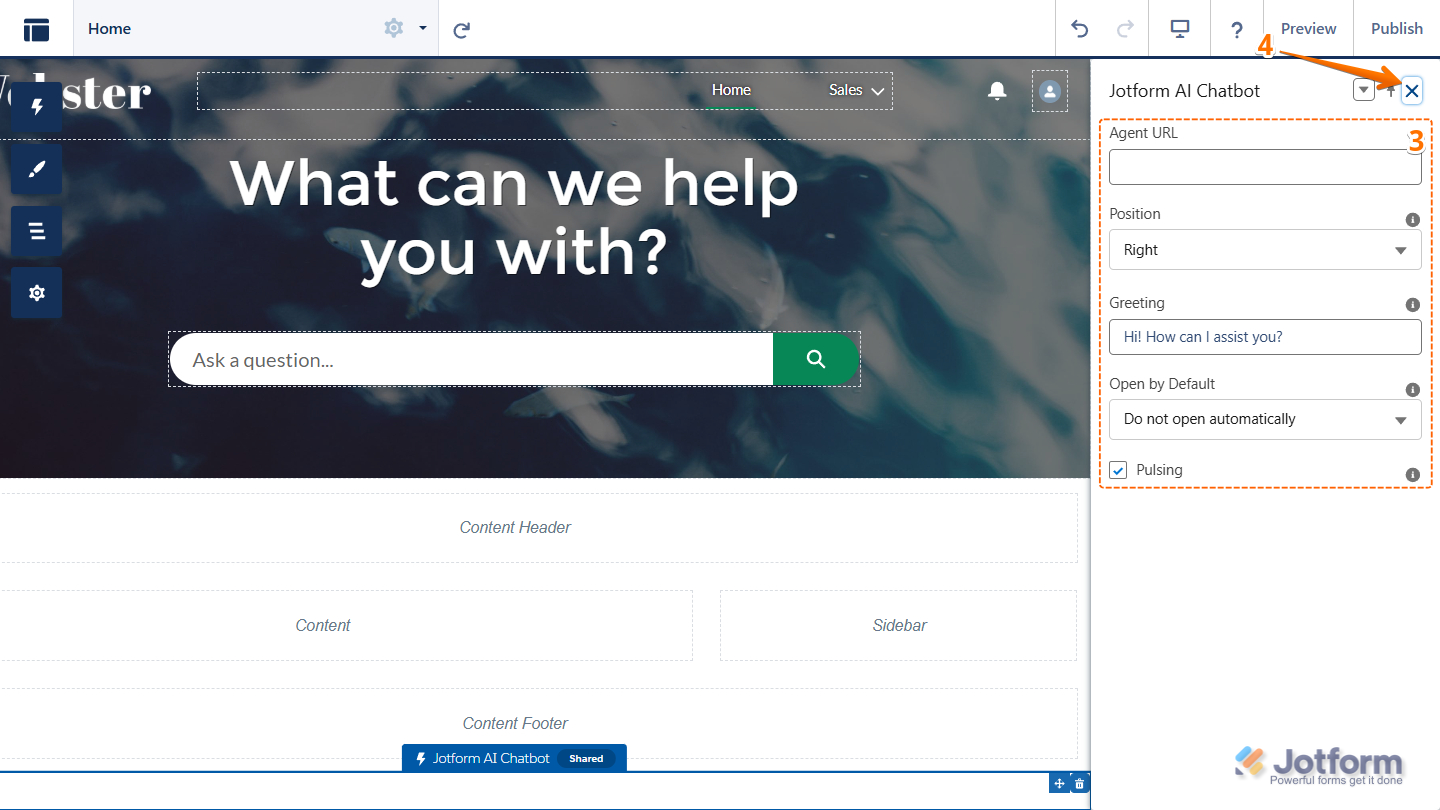
3. Next, use the panel on the right to set up and customize the AI agent.
4. Once you’re done, close the settings by clicking the X in the top-right corner.
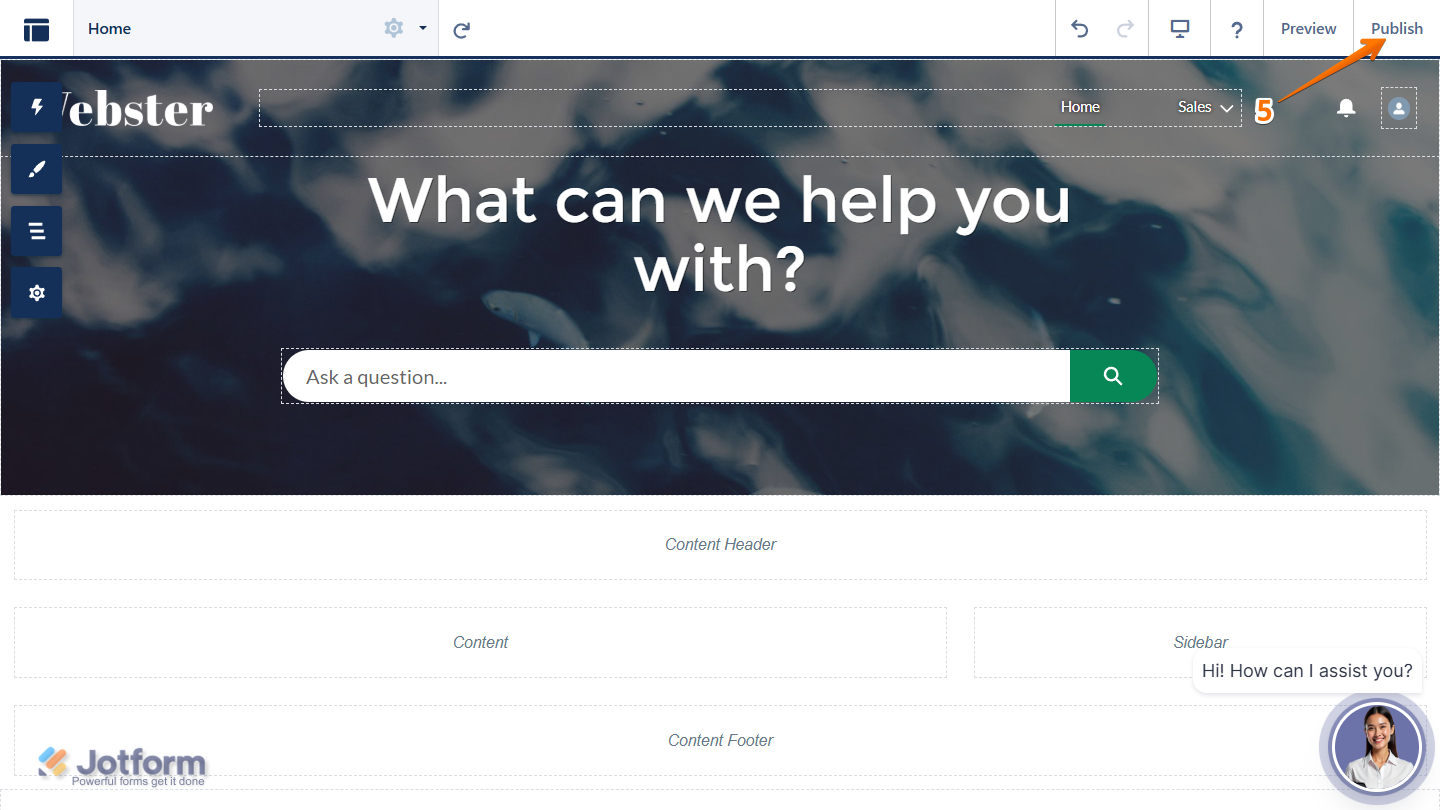
5. Click Publish in the top-right of Experience Builder.
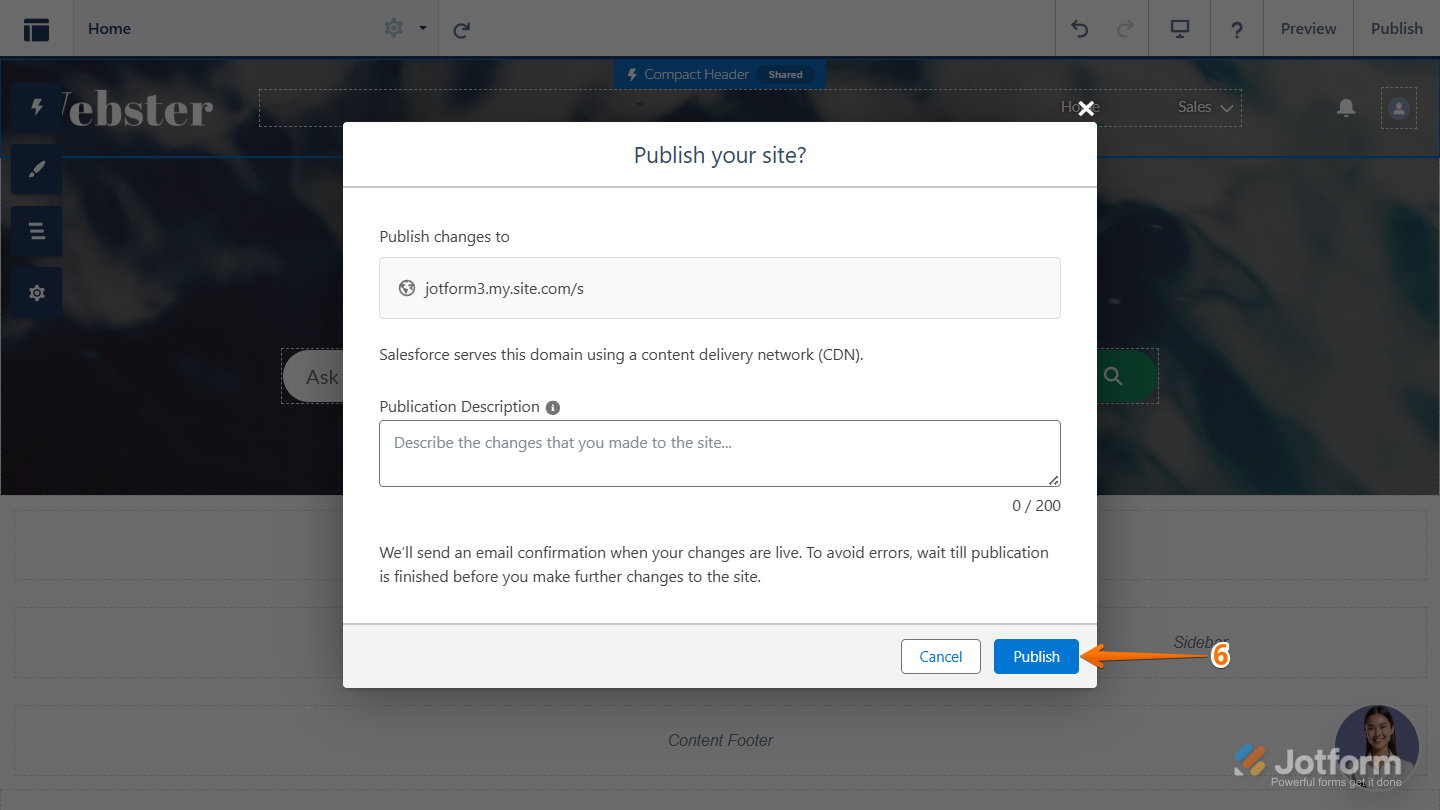
6. In the popup, click Publish again to proceed.
7. Now, click on Got it to confirm.
Reach out again if there’s anything else we can help you with.
-
 tiffanyspencer360
We are getting the same sort of error: This page has an error. You might just need to refresh it. Error during LWC component connect phase: [Failed to execute 'appendChild' on 'Node': parameter 1 is not of type 'Node'.] Failing descriptor: {markup://jotform:aiAgent}
this comes up after we add the chatbot component in
-
 Brandon
Hi Chris,
Thank you for providing the error. Can you share a quick screen recording of what’s happening with the error in view so we can try to replicate it on our end? You can upload it to Google Drive, Dropbox, or record with Loom and send us the link.Let us know if you have any questions.
-
CChris Blythe
Hey Brandon,
Please see attached link
https://drive.google.com/file/d/1rEe3GTIDrYI9zBT8GdyM4oiSUFzVbObz/view?usp=drive_linkMany thanks
-
Brandon
Hi Chris,
Thank you! Can you open up viewing access to anyone with access to the link? We'll take a look once you do so.
Let us know if you have any questions. -
CChris Blythe
Hello Brandon,
Updated
Many thanks
Chris
-
 Emre
EmreHi Chris,
You can follow steps below:
1. Refresh & Clear Cache (quick first step)- Hard refresh: Ctrl+Shift+R (Windows) / Cmd+Shift+R (Mac)
- Try opening in an incognito/private window
- Clear browser cache and cookies
2. Check the JotForm AI Agent Component The failing descriptor {markup://jotform:aiAgent} points to a custom/third-party LWC. You should:
- Go to Setup → Lightning Components and verify the jotform:aiAgent component exists and is active
- Check if it was recently updated or deployed (a bad deployment can cause this)
3. Check for Null/Undefined in the Component Template If you have access to the component code, look for patterns like:
js

// BAD - can cause this error

this.template.querySelector('.container').appendChild(someVar);

// where someVar is null or undefined
Ensure the value being appended is always a valid DOM node.
4. Verify API Version Compatibility
- In Setup → Lightning Components, check the API version of jotform:aiAgent
- Outdated API versions can cause DOM manipulation failures in newer Salesforce releases
5. Check JotForm's Side Since jotform:aiAgent appears to be a Jotform-provided package/component:
- Log into JotForm and check if there are any known outages or updates
- Reinstall or update the JotForm managed package via Setup → Installed Packages
- Contact JotForm support with the Error ID: -1872092931
Give it a try and let us know if you need any other help.
-
CChris Blythe
Hello,
Thank you for the update.
I installed it out of the box and followed the instructions with the latest version, so I would say that some of these steps shouldn't be applicable.
Is there not more understanding of why the error could be happening if just adding it to the site as is, even another user reported same error?
I also have re-installed and came up with the same error.
Many thanks
Chris
-
Brandon
Hi Chris,
We're looking into this issue, and we'll let you know when we have more information. We appreciate your patience, and we'll get back to you as soon as we can.
Let us know if you have other questions. -
Brandon
Hi Chris,
Thank you for your patience! Based on my research, this could be due to permission settings. Try out the following:1. Add the following as CSP Trusted Sites or Trusted URLs
https://www.jotform.comhttps://js.jotform.comhttps://cdn.jotfor.mshttps://api.jotform.com2. Ask Salesforce Admin to check
Setup > Profiles > Your Profile > Enabled Lightning Component Access
Make sure the following are allowed:
- jotform:aiAgent
- Jotform AI Chatbot
If those do not work, let us know and we can investigate further.

Your Reply
Something Went Wrong
An error occurred while generating the AI response. Please try again!