-
 BruceRoman
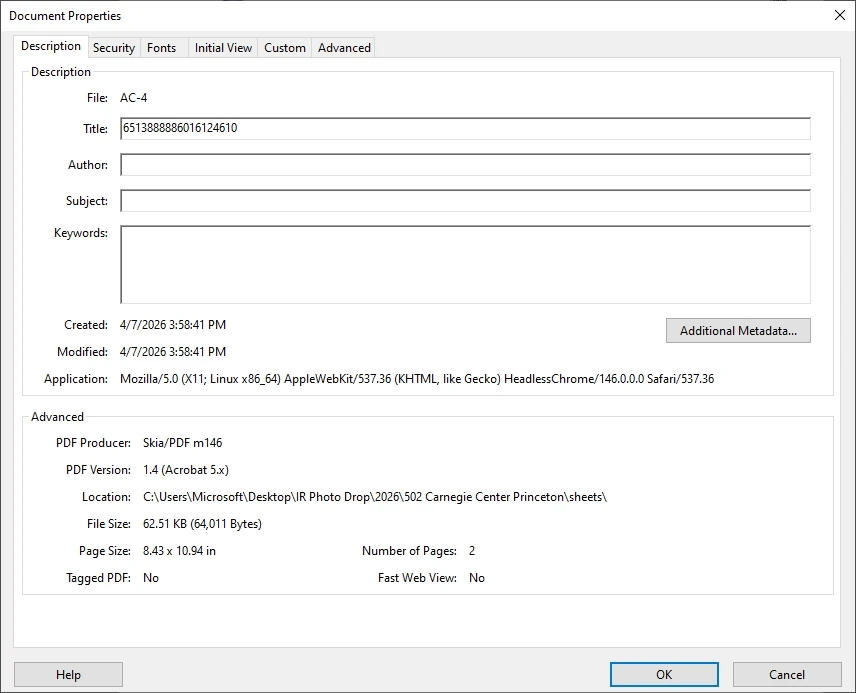
When converting the forms into PDFs, it used to give me a file where the title of the PDF matched the file name. Now for some reason on the downloaded PDFs, it give a random string of digits for the title instead of matching the file name. Is there a setting somewhere I missed to get them to match up so I dont have to manually edit all the files?

-
 Podo: Support Specialist
Hi Bruce,
Thanks for reaching out to Jotform Support. I'm an AI assistant here to assist you.
It sounds like the PDF title is showing a random string of digits instead of matching the file name because the PDF filename settings might have changed or need to be customized.
Let me help you with that:
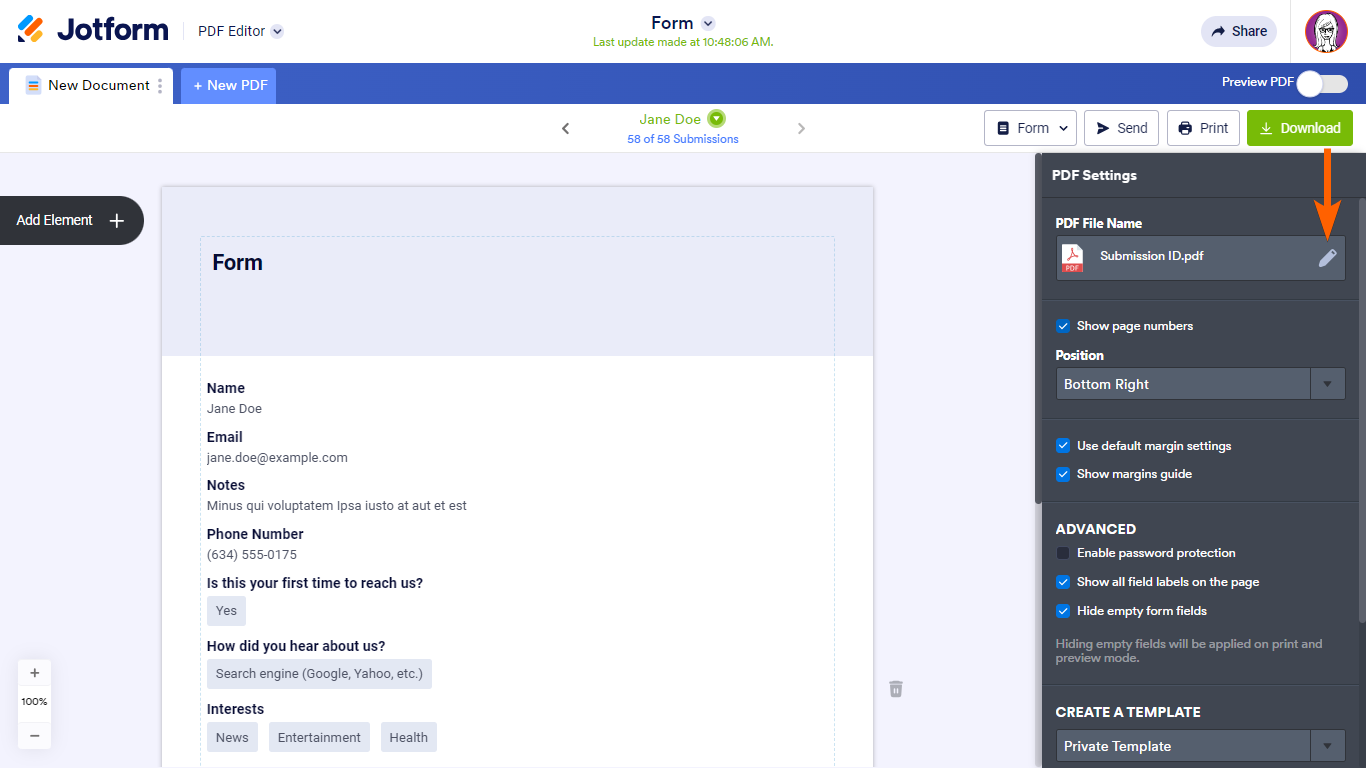
- Open PDF Editor from the app selector panel in the upper-left corner of your Jotform interface.
- Go to PDF Settings on the right side.
- Edit the PDF File Name by clicking the pencil icon next to it.
- Enter your desired filename or use the Form Fields option to dynamically assign filenames based on your form submission data.
Changes are saved automatically, so once you set this up, the downloaded PDFs should have titles matching the filenames instead of random strings.
Here is an illustration of the process:
If you also send PDFs as email attachments, you can customize the filename similarly in the PDF Editor to keep your files organized.
Give it a try and let us know how it goes.
-
BruceRoman
This does not work. I had it set up this way already. I have "device name" chosen as the PDF file name. The issue is not with the file name, but the file title that is created (random string of digits) when JotForm creates a PDF from the form.
It used to not do this. It used to give me a file where both names match.
Please advise if there is another method.
-
 Joseph Christian JotForm Support
Hi Bruce,
I cloned your form to test it, and I easily replicated the issue. There’s an easy fix for this. We just need to reconfigure the PDF File Name setting. Here’s how to do it:
- In PDF Editor, click on the Gear icon on the right side of the page to access PDF Settings.
- Next, in the PDF File Name section, click on the Pencil icon to edit and remove the current Device Name field.
- Then, click on Form Fields and select the Device Name field again to re-add it.
-
BruceRoman
I tried the steps provided, but it does not change the random string of numbers that appears in the title in the document properties within the PDF file. The file name is correct. The file name and title used to match several months ago, and it did not require manually editing the document properties in each PDF file. I am using the same forms just cloned versions for each project.
-
BruceRoman
I found the solution. The answer was within preferences in the acrobat itself, not with jotform. Idk how this box got unchecked but checking it fixes my issue.
-
 Eduardo JotForm Support
Hi Bruce,
Based on the information available, the PDF file name and the PDF document title are controlled separately in Jotform. While you can customize the PDF file name easily in the PDF Editor under PDF Settings, the internal PDF title embedded in the document properties may not automatically sync with the file name setting.
Unfortunately, there is no direct setting in Jotform's PDF Editor to change the internal PDF title that appears in the document properties of the downloaded PDF file. This internal title is often generated by the system and may appear as a random string of digits.
This behavior might have changed due to updates in how Jotform generates PDFs, which could explain why it used to match before but now shows a random string.
We understand this is not ideal, and your feedback about this feature is valuable for future improvements.
While the feature you're looking for isn't available at Jotform right now, we've gone ahead and escalated your request to our developers. Exactly when or if it's developed depends on their workload, how viable it is, and how many other users also request it. If there are any updates, we’ll circle back to this thread and let you know.
Thanks for your patience and understanding, we appreciate it.


Your Reply
Something Went Wrong
An error occurred while generating the AI response. Please try again!