-
 modelcompentries
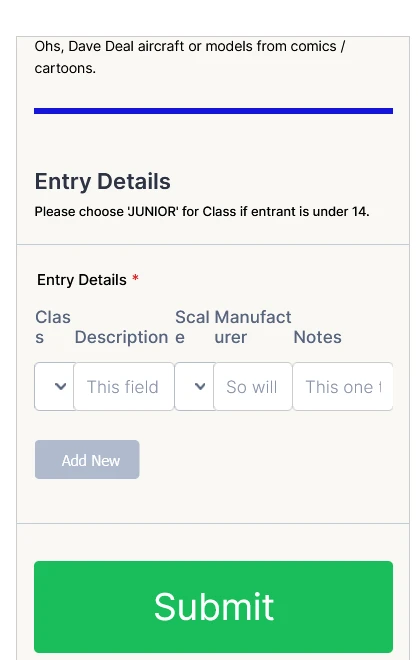
As above - the form works well on tablet and properly on PC, but is too narrow to use on mobile, everything is crammed together.
I have tried various CSS scripts that I have found here but I guess they need to be written specifically for the form to which they are being applied, as none of them have helped (I will learn CSS when I get some time, not this week though!)
Does anyone have a solution?
The fields all relate to the same entry, so ideally they need to be kept together - maybe 2 lines for each entry would be OK for mobile.
Thanks. :)
 Page URL: https://form.jotform.com/260943123858866
 -
modelcompentries
For further information - I have tried redoing the form at 320 px wide and the Configurable List widget gets scrambled. I need to use that particular widget as there doesn't seem to be another way to do what I require - I have a thread about it somewhere here.
Thanks again.
-
 Nikola JotForm Support
Hi modelcompentries,
Thanks for reaching out to Jotform Support. To resolve the issue, add the existing CSS code from the widget inside this CSS code:
@media (min-width: 768px){

Existing code is here

}
Here are the steps for adding CSS code to the Configurable List widget and the whole CSS code:
- First, copy this code:
/* adjust CL fields width */

@media (min-width: 768px){

.configurable-list-field-row {

display: grid !important;

grid-template-columns: 11% 28% 11% 22% 28%;

/* adjust width as needed */

}

.configurable-list-field-wrapper {

max-width: none !important;

}}

/* Ends here */
2. Open your form in Form Builder, scroll down, and select the Configurable List widget.
3. Click on the Wand icon on the right side of the widget to open Widget Settings.
4 . Under the Custom CSS tab, paste the code into the CSS Code box and click Update.
Let us know if you have any other questions.
-
modelcompentries
That's sorted it out, thank you very much.
-
 Podo: Support Specialist
Hi Mackay Scale Modellers,
Your request has been answered and the thread is closed.
If you have another question or need more help, feel free to reply here and we'll assist you right away.
Your Reply
Something Went Wrong
An error occurred while generating the AI response. Please try again!