-
 jrreadmin
I have a PDF attachment that is included in the auto responder email which is under 5 MB. However it keeps disappearing from the settings and is not being delivered to clients who fill out a required form to receive it.
*I am a new customer and not happy at this time*
-
 Podo: Support Specialist
I’m really sorry for the frustration, especially as a new customer — let’s get this PDF attachment issue fixed.
Since the PDF is under 5 MB but keeps disappearing and not sending, please try fully removing and re-adding it in your autoresponder email:
- In Form Builder, in the orange navigation bar at the top, click on Settings.
- Click on Emails on the left side of the screen.
- Hover your mouse over your Autoresponder email and click Edit.
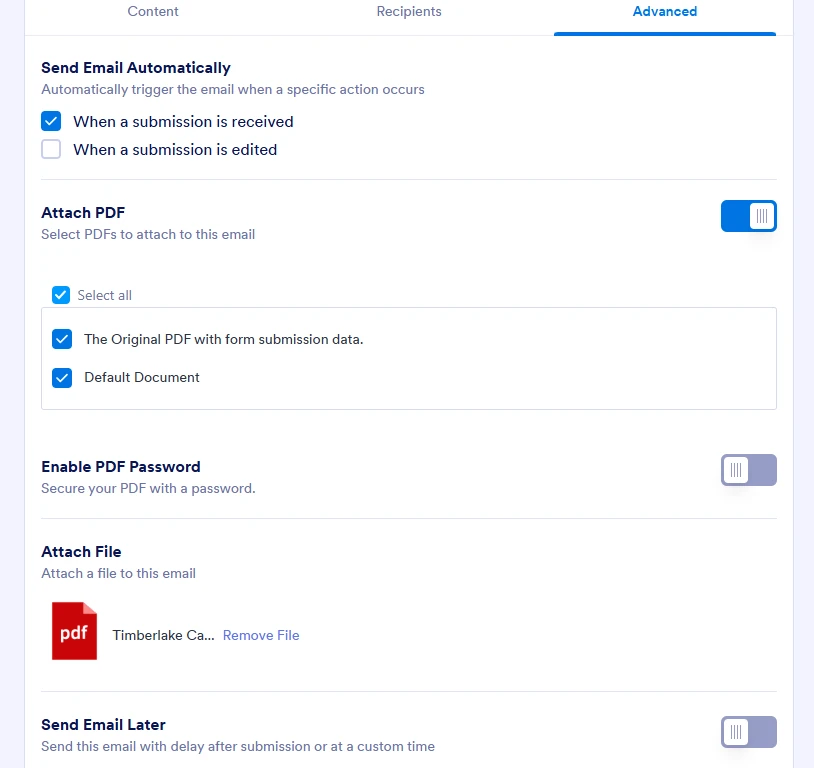
- Go to the Advanced tab.
- In the Attach File section, click Remove File, then re-upload your PDF document.
- Scroll down and click Save Email.
If you’re also sending uploaded files as attachments, make sure the Send File Uploads as Attachments toggle is enabled in the Advanced tab.
If this still happens after re-adding the file, can you tell me:
- The form URL you’re using
- Whether the issue happens on every submission or only sometimes So I can help you dig deeper into what’s going on.
Your Reply
Something Went Wrong
An error occurred while generating the AI response. Please try again!