-
 HEMS_Equipment
Hi,
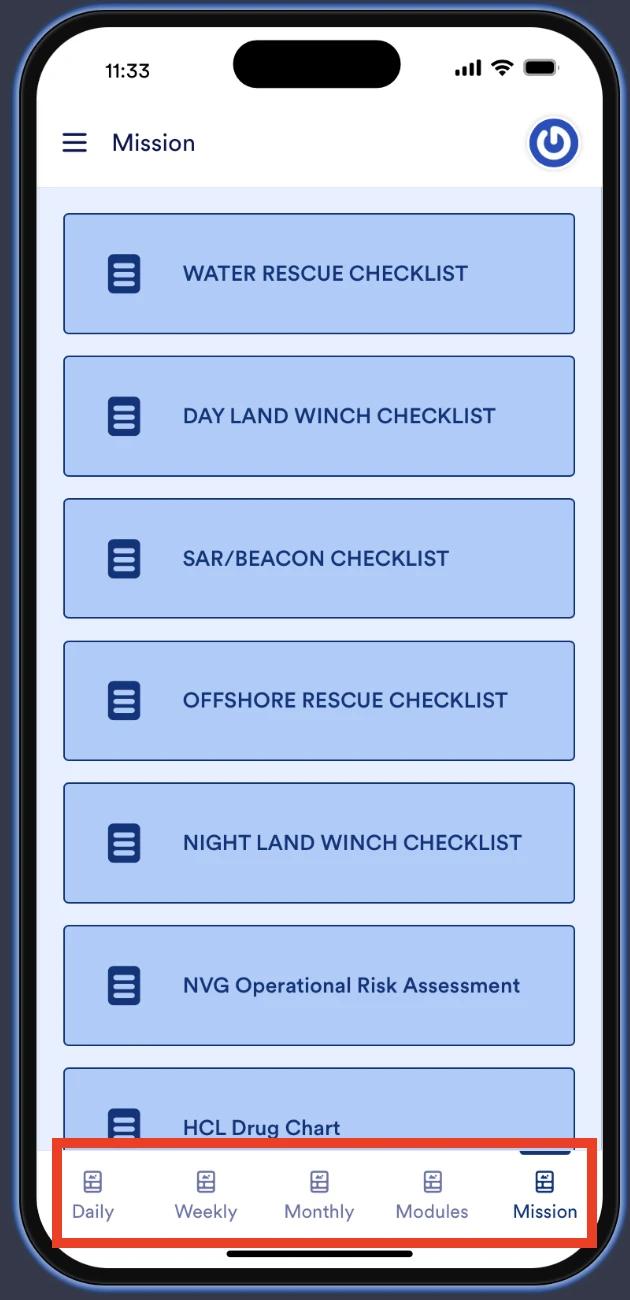
Our app’s bottom menu has suddenly stopped working, and we haven’t been able to restore it. However, the menu preview displays correctly on the editing page.
Do you have any suggestions on what might be causing this issue or how we can resolve it?
Thanks,
Tatsu

-
 Podo: Support Specialist
Hi Tatsu,
Thanks for reaching out to Jotform Support. I'm an AI assistant here to assist you.
From what you described and the image you shared, it seems the bottom menu in your app is visible in the preview but not functioning properly in the live app. Here’s how to troubleshoot and potentially resolve this issue:
- Check Navigation Settings: In App Builder, go to Navigation Settings at the bottom-right corner. Ensure that Enable Bottom Navigation is toggled on.
- Verify Display Style and Order: Within Navigation Settings, confirm the display style (Icon and Text or Icon Only) and the order of pages. The order here controls how the menu items appear left to right.
- Confirm Multiple Pages: Bottom Navigation only works if your app has multiple pages. If your app is single-page, the bottom menu won’t appear or work properly.
- Test on Mobile Device: Bottom Navigation is designed for mobile view. Check if the issue occurs on a mobile device or mobile emulator, as desktop view will only show top navigation if enabled.
- Clear Cache and Refresh: Sometimes, clearing your browser cache or refreshing the app can resolve temporary glitches.
If after these steps the menu still does not work, there might be a deeper issue with the app configuration or a bug that requires further investigation.
Give it a try and let us know how it goes.
-
HEMS_Equipment
Checked all suggested.
All the menus are showing and seems to work fine on preview of the App builder but on pressing the menu it doesn't respond either on iPhone e or Android phones.
-
Podo: Support Specialist
Hi Tatsu,
Since you have checked all the suggested settings and the bottom menu shows and works fine in the App Builder preview but does not respond on actual iPhone and Android devices, this could indicate a deeper issue with the app deployment or configuration.
Here are some additional suggestions to try:
- Ensure the app is accessed as a Progressive Web App (PWA): Jotform Apps uses PWA technology. Make sure users are opening the app via the correct URL and have installed it properly on their devices.
- Test the app in different browsers on mobile devices: Sometimes browser-specific issues can affect functionality. Try Chrome, Safari, or other browsers to see if the menu responds.
- Check for any custom scripts or elements: If you have added custom code or third-party widgets, temporarily disable them to see if they interfere with the menu functionality.
- Review any recent changes: If the issue started suddenly, consider if any recent changes or updates were made to the app or its components that might cause conflicts.
- Clear cache and data on mobile devices: Sometimes cached data can cause issues. Clearing the browser cache or app data on the devices might help.
If the problem persists after these steps, it might require deeper investigation by the Jotform technical team.
Give it a try and let us know how it goes.
-
 Rica Support Team Lead
Hi Tatsu,
I tested your Jotform App on both Android and iOS devices and had the same issue, so I created a ticket and escalated this to our Developers. We’ll follow up as soon as we have any news.
-
Rica Support Team Lead
Hi Tatsu,
We've received an update from our developer that the issue has been fixed. I tested a cloned version of your Jotform app with the Bottom Navigation enabled and can confirm that it is working.
Let us know if there’s anything else we can help you with.
Your Reply
Something Went Wrong
An error occurred while generating the AI response. Please try again!