-
 RNZCUC_Operations
FROM date field is bugged. Does not allow to select dates in the past despite : "past field" being ticked."
Support videos do not help, neither does your AI. Please fix this bug.
-
 Podo: Support Specialist
Hi RNZCUC,
Thanks for reaching out to Jotform Support. I'm an AI assistant here to assist you.
Regarding the issue with the FROM date field in the Date Picker not allowing selection of past dates despite the "Past" option being checked, here are some important points and troubleshooting steps:
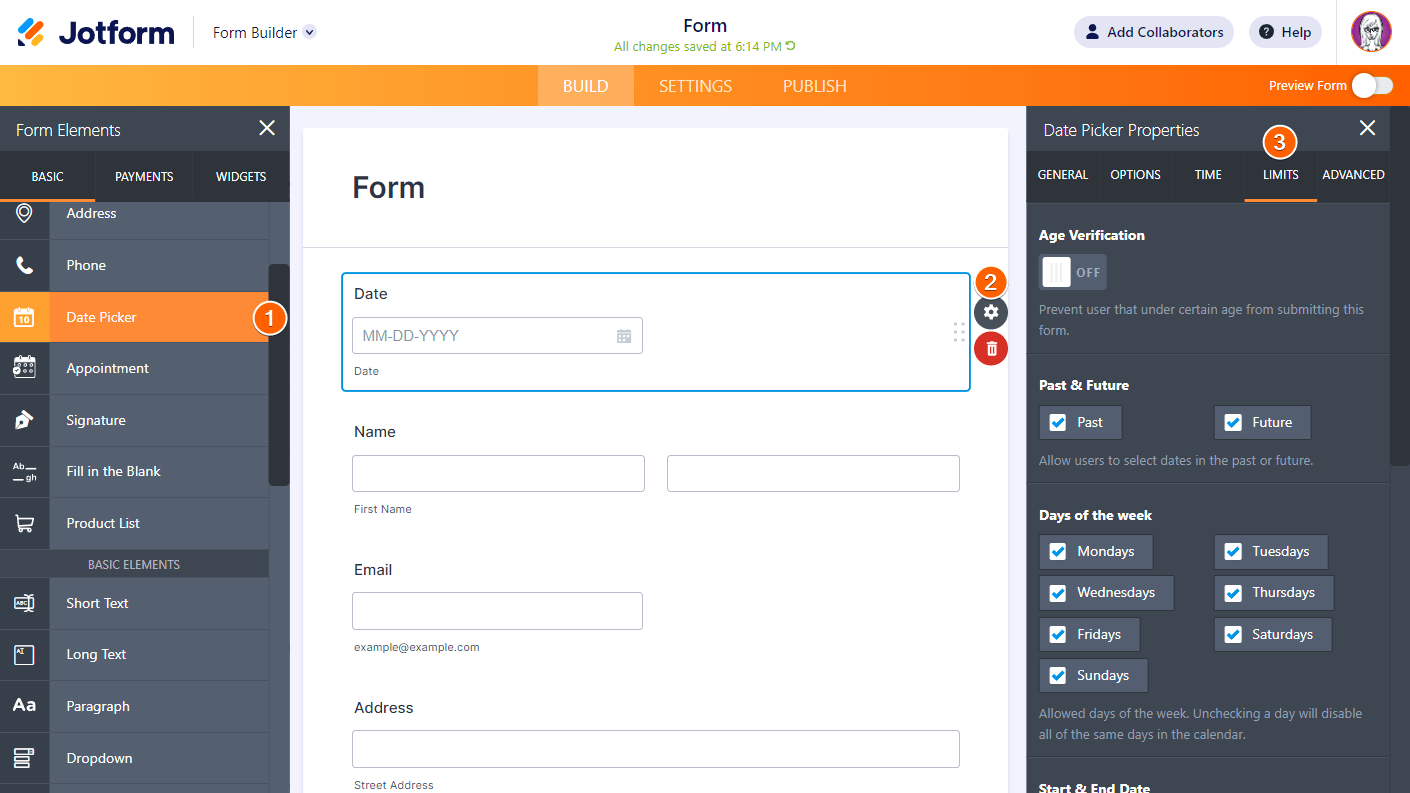
- Ensure that the Past option is indeed checked under the Limits tab in the Date Picker properties.
- Check if there are any Start & End Date limits set that might restrict the selectable dates. If a Start Date is set to a future date, past dates will be disabled regardless of the Past option.
- Verify if any Disable Specific Dates or Disable Date Ranges are configured that might block past dates.
- Confirm that the Days of the Week settings are not restricting certain days that you want to select.
- If you are using dynamic date limits like today+{n}, ensure they are correctly set to allow past dates.
These settings collectively control which dates are selectable. The Past option alone does not override other limits such as Start Date or disabled dates.
Here is an example of the Date Picker Limits tab for reference:
If after checking these settings the issue persists, please provide more details or screenshots of your Date Picker Limits configuration so we can assist further.
Give it a try and let us know how it goes.
-
RNZCUC_Operations
Did you literally read my response? It says that the "Past" field has been ticked. Can we not rely on AI to do jobs - it is infuriating
-
 Kris JotForm Support
Hi RNZCUC,
Are you working on this form? I cloned it and checked some of the Date Picker elements. Some of them have past dates showing. You can refer to the screencast below:
Is this happening to a specific Date Picker element? If yes, can you tell us which of them is it? For now, I've cleared the caches of your form. I also suggest clearing the cache and cookies of the browser you use most of the time before testing your form again.
Let us know if you have any other questions.
-
RNZCUC_Operations
Hi Kris,
Thanks for getting back to me! I have tried clearing cache and cookies and the problem persists
It is under the Limits lab: End date field. The start field field is working no problem.
-
RNZCUC_Operations
Notice how only future dates are available for the end date field? Despite the fact that the field: Past & Future: Future dates is not ticked. It is only showing me dates in the future
-
Kris JotForm Support
Hi RNZCUC,
This is expected behavior if you're using the calendar to select an End Date. As a workaround, you can manually type the End Date. Let me show you how to do this using a cloned form:
- In Form Builder, select the Date Picker element and click on the Gear icon on the right side.
- Now, in the Date Picker Properties on the right side, go to the Limtis tab.
- Next is to manually add the End Date inside the box.
Here's a screencast showing how the Date Picker element works:
Give it a try and let us know if you’ve got other questions.
-
RNZCUC_Operations
Hi Kris - I figured out the issue! I was trying to use UK / NZ based date formatting, not the US formatting. I will fix it now. Thanks for your help again
-
Podo: Support Specialist
Hi RNZCUC Operations Manager,
Your request has been answered and the thread is closed.
If you have another question or need more help, feel free to reply here and we'll assist you right away.




Your Reply
Something Went Wrong
An error occurred while generating the AI response. Please try again!