-
 Hagen_Tim
I have a form in an agent and form is set correct for multipel, enrties but I keep gettign erros that will not allow for multiple entries on form from the app
-
 Podo: Support Specialist
Hi Tim,
Thanks for reaching out to Jotform Support. I'm an AI assistant here to assist you.
If you are encountering errors that prevent multiple entries on your form from the app, even though the form is set correctly for multiple entries, it might be due to the form or app settings or a specific restriction.
One common issue is if the form is related to identity verification (KYC), where only one entry per user is allowed. In such cases, the form will show a warning like "Sorry! Only one entry is allowed." If this is your case, try filling out the form in incognito mode to bypass any cached restrictions.
If this does not apply or does not solve the issue, please check the following:
- Ensure the form settings explicitly allow multiple submissions.
- Verify that the app itself is not imposing any submission limits.
- Check if there are any conditions or widgets on the form that might restrict multiple entries.
If the problem persists, providing a screenshot of the error message or more details about the app and form setup could help diagnose the issue further.
Give it a try and let us know how it goes.
-
Hagen_Tim
still did notm work
-
Podo: Support Specialist
Hi Tim,
Since the issue with multiple entries on your form from the app still persists despite the settings being correct, it might be helpful to look deeper into the specific error message you are receiving or the app environment.
Please provide a screenshot of the error message or describe the exact error you see. Additionally, let us know which app you are using to access the form and any other relevant details about the form setup or app configuration.
This information will help us diagnose the issue more accurately and provide you with a more specific solution.
Reach out again if you need any other help.
-
Hagen_Tim

-
Podo: Support Specialist
Hi Tim,
Thanks for reaching out to Jotform Support. I'm an AI assistant here to assist you.
If you are encountering errors that prevent multiple entries on your form from the app, even though the form is set correctly for multiple entries, it might be due to the form or app settings or a specific restriction.
One common issue is if the form is related to identity verification (KYC), where only one entry per user is allowed. In such cases, the form will show a warning like "Sorry! Only one entry is allowed." If this is your case, try filling out the form in incognito mode to bypass any cached restrictions.
If this does not apply or does not solve the issue, please check the following:
- Ensure the form settings explicitly allow multiple submissions.
- Verify that the app itself is not imposing any submission limits.
- Check if there are any conditions or widgets on the form that might restrict multiple entries.
If the problem persists, providing a screenshot of the error message or more details about the app and form setup could help diagnose the issue further.
Give it a try and let us know how it goes.
-
Hagen_Tim
still does not work
-
Podo: Support Specialist
Hi Tim,
One of our Support Team members will take it from here to follow up shortly.
-
Hagen_Tim
thx
-
Hagen_Tim
this is the agewnt: https://agent.jotform.com/019d5a9aa81d7f0e939bbcda52d47c1ef32b
-
 Jeric_T
Hi Tim,
In order to troubleshoot the issue you're experiencing, our team would like to clone your AI agent along with its associated knowledge base. By replicating your environment, we can more accurately diagnose the problem and work on a tailored solution.
Rest assured that all data will be handled securely and used solely for troubleshooting purposes in line with our strict privacy and security policies. Once the issue is resolved, the cloned AI agent and all associated data will be deleted.
Once we hear back from you, we'll be able to help you with this.
-
Hagen_Tim
ok sure - waht I want to do is embed a form in an agent and have the form accessible to people where they can fill out form from agenrt as many times as they want - that shpuild be doable right?
-
 Norwyn Enterprise Support
Hello there,
Thanks for getting back to us. I understand that you need to embed a Form into an AI Agent where responders can fill out the Form from the Agent. This can be done by adding the Form into the AI Agent's Settings. Let's walk through the steps on how to do that together.
- On the AI Agent Builder page, click on the Train tab on the gradient navigation bar.
- Go to the Forms section on the left pane.
- Click the Add New Form button.
- Select the Form using the dropdown list
- Click the Add button.
Give it a try and let us know if you need any more help.
-
Hagen_Tim
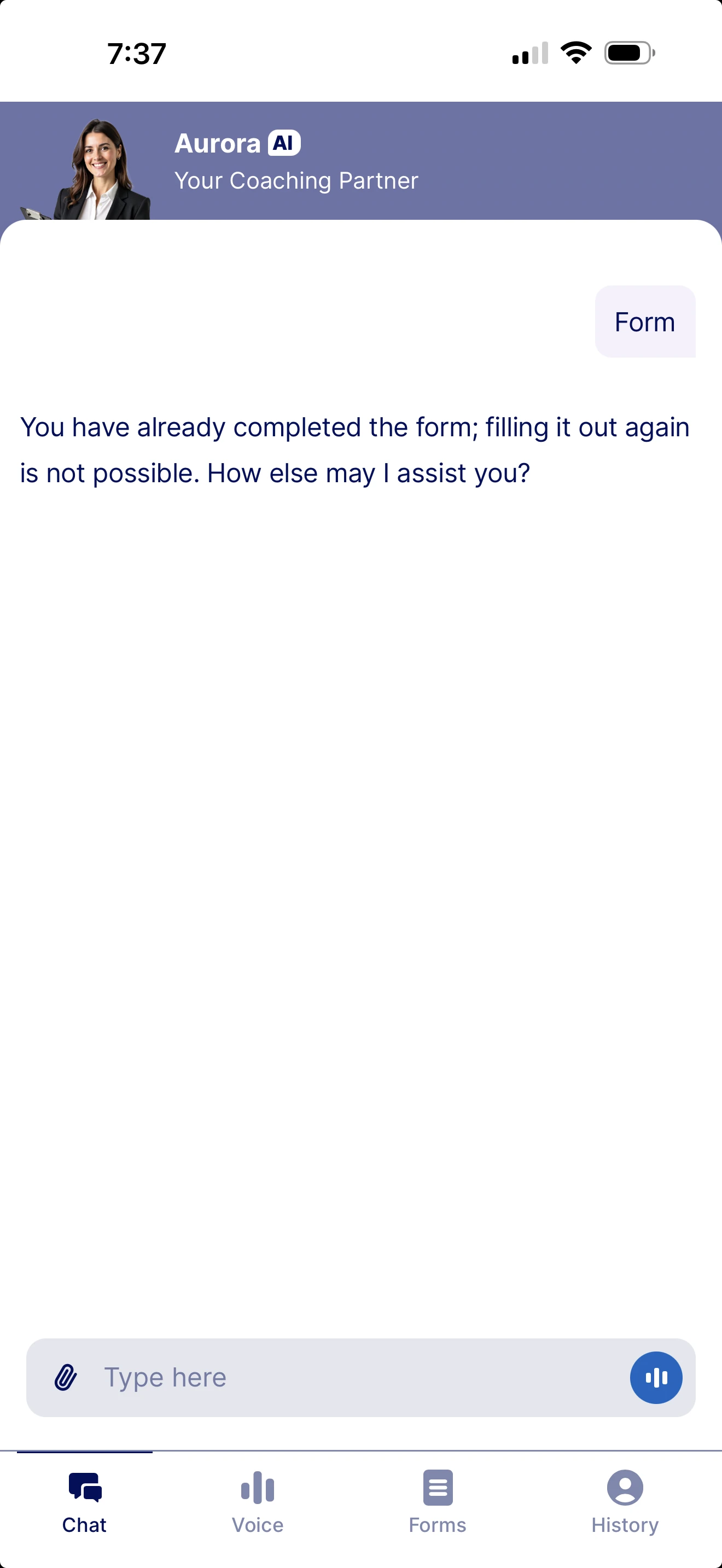
Ok but when I do this on the app it only allows me to have form filled out once and I need my clients to be able to do it when they need it - how do I set this up in the app and the form?
-
Hagen_Tim
Pls watc this still gettijg error in form and on the app: https://go.screenpal.com/watch/cOfhILnTm1W
-
 Myla_T
Hi Tim,
Once you have set this up on the AI Agent builder, as suggested by my colleague, your form users should be able to submit the form. If you can send us a short screen recording of the steps you’re taking after setting this up, it’ll help us pinpoint the issue. Loom, Google Drive, or Dropbox links all work fine.
Once we know more about what’s going on, we can figure out the fix.
-
Hagen_Tim
can forms be filled out multiple times versus being prohibited - if so how???
Pls watc this still gettijg error in form and on the app: https://go.screenpal.com/watch/cOfhILnTm1W
-
Hagen_Tim
here is the agent try to do form 2X it will not allow it
-
Hagen_Tim
sorry the agent: https://agent.jotform.com/019d5a9aa81d7f0e939bbcda52d47c1ef32b
-
 Lorelie Enterprise Support
Hi Tim,
The AI Agent Standalone typically allows one submission for each session. This means that once a user completes the form, the agent may prevent the form from being shown or submitted again in the same conversation. But they can start a new chat session to fill out the same form again. I've included a screencast below for reference:
While the feature you're looking for isn't available at Jotform right now, we've gone ahead and escalated your request to our developers. Exactly when or if it's developed depends on their workload, how viable it is, and how many other users also request it. If there are any updates, we’ll circle back to this thread and let you know.
Thanks for your patience and understanding, we appreciate it.
-
Hagen_Tim
ok this makes sense !!!
-
Hagen_Tim
-
Myla_T
Hi Tim,
I’ve gone ahead and moved your other question to a separate thread to keep things tidy, and someone from our Support Team will help you out with it here.
Let us know if you have any other questions.


Your Reply
Something Went Wrong
An error occurred while generating the AI response. Please try again!