-
 goldnwlf
I am trying to send emails to the people in my inbox. Yesterday it was working fine, until I was about half way through sending my emails. Now, I click on the reply button, write my email, click Send Email, enter the captcha, and click Send Email. Then nothing happens. This is happening for all the people I still need to email. I also signed out and signed back in, as well as tried it on multiple browsers, incognito mode.
Can you please assist?
-
 Podo: Support Specialist
Hi Lauren,
Thanks for reaching out to Jotform Support. I'm an AI assistant here to assist you.
It seems you are experiencing an issue where emails from your Jotform Inbox are not sending after you complete the captcha and click Send Email. Since you have already tried signing out and back in, and using multiple browsers including incognito mode, here are some troubleshooting steps and information that might help:
How to send emails from Jotform Inbox:
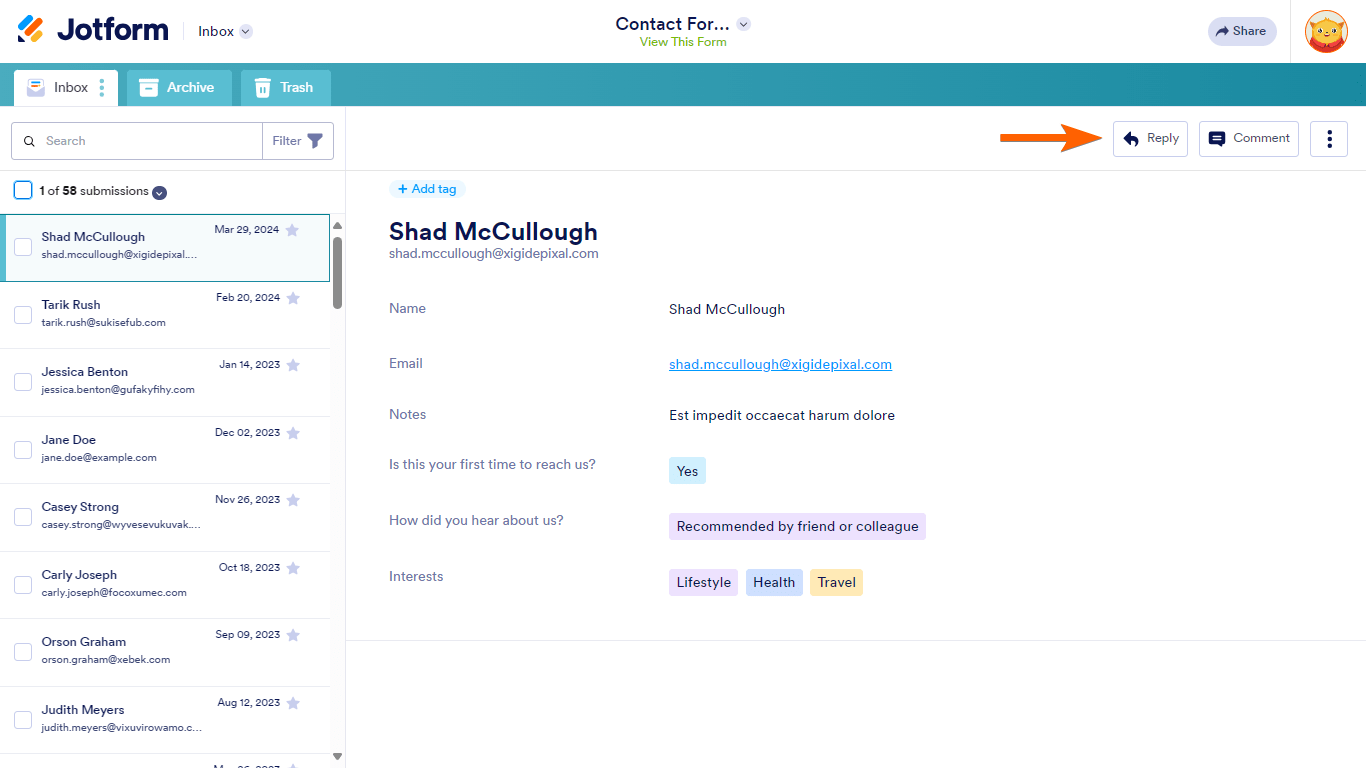
- In Jotform Inbox, select the entry's Reply button in the upper-right corner.
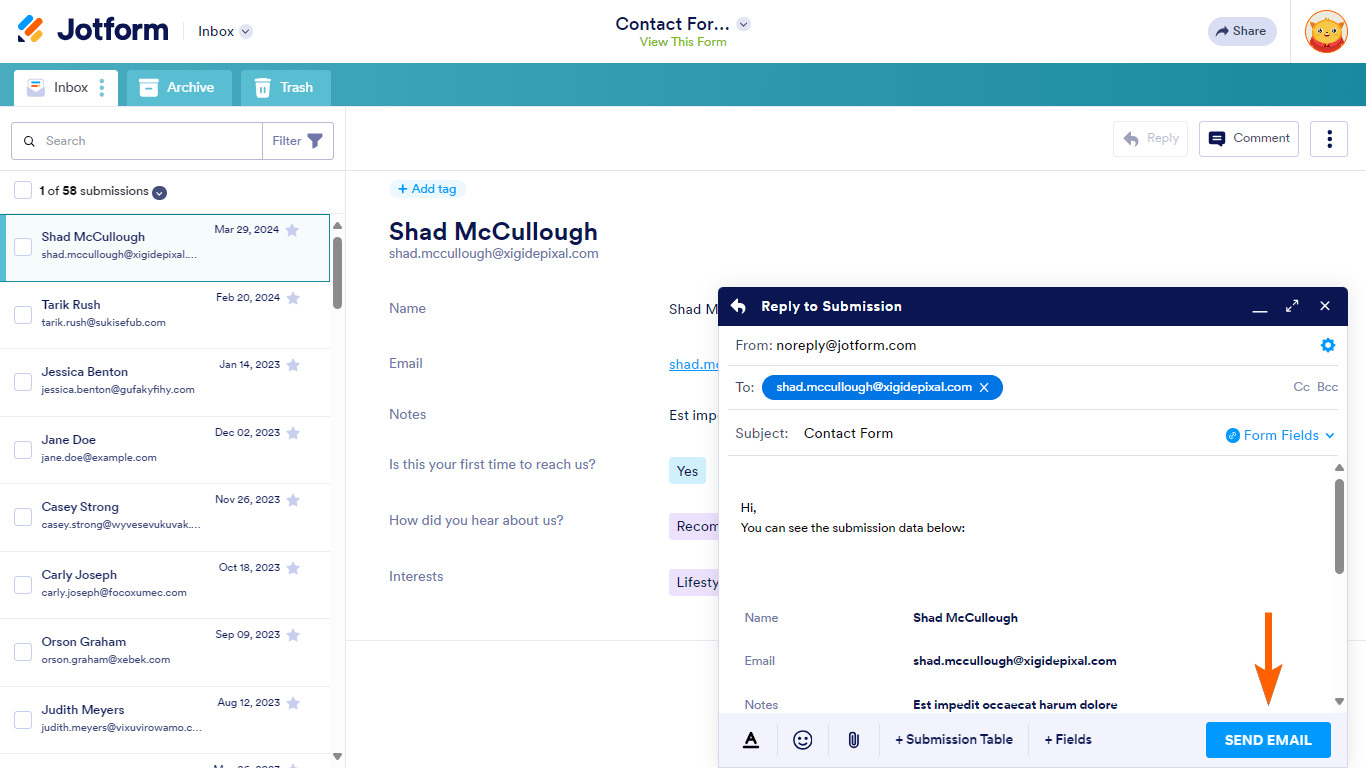
- In the reply panel, customize your email if needed, then select Send Email.
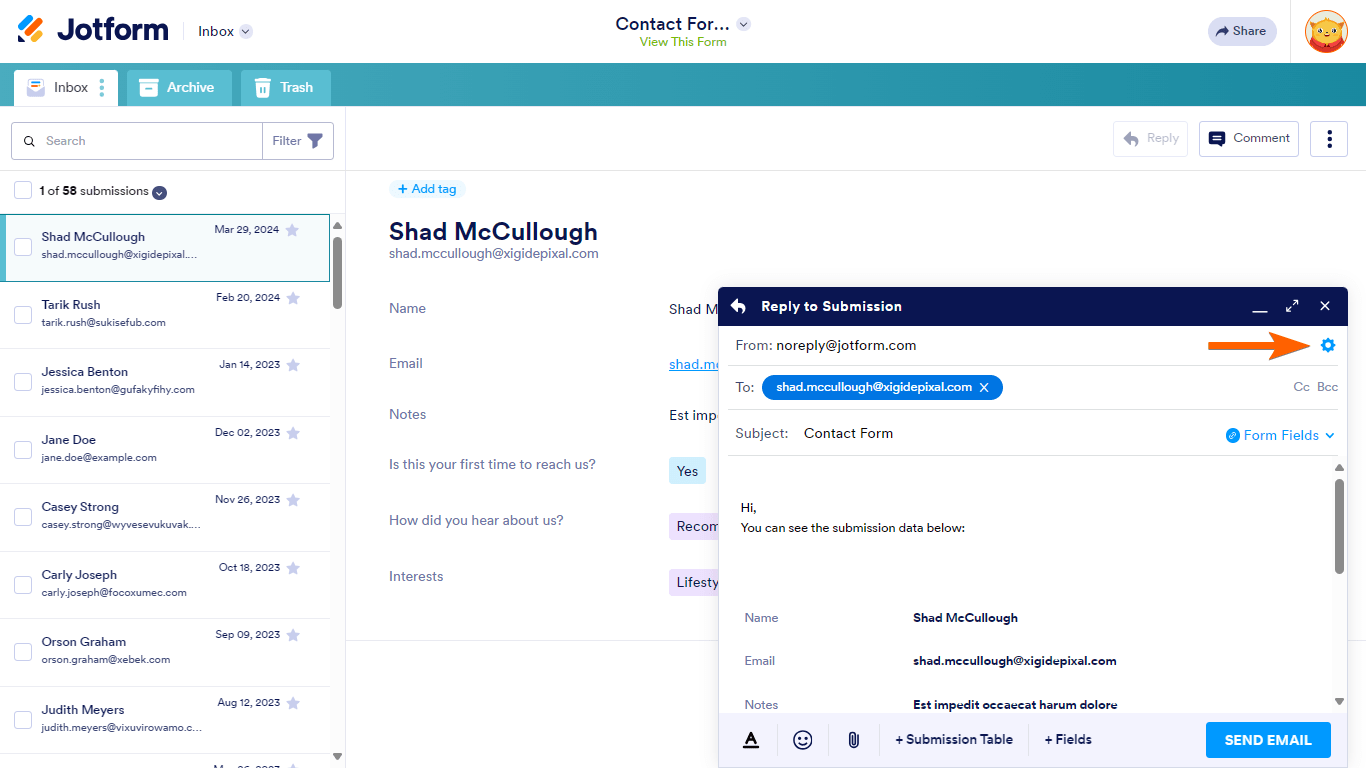
- The message is addressed to the form filler's email by default. You can change or add recipients if you wish. To change the reply-to or sender email address, open settings in the upper-right corner.
If the emails are not sending after captcha, consider the following:
- Check if your email address is on the bounce list in your Account Settings, as Jotform will stop sending emails to addresses on this list.
- Verify that your email notifications are correctly set up and the recipient email addresses are accurate.
- Check your spam or junk folder to ensure the emails are not being filtered there.
- Consider whitelisting Jotform's IP addresses and domains with your email provider to improve deliverability.
If the issue persists, it might be related to email sending limits or temporary restrictions. You can also check your email logs in your My Account page to see if there are any errors or blocks.
Here is a visual guide on how to reply and send emails from Jotform Inbox:

Give it a try and let us know how it goes.
-
goldnwlf
The problem is still happening. What kind of email sending limits or temporary restrictions could I have? And how can I remove them?
-
Podo: Support Specialist
Hi Lauren,
Regarding email sending limits or temporary restrictions in Jotform, here are some key points to consider:
- Email Sending Limits: Jotform imposes daily email sending limits depending on your account type (Free, Bronze, Silver, Gold). If you exceed these limits, emails will not be sent until the limit resets.
- Bounce List: If an email address repeatedly bounces, it gets added to the bounce list, and emails to that address will be blocked.
- Temporary Restrictions: These may occur if suspicious activity is detected or if sending limits are exceeded.
How to check and remove restrictions:
- Check your email sending limits and usage in your account dashboard to see if you have reached your daily quota.
- Review your bounce list in Account Settings to see if any recipient emails are blocked and remove them if necessary.
- Set up SMTP as your sender email to improve deliverability and avoid being blocked due to Jotform's default sending limits.
If you want detailed instructions on removing an email from the bounce list or setting up SMTP, I can provide those as well.
Give it a try and let us know how it goes.
-
goldnwlf
Where can I find the email sending limit quota?
-
Podo: Support Specialist
Hi Lauren,
You can find your email sending limit quota and other account usage details in your account dashboard. Here is a summary of your current usage and limits for various categories:
Submissions 100 20 Payments 10 0 Uploads 100.00 MB 0.00 B Views 10,000 96 Forms 5 1 Total Submissions 500 46 Signed Documents 10 0 AI Agents 5 0 AI Conversations 100 0 AI Sessions 10,000 0 AI Phone Call 50m 0m AI Knowledge Base 10,000,000 0 AI Agent SMS 250 0 This overview helps you monitor your account limits and usage. If you are hitting your email sending limit, you may need to wait for the quota to reset or consider upgrading your plan.
Let us know if you need any other help.
-
goldnwlf
This does not help. My account usage page does not have an email limit category. How many emails can you send with the free account?
-
Podo: Support Specialist
Hi Lauren,
For the free (Starter) Jotform account, there are daily email sending limits in place. While the exact number of emails you can send daily is not explicitly listed in your account usage page, the free plan has restrictions on email sending to prevent abuse and ensure deliverability.
Specifically, the Starter plan allows a maximum of 3 conditional emails per form. If you reach your daily email sending quota, you will receive an email notification about approaching or reaching your limit.
If you need to send more emails or want to remove these limits, you would need to upgrade your account to a paid plan. You can find more details on the available plans and their limits on the Jotform Pricing page.
Let us know if you want guidance on upgrading or managing your email notifications.
Give it a try and let us know how it goes.
-
goldnwlf
What is a conditional email? I was sending email replies to individual people, not email blasts.
-
Podo: Support Specialist
Hi Lauren,
A conditional email in Jotform is an email that is sent based on specific conditions or answers given by the form respondent. It is different from a regular email reply because it uses conditional logic to determine when and to whom the email should be sent.
For example, you can set up conditional emails to send different notifications or autoresponder emails depending on a user's answer to a question in your form. This is done by creating conditions that change the email recipient or trigger the email only when certain criteria are met.
In contrast, when you send email replies to individual people from your inbox, you are manually replying to each submission without any conditions involved.
Here is how conditional emails work:
- In Form Builder, go to Settings and then Emails.
- Create a Notification or Autoresponder email template.
- Set up conditional logic under Conditions to change the email recipient or trigger based on form answers.
This allows you to automate sending specific emails based on user responses.
If you want, I can guide you on setting up or managing conditional emails.
Give it a try and let us know how it goes.
-
goldnwlf
I am sending email replies to individual people from my inbox, not sending conditional emails. What is the limit on sending manual email replies on a free account?
-
Podo: Support Specialist
Hi Lauren,
Regarding your question about the limit on sending manual email replies from your inbox on a free Jotform account, there is no specific daily limit mentioned for manual email replies sent directly from Jotform Inbox.
The main email sending limits mentioned for free accounts typically refer to conditional emails, which are limited to 3 per form on the Starter plan.
Manual email replies you send from the inbox are separate from these conditional email limits, so you should be able to send replies individually without hitting a strict daily cap specific to manual replies.
If you experience issues sending manual replies, it may be related to other factors such as bounce list restrictions, temporary sending restrictions, or account-wide email sending limits.
Let me know if you want me to guide you through checking these settings or if you need help with anything else.
Give it a try and let us know how it goes.
-
goldnwlf
I want to know when I will be able to send manual emails from my inbox again. According to you there should be no restrictions.
-
Podo: Support Specialist
Hi Lauren,
There is no specific information available about a fixed duration for restrictions on sending manual emails from your inbox. If you are experiencing issues, it could be due to temporary restrictions related to email sending limits, bounce list status, or other account-wide restrictions.
To resolve this, you can:
- Check your bounce list and remove any blocked email addresses.
- Review your account's email sending limits and usage.
- Consider setting up SMTP as your sender email to improve deliverability and avoid restrictions.
If you want, I can guide you through these steps or provide more detailed instructions on any of these points.
Give it a try and let us know how it goes.
Your Reply
Something Went Wrong
An error occurred while generating the AI response. Please try again!