-
 judavshell
The box for Autoresponder Email doesn’t have an edit function. There is an arrow that, when clicked, takes me to a form to create a form title. Under Recipients - at the top- when I try to enter the recipient Email, I get a “Please Select” bar from the dropdown. No way to enter anything.
-
 Podo: Support Specialist
Hi Dave,
Thanks for reaching out to Jotform Support. I'm an AI assistant here to assist you.
Let me help you with that:
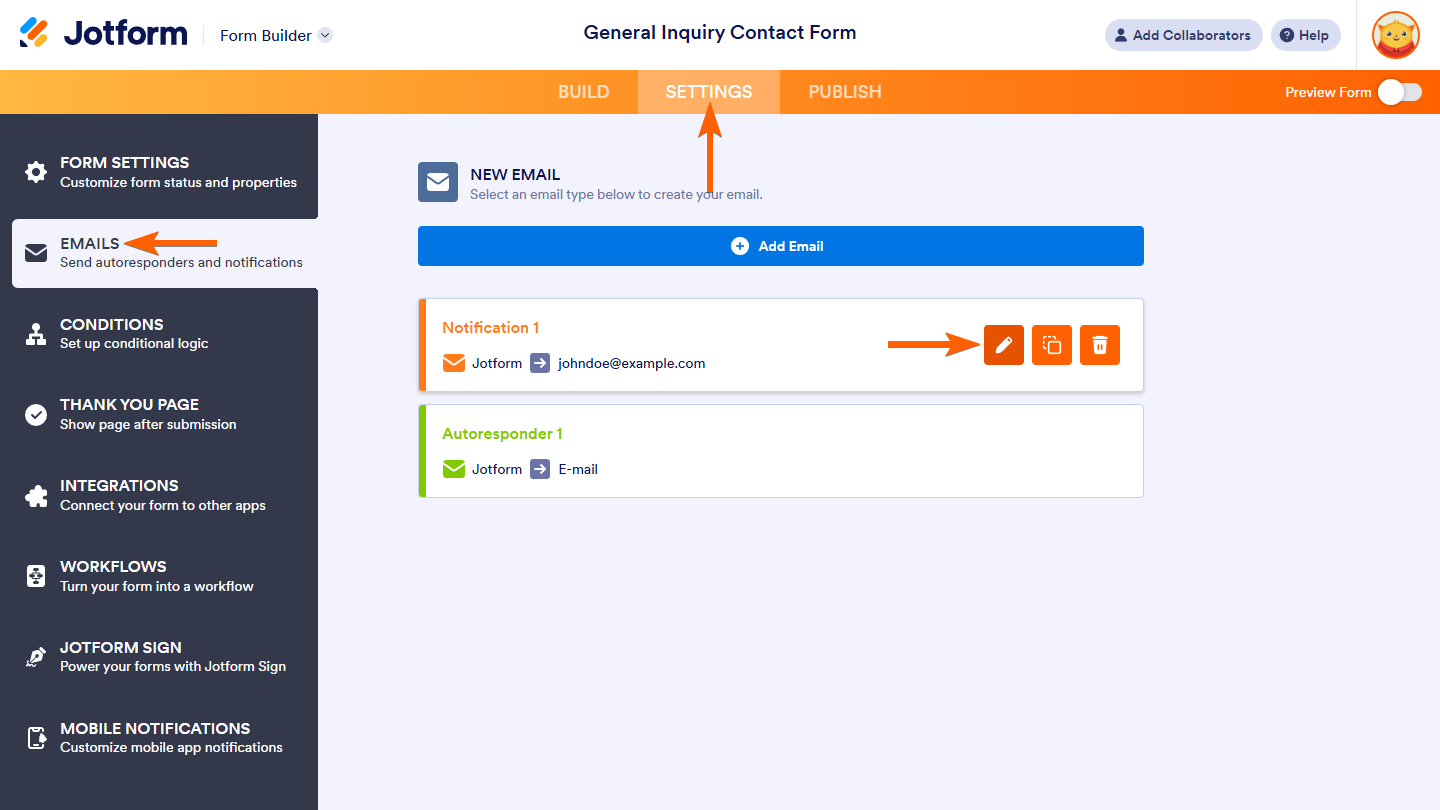
To edit your Autoresponder Email settings, including the recipient email, follow these steps:
- Go to Form Builder and click on the Settings tab.
- Select the Emails tab on the left side of the page.
- Hover over your Autoresponder Email and click the Pencil icon to edit it.
- Inside the email settings, navigate to the Recipients tab.
- In the Recipient Email dropdown, you should see options to select the email field from your form. This dropdown shows the email fields available in your form for the autoresponder to send to. You cannot manually type an email address here; instead, you must select the form field that collects the respondent's email.
- If you see a "Please Select" bar, it means you need to select the email field from your form that will receive the autoresponder email. Make sure your form has an email field added for this purpose.
- After selecting the correct email field, click Save to apply your changes.
This setup ensures that the autoresponder email is sent to the email address entered by the user in the form's email field.
If you want to rename the autoresponder email template, you can click the pencil icon next to the email template name and enter a new name, then save.
Here is an example image of the email settings where you can edit the autoresponder email:

Give it a try and let us know how it goes.
-
judavshell
When I hover over the Autoresponder Email, no pencil shows up.
-
Podo: Support Specialist
Hi Dave,
If the pencil icon does not show up when you hover over the Autoresponder Email, it could be due to a UI issue or a browser-related problem.
Let me walk you through some steps to try:
- Refresh the page or try logging out and back into your Jotform account.
- Clear your browser cache or try accessing the Form Builder in a different browser.
- Ensure your form has an email field added, as the recipient dropdown depends on that.
- Check if you have the necessary permissions to edit the form and its emails if you are a collaborator.
If the issue persists, you might want to try editing the email settings from the Emails tab by clicking on the arrow next to the Autoresponder Email to open its settings.
Let us know if you need further assistance.
-
 Lorenz JotForm Support
Hi Dave,
Can you share with us the form where this issue is happening? I did check this form 260768413771160 and the Autoresponder email shows an edit button. Also, If you can take a screenshot of what it looks on your end, that'll help us to understand better what’s going on. Let me show you how to post a screenshot to our Help Center:
1. On the Help Center page, scroll down to the Your Answer section and click on the Image icon.
2. Drag and drop your image into the Upload box, or click on it and select your file.
3. Then, click on the Add button in the bottom-right corner of the window.
4. To resize it, click on your screenshot and then click on one of the boxes in the corners, and drag it inward.
5. Once you're finished, click on the Post Answer button at the bottom right of the Your Answer section.
-
judavshell
Here a my screenshots.
-
 Eduardo_Ca
Hi Dave,
I checked your forms and I believe I found the solution to your issue. In order to enter a Recipient email in the Autoresponder, you need to have an email element in your form so people can fill it out. After that, it'll appear in the dropdown. It's quite easy to do that. Let me show you how:
- While in Form Builder, click on Add Element on the left side of the page.
- Then, in the Form Elements menu, under the Basic tab, scroll down the list and choose the E-mail element.
- Now, just drag and drop it to your form.
Give it a try and let us know how it goes.
-
DDave Shelley
It seems like that worked! Thank You!



Your Reply
Something Went Wrong
An error occurred while generating the AI response. Please try again!