-
 kristinstanley60
Dear Support,
For this form - https://pci.jotform.com/form/260908571540155.
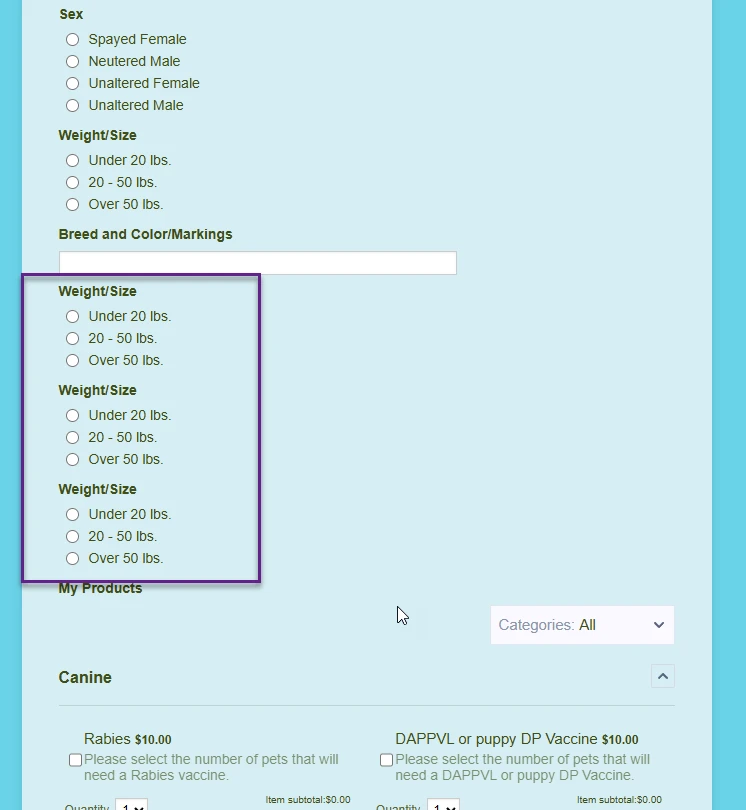
I added Weight/Sizes option to the Build form for each of four pet selections, but when I choose the option for One pet, Two pets, or Three pets, there are duplicate Weight/Sizes options.
Thank you for your assistance!
Krisgin

-
 Podo: Support Specialist
Hi Krisgin,
Thanks for reaching out to Jotform Support. I'm an AI assistant here to assist you.
Regarding the issue of duplicate Weight/Sizes options appearing when selecting One pet, Two pets, or Three pets in your form, this usually happens due to how the fields and conditional logic are set up in the form builder.
Let me help you with that:
- Check your conditional logic: Ensure that the conditions controlling the visibility of the Weight/Sizes fields are set correctly so that only the relevant fields show depending on the number of pets selected.
- Avoid duplicating fields unnecessarily: Instead of creating multiple Weight/Size fields for each pet option, consider using one set of fields and use conditional logic to show or hide them based on the selection.
- Use field management tools: In Form Builder, you can select multiple fields and manage them together, such as hiding or deleting duplicates. Use the multi-select feature by holding Ctrl (PC) or Command (Mac) to select and adjust fields.
This approach helps prevent duplicate fields from showing up when multiple options are selected.
If you want detailed steps on managing fields and conditional logic, I can provide that as well.
Give it a try and let us know how it goes.
-
kristinstanley60
Thank you. I deleted the duplicate fields for weight/size on the form, but how do I add the Weight/Size field for multiple pets under the Conditions?
-
kristinstanley60
Yes - I need a real person to help me. Thank you! ks
-
Podo: Support Specialist
Hi ks,
One of our Support Team members will take it from here to follow up shortly.
-
 Brandon
Hi Kristin,
Thank you for using Jotform. I would be happy to show you how to add the Weight/Size field for multiple pets. Follow these quick steps to get started:- First, add another Weight/Size field to each of the pet sections. I just copy/pasted the original one in a copy of your form into the section for a potential second pet.
- After that, go to the "Settings" tab in your form.
- Go to "Conditions" and then select the amount of pets you want to create this setting for. For this example, I just chose "How many pets will we be seeing today is equal to two"
- Once you are in the correct section, add the new Weight/Size field you just made to the list of fields that will appear. Note that you will need to do this for every outcome i.e. for 3 pets and 4 pets as well. Each of these outcomes will need a net Weight/Size field for the subsequent pet.
Try that out and let us know how that works.
-
kristinstanley60
Thank you Brandon. I followed those instructions - adding back the Weight Size field for each pet option and added the conditions. However, the Weight/Size is still showing up twice for 2 pets or 3 pets. Which was my original issue :( ks
-
Brandon
Hi Kristin,
I took another look and found where the likely reason this was occurring. The last Weight/Size field, i.e. the one for the 4th pet, was not tied to a condition. You can see on the right side in the image below that there are only there are only two symbols: the settings gear and the trash icon.If you compare that to this image, you'll see that there is one more symbol on top: the "Conditions" icon. This indicates that this field is tied to a condition.
The reason that the duplicate field was appearing was because that specific field was appearing in every instance of the form since it had no condition, regardless of how many pets were selected. I added a condition to that Weight/Size field in the clone I made and the duplicate field stopped appearing.
Let us know if that works for you! -
kristinstanley60
Ah! I FINALLY get it! Thank YOU Brandon. You are awesome!
I apologize for taking so long to understand. Have a great weekend! ks
-
Podo: Support Specialist
Hi Kristin Stanley,
Your request has been answered and the thread is closed.
If you have another question or need more help, feel free to reply here and we'll assist you right away.


Your Reply
Something Went Wrong
An error occurred while generating the AI response. Please try again!