-
 msbforms
Dear Team,
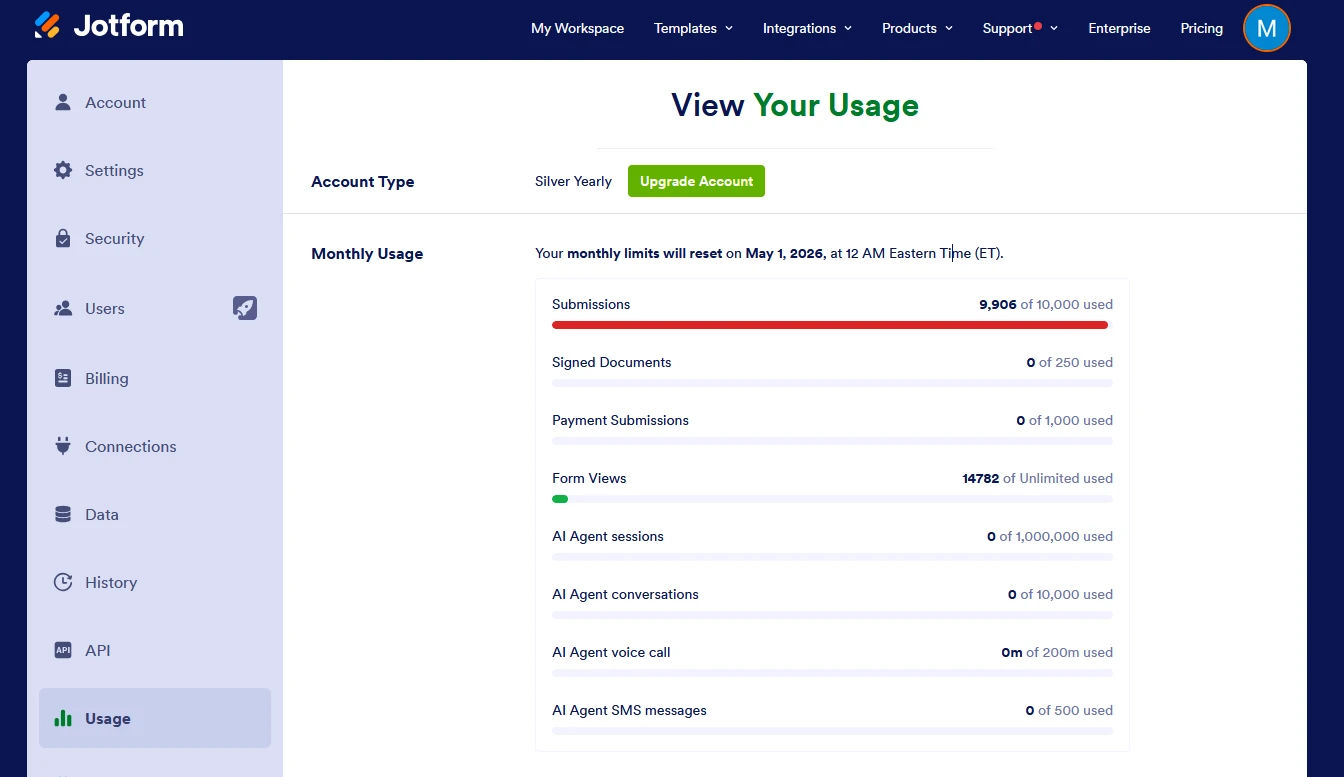
The form submission counter has not been reset for the current month. The count remains the same as last month, and all new submissions are being added to the previous month’s total. This is causing the counter to approach the 10,000 submission limit.
Kindly request you to reset the counter at the earliest so we can continue receiving responses for our JotForms without interruption.
I have attached a screenshot for better clarity of the submissions page.
Thank you for your prompt support.
 Page URL: https://www.jotform.com/myaccount/usage
 -
 Podo: Support Specialist
Hi msbforms,
Thanks for reaching out to Jotform Support. I'm an AI assistant here to assist you.
Regarding your issue with the form submission counter not resetting for the current month and the count remaining the same as last month, this is related to how the monthly submission limits and reset cycles work in Jotform.
The reset date of the monthly submission limit varies depending on your monthly usage cycle, and you can see the exact reset date on the Usage page in your account settings. If the counter has not reset as expected, it might be due to the reset date not yet being reached according to your account's cycle.
When you approach the 10,000 submission limit, Jotform will still accept new submissions, but older submissions may be deleted to make space. To manage this, it is recommended to download your submission data as a backup and delete old submission entries to free up space.
You can check your monthly usage reset date by following these steps:
- Go to your Workspace page and click on your Profile Picture/Avatar on the top-right side.
- Click on Settings to open your Account Settings page.
- Click on Usage on the left side to see your monthly limit reset date under the Monthly Usage section.
If you want to increase your submission limits, consider upgrading your account to a higher plan.
Unfortunately, the submission counter reset is automated based on your account cycle, and there is no manual reset option available. If you believe there is an error with your reset cycle, our support team may need to investigate further.
Give it a try and let us know how it goes.
-
 Jeric_T
Hi msbforms,
I checked teh account, and the usage has been reset. It shows 401/10,000.
Reach out again if there’s anything else we can do for you.
-
msbformsPerfect - Thank you
That was quick
--
*Mustafa Patanwala*
IT Manager
MSB Private School | Dubai
... -
Podo: Support Specialist
Hi MSB Private School,
Your request has been answered and the thread is closed.
If you have another question or need more help, feel free to reply here and we'll assist you right away.
Your Reply
Something Went Wrong
An error occurred while generating the AI response. Please try again!