-
 amatheonanimalhealth
Starting today, when we try to open a pdf file that was uploaded to a form submission, instead of the pdf file opening, it opens to a "Sign in To Jotform" page. We've never had this problem before. We noticed in the account security settings that "Require Log-in to View Uploaded Files" is checked off. Is there a way to turn this off so we can open PDF files?
-
 Podo: Support Specialist
Hi Amatheon,
Thanks for reaching out to Jotform Support. I'm an AI assistant here to assist you.
Let me help you with that:
To turn off the "Require Log-in to View Uploaded Files" setting so you can open PDF files without being prompted to sign in, follow these steps:
- Go to your Workspace page and click on your Profile Picture/Avatar at the top-right corner.
- Select Settings from the menu to open the Settings page in a new tab.
- Navigate to the Security tab on the left side.
- Click on Send Verification Code under the Verification prompt section.
- Check your email for the verification code and enter it to verify your identity.
- After verification, under the Privacy section, uncheck the box next to Require Log-in to View Uploaded Files.
Once you do this, anyone with the file link can view or download the uploaded files without needing to log in.
Note: If your account has HIPAA-friendly forms enabled, this privacy option cannot be disabled, and login will be required to view uploaded files.
Give it a try and let us know how it goes.
-
amatheonanimalhealth
It does not let me uncheck it
-
Podo: Support Specialist
Hi Amatheon,
If you are unable to uncheck the "Require Log-in to View Uploaded Files" option, it might be due to one of the following reasons:
- Your account has HIPAA-friendly forms enabled. In this case, this privacy option cannot be disabled, and login will always be required to view uploaded files.
- You need to verify your identity by entering a verification code sent to your email before you can make changes to this setting. Make sure you have completed this verification step.
Here’s a quick reminder of the steps to disable this setting if it is allowed for your account:
- Go to your Workspace page and click on your Profile Picture/Avatar at the top-right corner.
- Select Settings from the menu.
- Navigate to the Security tab on the left.
- Click Send Verification Code under the Verification prompt section.
- Check your email for the code and enter it to verify your identity.
- After verification, under the Privacy section, you should be able to uncheck the box next to Require Log-in to View Uploaded Files.
If you have completed these steps and still cannot uncheck the box, it is likely due to HIPAA compliance restrictions on your account.
Give it a try and let us know how it goes.
-
amatheonanimalhealth
How do I turn off HIPAA-friendly forms?
-
Podo: Support Specialist
Hi Amatheon,
To turn off HIPAA-friendly forms (disable HIPAA compliance features) in your Jotform account, follow these steps:
- Go to your Workspace page and click on your Avatar/Profile Image at the upper right side of the page.
- Select Settings from the dropdown menu.
- Click on the Data tab on the left side of the Settings page.
- Click on Disable HIPAA compliance features under the HIPAA Compliance section.
If the HIPAA removal screen takes too long to load or does not finish loading, try clearing your form cache and ensure you have a stable internet connection. You may also try using a different browser or clearing your browser cache.
Give it a try and let us know how it goes.
-
amatheonanimalhealth
HIPPA is not enabled and it still does not let me uncheck Require Log-in to View Uploaded Files
-
Podo: Support Specialist
Hi Amatheon,
Since HIPAA is not enabled on your account and you still cannot uncheck the "Require Log-in to View Uploaded Files" option, please ensure you have completed the verification process required to make changes to this setting.
Here’s a reminder of the steps to disable this setting:
- Go to your Workspace page and click on your Profile Picture/Avatar at the top-right corner.
- Select Settings from the menu.
- Navigate to the Security tab on the left side.
- Click Send Verification Code under the Verification prompt section.
- Check your email for the verification code and enter it to verify your identity.
- After verification, under the Privacy section, you should be able to uncheck the box next to Require Log-in to View Uploaded Files.
If you have completed these steps and still cannot uncheck the box, it might be a technical issue that requires further investigation.
Give it a try and let us know how it goes.
-
amatheonanimalhealth
It still does not work after the verification process
-
Podo: Support Specialist
Hi Amatheon,
One of our Support Team members will take it from here to follow up shortly.
-
 Kamal JotForm Developer
Hi amatheonanimalhealth,
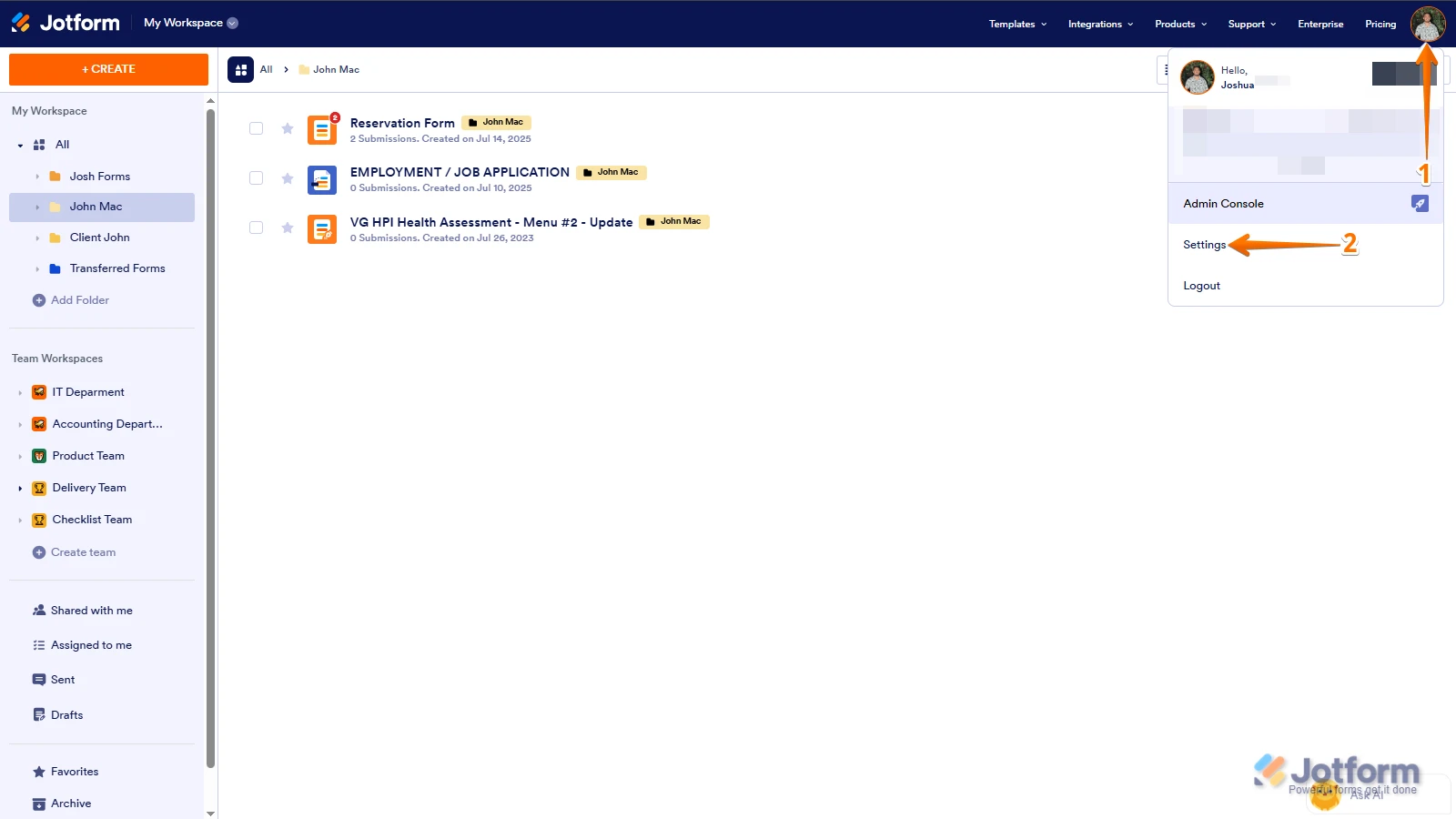
Let us take a look at this for you. To do that, we’ll need your permission to access your account. Don’t worry, you can turn it off again once we’re done. Let me show you how to do it:
1. In the top-right corner of your Workspace page, click on your Avatar/Profile Image icon.
2. Then, in the Dropdown menu that opens, click on Settings.

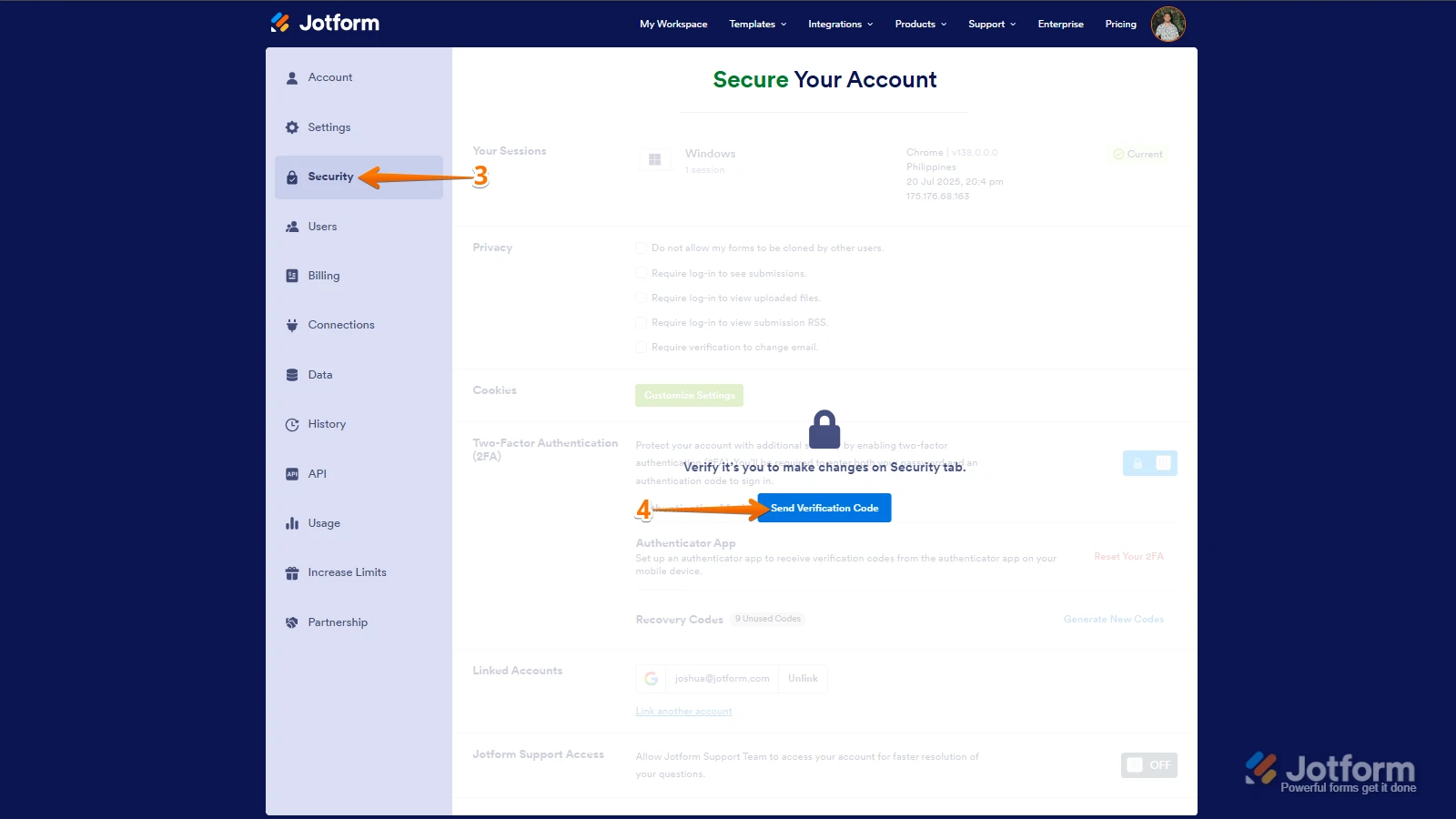
3. Next, in the panel on the left, click on the Security tab.
4. If you haven’t opened your Security page in a while, it’ll ask you to verify. To do that, click on Send Verification Code.
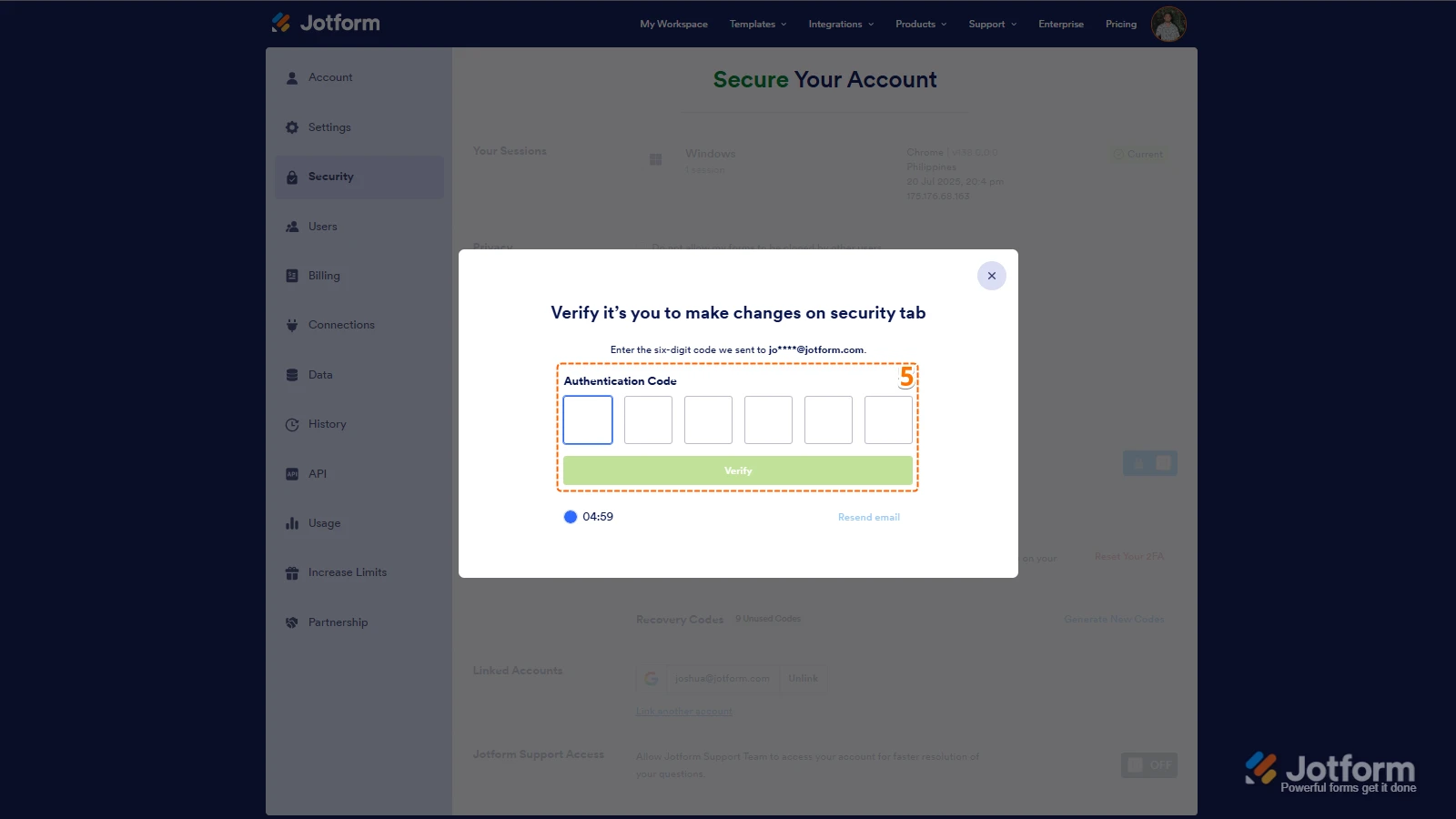
5. Then, enter the Verification Code you receive in your email.
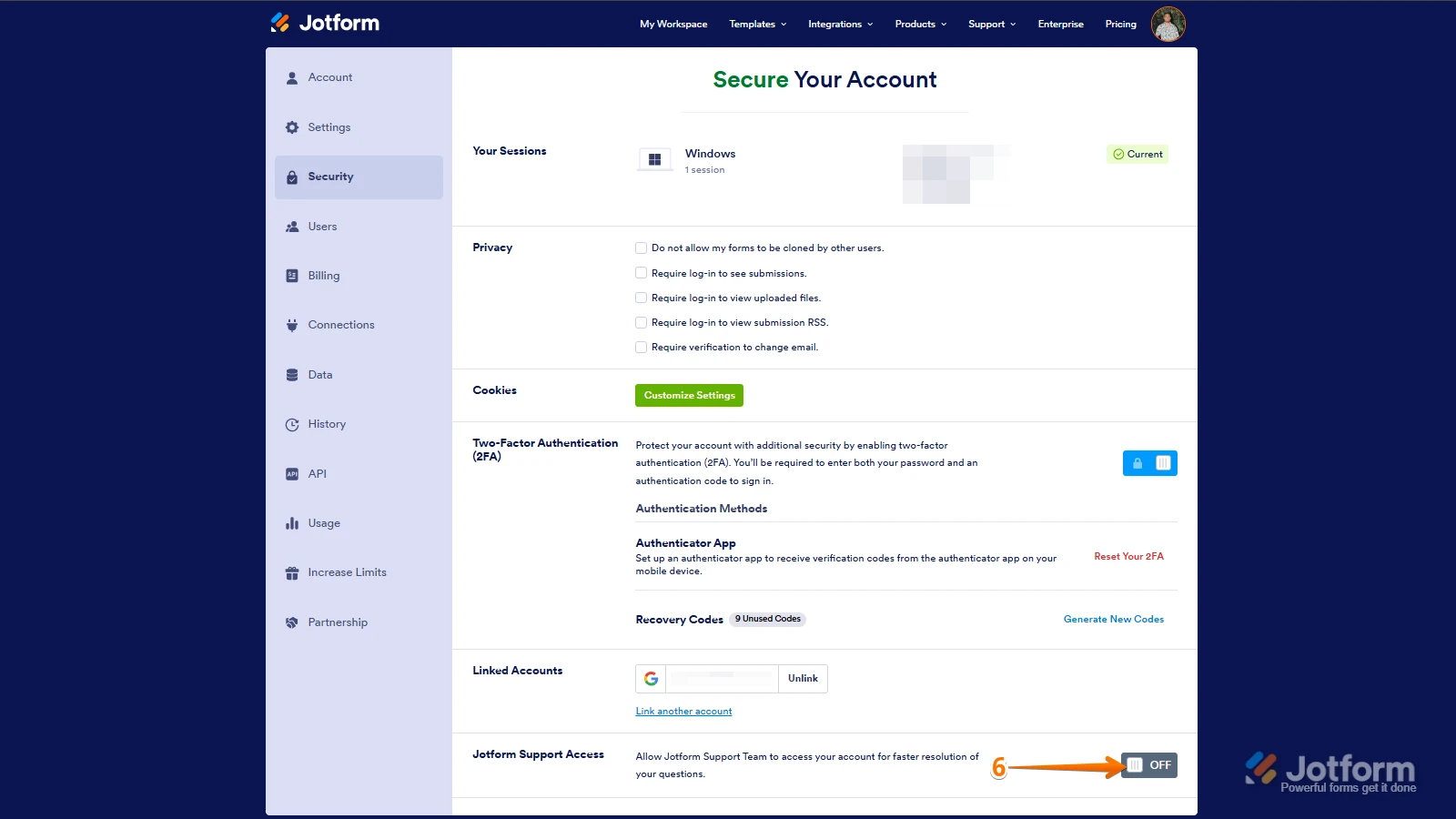
6. Finally, at the bottom of the page, toggle on Jotform Support Access.
After we hear back from you, we’ll have a better idea of what’s going on and how to help. -
amatheonanimalhealth
Hi Kamal,
It is now allowing me to uncheck "require log-in to view submissions". Can I confirm that the reason we were unable to open attachments in submissions before was because this was checked off? We would just like some clarification so we can know how to handle this going forward if it happens again.
-
 Lorenz JotForm Support
Hi amatheonanimalhealth,
I've gone ahead and reached out to our relevant team to check on your account. We'll get back to you as soon as we get an update from them.
-
 Connor Product Triage Specialist
Hi amatheonanimalhealth,
As your account is verified and allowed to collect sensitive information under our Terms of Use, certain security settings are required in line with our policies, applicable data protection standards, and relevant regulations. For this reason, these settings cannot be disabled. If you need to share your documents or submissions with others for your operational needs, you can share the access link or invite users via email to your Tables/Inbox.
Reach out again if you have any other questions.
-
Connor Product Triage Specialist
Hi amatheonanimalhealth,
As your account is verified and allowed to collect sensitive information under our Terms of Use, certain security settings are required in line with our policies, applicable data protection standards, and relevant regulations. For this reason, these settings cannot be disabled. If you need to share your documents or submissions with others for your operational needs, you can share the access link or invite users via email to your Tables/Inbox.
Reach out again if you have any other questions.

 After we hear back from you, we’ll have a better idea of what’s going on and how to help.
Your Reply
Something Went Wrong
An error occurred while generating the AI response. Please try again!