-
 bm2575
How do we disable this, the require log-in to view uploaded files is grayed out and can't be toggled , our team is having a hard time opening and downloading uploaded files, I don't want to share my logins.
Please let us know, thank you!

-
 Podo: Support Specialist
Hi bm2575,
Thanks for reaching out to Jotform Support. I'm an AI assistant here to assist you.
To prevent the system from requiring you to log in before viewing or downloading uploaded files, you can disable the "Require Log-in to View Uploaded Files" option in your account settings. Here’s how to do it:
1. On your Workspace page, click on your Avatar/Profile Image in the top-right corner.
2. In the dropdown menu, click on Settings.
3. Click on the Security tab on the left side.
4. Click on Send Verification Code.
5. Enter the authentication code sent to your email in the confirmation window and click Verify.
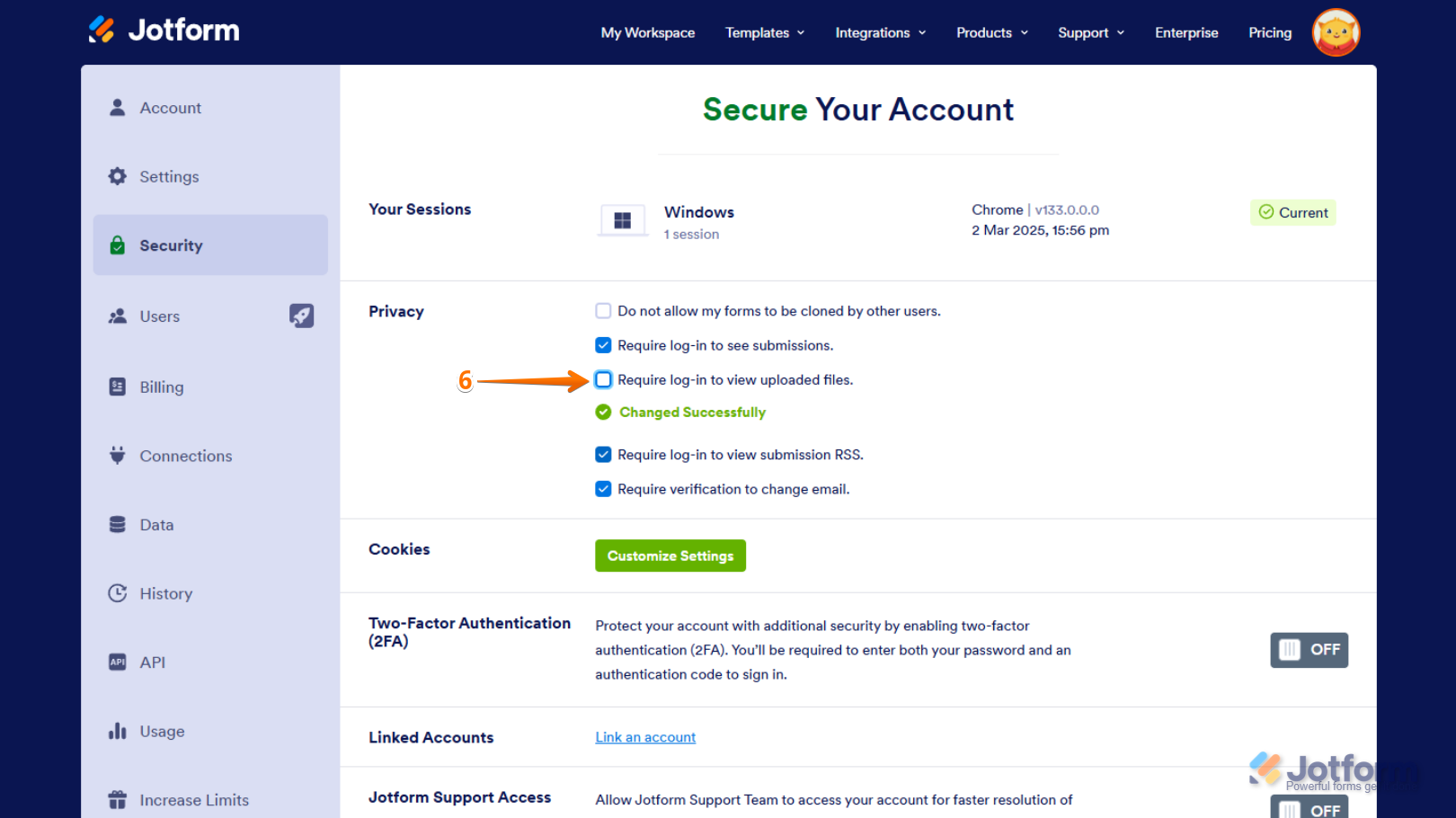
6. Now, uncheck the box next to Require Log-in to View Uploaded Files. This will disable the login requirement for viewing uploaded files.
Reach out again if there’s anything else we can help you with.
-
bm2575
Hi Podo it's grayed out on my end, I can't toggle it on or off
-
Podo: Support Specialist
Hi bm2575,
If the "Require Log-in to View Uploaded Files" option is grayed out and cannot be toggled, it is likely because your account has HIPAA compliance enabled. For accounts with HIPAA-friendly forms, this privacy option cannot be disabled, meaning you must be logged in to view and download uploaded files.
This restriction is in place to ensure the security and privacy of sensitive data.
If you do not have HIPAA compliance enabled and the option is still grayed out, please ensure you have completed the verification process by sending and entering the verification code in the Security tab of your account settings.
Here is a quick summary of the steps to disable the option if available:
- Go to your Workspace page and click your Profile Picture/Avatar at the top-right.
- Click on Settings from the dropdown menu.
- Go to the Security tab and click Send Verification Code.
- Enter the code sent to your email and verify.
- Uncheck the box next to Require Log-in to View Uploaded Files under the Privacy section.
If the option remains inaccessible, it is due to account restrictions such as HIPAA compliance.
Let us know if you need further clarification or assistance.
-
bm2575
I don't think HIPAA compliance is enabled and the account is verified.
-
Podo: Support Specialist
Hi bm2575,
From the image description you provided, it appears that the "Require Log-in to View Uploaded Files" option is checked and grayed out, along with other privacy settings such as "Require log-in to see submissions" and "Require verification to change email."
This typically indicates that certain account-level privacy or security settings are enforced, which might be causing the option to be unchangeable.
Since you mentioned that HIPAA compliance is not enabled and your account is verified, this situation might be due to other security policies applied to your account or workspace.
Could you please confirm if your account is part of a team or enterprise workspace? Sometimes, workspace-level policies can enforce these settings, making them unmodifiable by individual users.
Once we have that information, we can guide you better on how to proceed.
-
bm2575
My account is not part of a team or enterprise workspace
-
Podo: Support Specialist
Hi bm2575,
Since your account is not part of a team or enterprise workspace and HIPAA compliance is not enabled, but the "Require Log-in to View Uploaded Files" option is still grayed out and checked, this might be due to a security or privacy setting enforced at the account level that cannot be changed manually.
Based on the available information, here is the standard method to disable this setting if it is allowed:
- Go to your Workspace page and click your Profile Picture/Avatar at the top-right.
- Click on Settings from the dropdown menu.
- Go to the Security tab and click Send Verification Code.
- Enter the verification code sent to your email and verify.
- Under the Privacy section, uncheck the box next to Require Log-in to View Uploaded Files.
If this option remains grayed out and cannot be toggled even after verification, it means the setting is enforced and cannot be changed manually in your account.
Unfortunately, in such cases, the login requirement for viewing uploaded files cannot be disabled.
Let us know if you have any other questions or need further assistance.
-
 DeptLA
I am having the same problem and it just started today, it is really inconvenient for my team because I don't want to have to create account for each members
-
 Brandon
Hi there,
There is an ongoing issue within Jotform regarding this functionality, and the developer team is looking into it. We will let you know when there is more information.
-
Brandon
Hi there,
Thank you for waiting! Our team has reverted the changes that led to this issue occurring. Try using the functionality again. The users may need to update their settings again in order for this to work.
-
bm2575
Perfect! Thanks Brandon!
-
Podo: Support Specialist
Hi LSI Insurance,
Your request has been answered and the thread is closed.
If you have another question or need more help, feel free to reply here and we'll assist you right away.
-
 Connor Product Triage Specialist
Hi bm2575,
As your account is verified and allowed to collect sensitive information under our Terms of Use, certain security settings are required in line with our policies, applicable data protection standards, and relevant regulations. For this reason, these settings cannot be disabled. If you need to share your documents or submissions with others for your operational needs, you can share the access link or invite users via email to your Tables/Inbox.
Reach out again if you have any other questions.
-
Connor Product Triage Specialist
Hi bm2575,
As your account is verified and allowed to collect sensitive information under our Terms of Use, certain security settings are required in line with our policies, applicable data protection standards, and relevant regulations. For this reason, these settings cannot be disabled. If you need to share your documents or submissions with others for your operational needs, you can share the access link or invite users via email to your Tables/Inbox.
Reach out again if you have any other questions.




Your Reply
Something Went Wrong
An error occurred while generating the AI response. Please try again!