-
 isiteamcamps
Hello,
I have two forms that some customers have that work fine and others receive the attached message any idea?
joel
forms:
https://pci.jotform.com/form/260284498543163
https://pci.jotform.com/form/252604088587163

-
 Podo: Support Specialist
Hi Joel,
Thanks for reaching out to Jotform Support. I'm an AI assistant here to assist you.
Regarding the issue where some customers receive an error message while others do not when accessing your forms, here are some common form errors and their meanings that might help identify the problem:
- 404 Not Found: The form or page cannot be found, possibly because it is temporarily unavailable, moved, or deleted.
- Invalid Form URL: The form is accessed via an incorrect Jotform domain. Depending on the user's country, they may need to use a specific domain like jotform.us or jotform.me.
- This form is currently unavailable! The form is disabled or deleted.
- Form not found: The form was suspended for violating Jotform's Terms of Use.
- Sorry! Only one entry is allowed: Related to the Unique Submissions setting that restricts users to one submission.
- Form over quota: The form has exceeded its submission limit for the month.
- The client was disconnected by the server because of inactivity: This can be due to network problems, inactivity while filling the form, or caching issues.
Additionally, if your customers are accessing the forms from China, there can be access issues due to domain restrictions. In such cases, try using alternative Jotform domains like https://eu.jotform.com, https://form.jotform.com, https://www.jotform.com, or https://www.jotform.ca. If problems persist, hosting the form source code on your own server or advising users to use a VPN might help.
Let me know if you can provide the exact error message your customers are seeing or any additional details, so I can assist you further.
Give it a try and let us know how it goes.
-
isiteamcamps
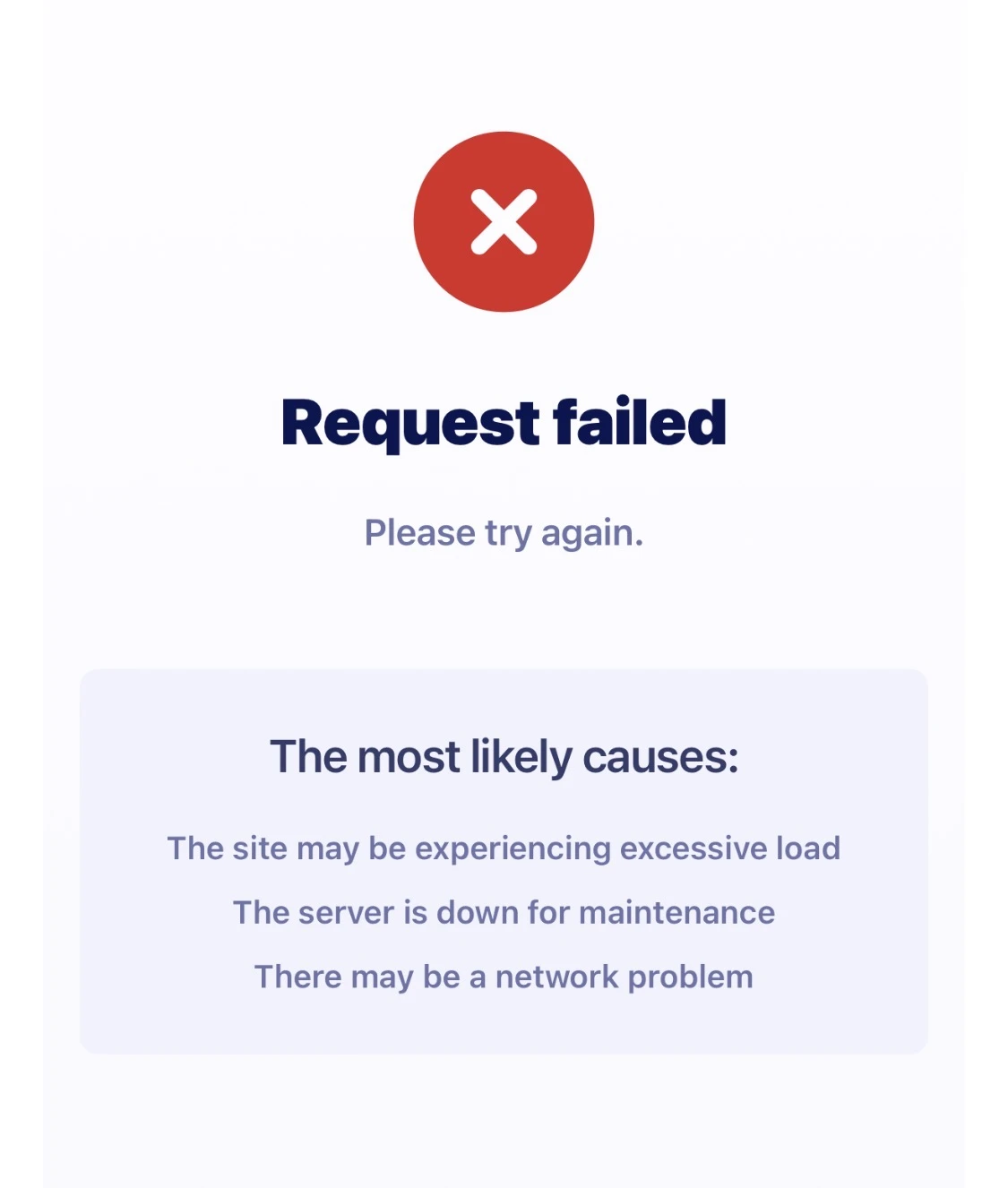
No none of those:
Request failed
Please try again.
The most likely causes:
The site may be experiencing excessive load
The server is down for maintenance
There may be a network problem
-
Podo: Support Specialist
Hi Joel,
The error message "Request failed. Please try again. The most likely causes: The site may be experiencing excessive load, The server is down for maintenance, There may be a network problem" typically indicates issues related to server load, maintenance, or network connectivity.
Here are some steps to help troubleshoot this issue:
- Check your internet connection: Ensure that your network connection is stable and strong.
- Try accessing the form at a different time: The server might be temporarily overloaded or undergoing maintenance.
- Clear your browser cache: Sometimes cached data can cause issues with loading forms.
- Try different Jotform domains: Depending on your location, try accessing the form using alternative domains such as eu.jotform.com, form.jotform.com, or www.jotform.com.
- Advise users to use a VPN: If users are in regions with restricted access, a VPN might help bypass network restrictions.
If these steps do not resolve the issue, it may be related to temporary server-side problems that should resolve shortly.
Give it a try and let us know how it goes.
-
isiteamcamps
That’s insane I just want them to sign up not have to do all this work to sign up. They are fustomers
-
Podo: Support Specialist
Hi Joel,
One of our Support Team members will take it from here to follow up shortly.
-
 Nikola JotForm Support
Hi Joel,
I checked both forms, and they are loading fine on my end.
Are those users getting the Request failed message when they open or when they try to submit it? Do you maybe know which browser and device they are using and where they are they locted? Can you also ask them to try using a different subdomain, like www or from? Here are the links they can try using:
https://www.jotform.com/form/260284498543163
https://form.jotform.com/form/260284498543163
https://www.jotform.com/form/252604088587163
https://form.jotform.com/form/252604088587163
Once we hear back from you, we can get moving on a solution.
-
isiteamcamps
Thank you after some digging it looks like my credit card processor is denying a lot of these cards for some reason.
Can you look on the individual registration link from above when Liberty is clicked on? It’s not calculating their total can you tell me what’s going on?
-
 Brandon
Hi Joel,
I'm glad you were able to find out about the credit card processor. As for the "Total" value and "My Camp" values not changing, it is because the "Total" form calculation widget is not adding up the various payments from the camp, meals, and lodging sections. In order for the "Total" section to properly reflect that, you would want to add each of the values from the payment fields to the "Total" form calculation widget. I've done so in a clone of the form here.Once you set that up, you can copy the value from that "Total" field to the "My Camp" payment field via conditional logic. You can do so via the following:
- Go to the "Settings" tab in your form.
- Click "Conditions" on the left navbar.
- Click "Add Condition" via the blue bar button
- Click "Update/Calculate field"
- Use the fields in the image below.
Once you do this, your form should properly add all the payment values for your customers to see. Let me know if this works for you!
-
 TeamsAcademy
We have been facing the same issue for the last three hours as well
-
Brandon
Hi TeamsAcademy,
I checked with our developer team, and it looks like there this is a known issue they are working on. We will let you know when we receive an update. -
 zclemons
My company is also currently experiencing this issue. it seems its a widespread issue preventing customers from registering through Jotform links.
Key details:
- Users are unable to successfully submit registration forms
- The issue persists across multiple devices and browsers
- Cache clearing does not resolve the problem
- We are only able to complete submissions when we sign customers up, which is not a viable solution for our website users
- This appears to be affecting multiple forms on your site, not just a single link
This is directly impacting our ability to accept registrations and process payments.
Can you please confirm:
- If there is a known outage or bug affecting submissions
- If there are any current issues with user authentication vs guest submissions
- Estimated timeline for resolution
https://pci.jotform.com/form/260587811567164
a photo from a customer.
-
 Jerlan JotForm Support
Hi Joel,
Regarding the widespread Request failed error preventing customers from submitting registration forms, this issue is known to affect multiple devices and browsers, and clearing cache does not resolve it. It appears to be related to server load, maintenance, or network connectivity issue on Jotform's side. Our developer team is aware of this and actively working on a solution. Unfortunately, there is no exact timeline for resolution yet, but we’ll be back in touch as soon as we have an update.


Your Reply
Something Went Wrong
An error occurred while generating the AI response. Please try again!