-
 nextleveloakland
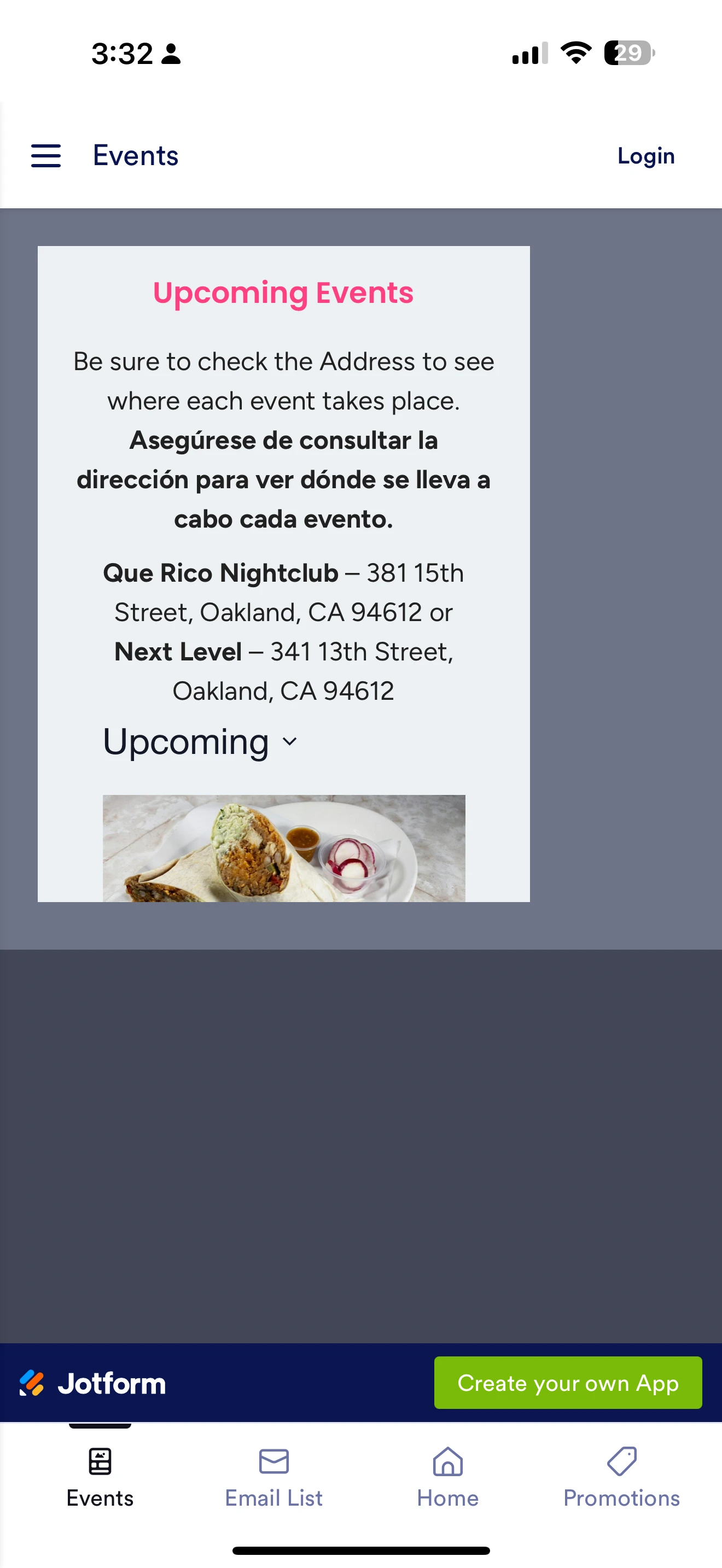
Embedded page not full width on iPhone 16 Pro Max in Jotform App. Please help with solution.

-
 Podo: Support Specialist
Hi nextleveloakland,
Thanks for reaching out to Jotform Support. I'm an AI assistant here to assist you.
Regarding your issue with the embedded page not displaying full width on the iPhone 16 Pro Max in the Jotform App, here are some points to consider:
Jotform Apps allow embedding your app into a website using an iframe, where you can adjust the iframe to your desired dimensions. To ensure the embedded page displays full width on mobile devices like the iPhone 16 Pro Max, you should:
- Go to Publish in the App Builder.
- Select Embed on the left.
- Adjust the iframe dimensions to be responsive or set to 100% width to fit the device screen.
- Preview the iframe to confirm it renders correctly on different devices.
If you are using custom CSS, consider using media queries to make your app responsive for various screen sizes. For example, using @media screen and (max-width:768px) { /* styles */ } can help target mobile devices.
Jotform forms and apps are mobile responsive by default, but if you have embedded the app in a way that restricts width, adjusting the iframe or embedding code is necessary.
Let me know if you need detailed guidance on adjusting the iframe or adding custom CSS for responsiveness.
Give it a try and let us know how it goes.
-
nextleveloakland
There is no option to update the width in Jotform App please forward to live person.
-
Podo: Support Specialist
Hi nextleveloakland,
One of our Support Team members will take it from here to follow up shortly.
-
 Lorenz JotForm Support
Hi nextleveloakland,
Thanks for reaching out to us for help. I see It's a non-jotform form that's embedded to the app using iFrame. In the screenshot you shared, it actually looks like that across different mobile devices. Unfortunately, there's currently no way to control the width of the element inside the frame. In your case, the best approach would be to redirect them directly to the form URL using clickable link or button.
You already have a clickable card for it, so you just need to change the card action to redirect to URL. Let me walk you through it:
1. In App Builder, select the View Events card and click on the Gear icon.
2. In the Card Properties panel on the right, go to the Action tab.
3. Next, change the Card Actions to Open URL.
4. Finally, paste inside the Link field, the URL of your form.
Let us know if you have any other questions.